

Self-hosted AI coding assistants: an enterprise guide to running them on-prem
 Batuhan Bilgin11 min read
A self-hosted AI coding assistant keeps the agent, the model, the gateway, your code and your docs inside your own network. This guide breaks the stack into five layers and shows what to check in each one.
You have a security team that says "no source code or prompts leave the network". You have developers that want an AI coding agent. You start looking for a self-hosted AI coding assistant. The vendors of those products often use terms such as "private", "secure" or even "on-prem". But those terms mean different things. For example, some tools may run the model in your network, but they still check a license online. Others may run tools on your machine but the agent itself is in the vendor's cloud.
What does "self-hosted" mean for an AI coding assistant?
A self-hosted AI coding assistant is an AI coding assistant where all components that interact with your code are hosted on your infrastructure. Each component can be self-hosted at different levels.
Vendors use four levels:
Tabnine’s deployment options are a great example of SaaS, VPC, on-prem on Kubernetes, and fully air-gapped.
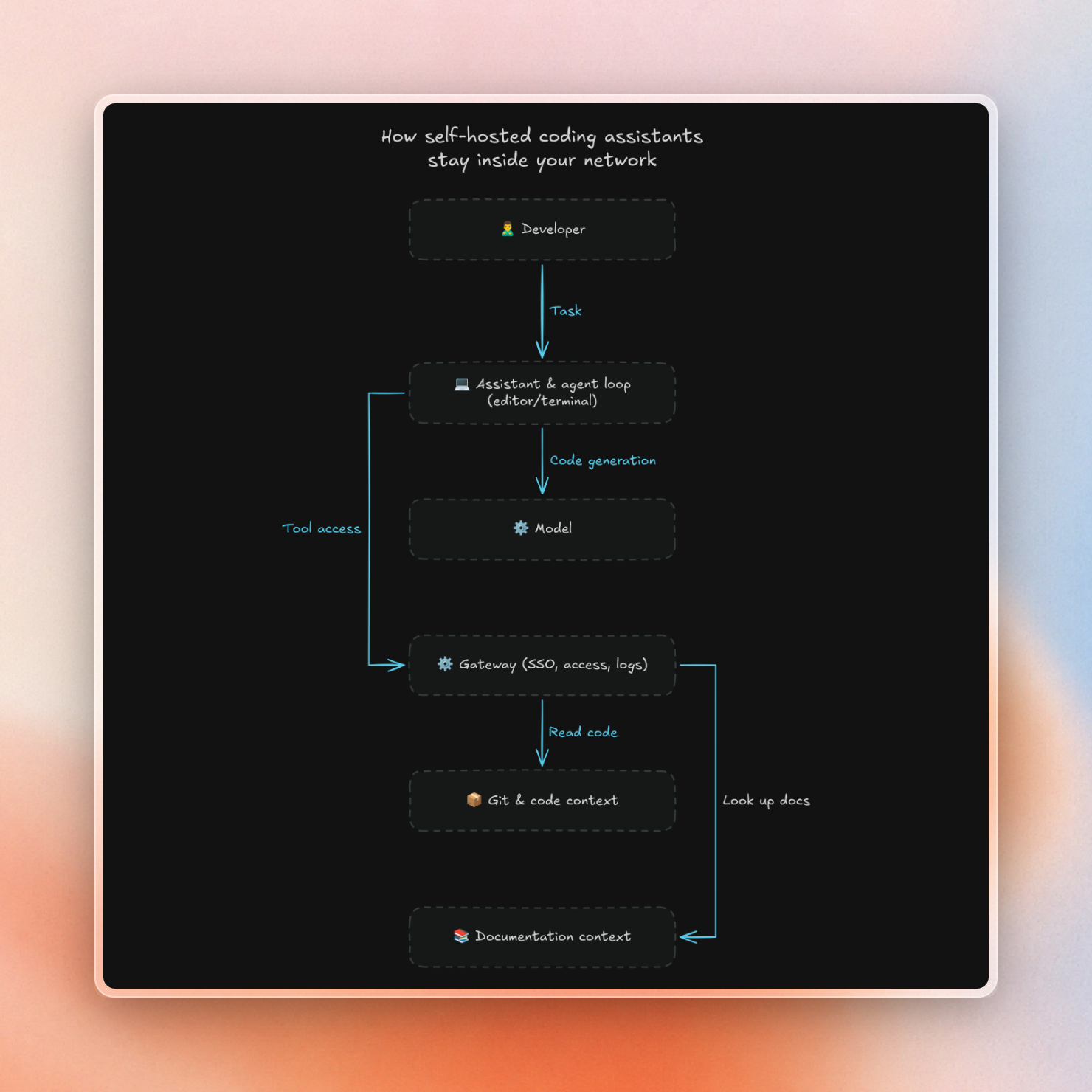
AI coding assistant architecture can be categorized into 5 layers, each of which can sit at a different level:
- Assistant in the editor or terminal, and the agent loop that plans each step.
- Model that writes code.
- Gateway controlling which models and tools can be used by whom.
- Git and code context: the code repos the agent can read.
- Documentation context: the library and internal docs the agent can look up.
Layer 1: the assistant and the agent loop
The first thing to find out is where the agent loop is running. This is the part of the agent that takes a task, figures out what to do, then decides what tool to call. If the agent loop is running in the vendor’s cloud, then your code will slowly find its way there as well.
This approach is used by Cursor’s self-hosted agents. Cursor runs the agent loop and inference/planning in the cloud. They have a worker running on your computer that does file edits, commands, and hosts any MCP servers that are local to you. The worker is then responsible for sending what is needed for each step of the agent loop to Cursor. This could be file contents, terminal output, diffs, etc. Your full checkout stays on your machine, but the code that the agent is working on does not.
Here is where some common tools run:
Open-source clients like Continue can work on closed networks with a few minor adjustments. For example, disabling the "Allow Anonymous Telemetry" option stops Continue from sending anonymous usage data. Installing Continue from a downloaded .vsix file instead of the usual marketplace install is also required.
Layer 2: the model
Most teams focus first on the model. There are three common setups:
- Run an open-weight model on your own GPUs. Serve it using a tool like Ollama or vLLM.
- Run a hosted model inside your cloud account (e.g. Amazon Bedrock).
- Use an enterprise API provided by a model provider, with a contract that explicitly prohibits training on your data.
Only the first option ensures that prompts stay within your own network. Options 2 and 3 ensure that prompts stay within the bounds of a contract. Selecting, sizing, and serving a model is a topic of its own, and depends on your GPUs and the size of your team. We cover it in self-hosted LLMs for coding agents.
Layer 3: the gateway
When you have multiple teams using coding agents, you need a way to manage them. That’s why we have a gateway that sits in between the agents and everything they call. The gateway authenticates users using your SSO and manages access to models and MCP servers. It also logs all requests made by the agents.
Without a gateway, every developer needs to manage their own MCP servers and security won’t know which servers the agents can access. We explain how gateways work with Entra ID and Okta in MCP gateways explained. Before approving any server for the gateway, run it through an MCP security checklist.
Layer 4: Git and code context
AI coding agents cannot be helpful without access to your code. In a regulated company, your code will often be stored in self-hosted GitLab, Bitbucket, Azure DevOps Server or Gerrit on-prem, which is usually not accessible from the public internet.
A cloud service cannot index a Git server it cannot access, so you have two options: either you need to open a connection from the vendor’s servers to your Git host, or you need to index the code in your own network. Most security teams would only approve the latter option. We compare the options for each host in connecting self-hosted GitLab, Bitbucket, Azure DevOps and Gerrit to AI coding agents.
Layer 5: documentation context
Since the models are trained on data that is months old, agents often write code for APIs that have since changed. The standard way to fix this is to allow the agent to look up current documentation while it is working, either through web search or a cloud-hosted documentation service. However, neither of these is available on a closed network.
Furthermore, any internal documentation is unavailable to public tools as well. For example, the SDKs provided by your platform team are located in private repositories. On top of that, different teams might be using different versions of the same SDK, so the agent must have access to the documentation for the version that is used by each team.
Context7 Enterprise implements this layer inside your network. It is deployed as a Docker Compose setup or a Kubernetes application. It consists of the following components:
- A pipeline to parse and index the content of your private GitHub and GitLab repositories
- A local vector store (no external vector database is used)
- A built-in MCP server that Cursor, Claude Code, Copilot and other clients can connect to
- A REST API that can be used by your own agents and pipelines
The model provider (OpenAI, Anthropic, Gemini, AWS Bedrock, or any OpenAI-compatible endpoint such as a local model served with Ollama or vLLM) is provided by you. Only the content required for parsing, embedding and reranking is sent to that provider. If the provider is a model that is hosted on your own servers, then nothing is sent out.
The license decides whether the install talks to Context7's cloud:
For the offline license, we let you choose up to 50 public libraries in Context7 Cloud and export them as a single zip file, which you can then take into your network as per your security policy. After installation, the snippets are locally re-embedded as embeddings depend on the embedding model. If you want to update any library, you need to re-export the bundle and re-import it.
Note that even in the cloud version, Context7 only receives the short query the agent writes and the library name. Your prompt and your source code are never sent to Context7. Queries from Enterprise teamspaces are never stored for benchmarking, with no setting needed.
What still leaves your network?
And even on-premises tools might still make outbound calls. Make sure you check for the following:
- License checks. Many tools check their license on startup or at scheduled intervals. What happens if the license check fails?
- Telemetry. Many editor extensions send usage data, e.g. anonymous telemetry sent by Continue.
- Model calls. Your code and prompts will be sent to any model hosted outside your network.
- Agent steps. A cloud agent loop will send file contents and command output, e.g. Cursor’s self-hosted agents.
- Docs and web search. If a tool looks something up online, it will send your query to a search provider.
- MCP servers. Every MCP server is a separate data path, with its own outbound calls and its own security risks.
- Updates. Extension marketplaces, package registries and model downloads all need a path in.
Hosting everything yourself is only half the battle. You’ll also need to document all connections that cross your firewall and have an owner for each one. We’ve covered what Copilot, Cursor, Claude Code and MCP servers send in What data AI coding assistants and MCP servers send to the cloud.
Running fully air-gapped
An air-gapped setup removes the list above entirely. All communication across the network edge is replaced with manual file transfer. This means finding an offline alternative for each of the above items:
- A model running on your own GPUs.
- An editor client installed from a downloaded file, with telemetry turned off.
- Licenses that can be used without calling home, such as Context7's offline license.
- Internal mirrors for packages, extensions, and model weights.
- A process to move docs, models, and updates across the air gap.
In addition, setup tools will require a plan, too. For instance, the Context7 CLI can be installed from an internal npm registry, and after that, the tool only talks to your installation. For the full list of things to consider, see our post Air-gapped AI coding: running LLMs and coding agents offline.
Rolling it out
Because a self-hosted stack is more complex than a single SaaS tool, you’ll want to start small:
- Identify one team and one repo for a pilot, using the stack layers your security team has approved.
- Hook the gateway up to your SSO, and configure the models and MCP servers for the pilot team to use.
- Enable audit logs for agent usage, prior to any production code written by agents.
- Verify that agents are making calls to the tools you gave them. If an agent has a docs tool but doesn’t use it, you’ll end up with old code. A rule that tells the agent to call the tool fixes most of this. See Cursor rules, Copilot instructions and CLAUDE.md for how to write one.
- Onboard teams one by one. As more tools are added, keep the list of outbound connections updated.
FAQ
Is GitHub Copilot self-hosted? No, GitHub Copilot is hosted as a cloud service. However, GitHub does offer an option to use Copilot in air-gapped environments by configuring API keys locally. This is referred to as bring-your-own-key deployment.
Can Cursor run on-prem? Cursor provides a self-hosted agent option that allows running tools on your own machines. However, Cursor still runs the agent loop and inference in its cloud. This means the code your agent is interacting with is still sent to Cursor.
Does an on-prem AI coding assistant need internet access? The answer to this question depends on the individual components of the coding assistant. For example, if you're using a local model, a client that has telemetry disabled, and licenses that are offline, then the entire setup doesn't need internet access. On the other hand, if even one component in your setup requires online license checks or cloud-based lookups, then you would need internet access.
What's the best way to run an AI coding assistant on-prem? Start by picking a suitable solution for each component of the assistant. For example, you can use a client that runs on your local machine, a local model running on your GPUs or a model hosted in your cloud, a gateway that integrates with your SSO, indexing of Git repos inside your network, and a docs-based system such as Context7 Enterprise. Now, list out all outbound connections that any of these solutions would make. Finally, disable any outbound connections that are not allowed by your company's security policies.
If you're missing a docs-based system for the assistant, start a Context7 Enterprise trial (available with online or offline licenses).