

Indirect prompt injection examples: how coding agents get hijacked through docs, issues and search
 Batuhan Bilgin10 min read
An indirect prompt injection occurs when a coding agent processes text written by an attacker, such as in a README, GitHub issue, documentation page, or search result, and follows instructions embedded within that text. Attacks of this nature have successfully targeted Cursor, Claude Code, Cline, and the GitHub MCP server, and the most effective mitigation is to limit the actions the agent can take after consuming malicious text.
Cline's GitHub repo ran an AI bot that answered new issues and could run shell commands. In February 2026, one specially crafted issue title triggered a sequence of events leading to the publication of the unauthorized cline@2.3.0 package to npm, where it remained available for roughly eight hours. The agent simply followed the instructions in the attacker's text.
What is indirect prompt injection in a coding agent?
Indirect prompt injection occurs when instructions that are part of other content the agent reads, and not part of the user’s original prompt, are used to influence the agent’s actions. For a coding agent, content that is fetched and included in the agent’s context can include repository files, issues, docs, search results, and tool outputs.
OWASP lists prompt injection as its #1 item in its Top 10 for LLM-based applications, with indirect prompt injection described as being injected via external sources such as websites or files. The model gets to read the token stream, but cannot reliably distinguish between a sentence provided by the user, and a sentence from a third-party README file.
The danger of this type of attack depends on the access the agent has, and becomes particularly severe when the agent has access to all three parts of the lethal trifecta:
- Access to private data: source code,
.envfiles, SSH keys, cloud tokens - Access to untrusted content: public issues, third-party docs, web content
- Ability to send data out: curl, git push, pull request, web request
A coding agent with access to a shell, a checked-out repository, and the internet will likely have all three of these by default.
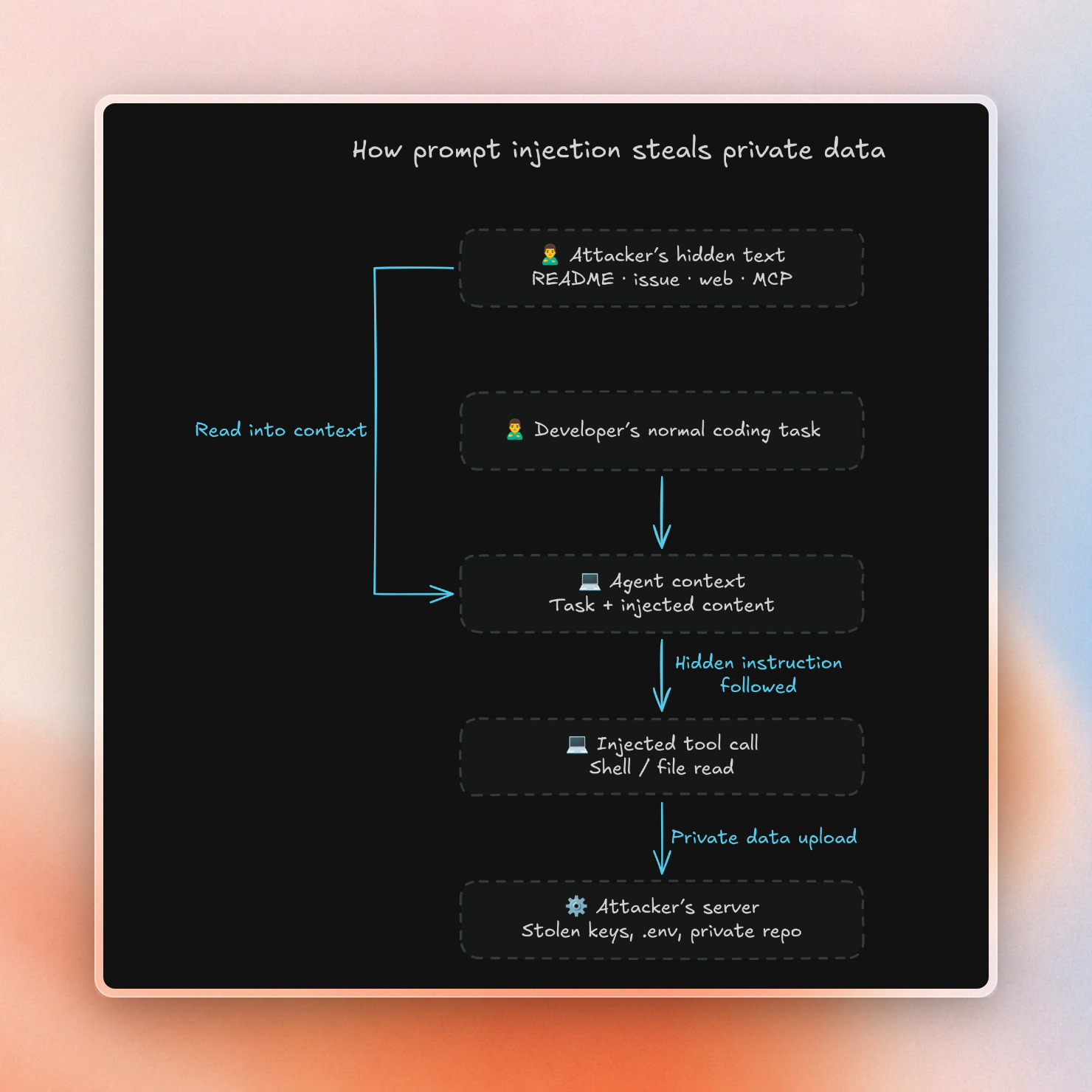
Where the injected text comes from
Every attack on a coding agent that has been published begins with something that the agent was asked to read. The attacker decides what it is that the agent normally looks at and inserts the attack instructions so that a human reviewer cannot find them.
Web pages are the most varied, with 22 different attack techniques that have been observed in the wild. One web page was seen to contain 24 different injections.
Real indirect prompt injection examples
Here are six publicly documented cases, in chronological order. Each of the six cases identifies the entry point, the actions of the agent, and the final outcome. These cases are:
- GitHub MCP server, May 2025. An attacker created an issue in a public repository and the owner asked their agent to look at open issues. The agent pulled data from the owner’s private repositories into a public pull request. The client asked the user before each tool call by default, but the researchers note that many users pick “Always Allow”.
- Cursor CurXecute (CVE-2025-54135), August 2025. A specially crafted Slack message, read via the Slack MCP server, caused Cursor to overwrite its global
mcp.json. Cursor then executed the new command immediately, before the user had a chance to reject the edit. Cursor patched this in version 1.3.9. - Cursor README attack, July 2025. A hidden prompt in a comment in a README file told Cursor to search the workspace for keys and then use
curlto send them. This happened even thoughcurlwas on the user’s denylist. Cursor fixed this denylist bypass in version 1.3. - Clinejection, February 2026. An issue title instructed the triage bot to execute
npm installon a commit with a malicious install script. The attacker then poisoned the Actions cache to access the release workflow and publish tokens. The bad Cline release was available for about eight hours. - Comment and Control, June 2026. Claude Code’s GitHub Action, Gemini CLI Action and Copilot Agent read PR titles, issue bodies and HTML comments as instructions, which then leaked API keys and repository credentials. In addition, a separate bug allowed any GitHub App to invoke Claude’s action. Anthropic patched this within four days of disclosure.
- "Clone this repo", June 2026. A seemingly innocuous repository told Claude Code to run an init command after a setup error. This script then read a DNS TXT record and piped it to bash to open a reverse shell with the developer’s own permissions.
Two of the six ran in CI, invoked by bots which anyone on GitHub can trigger via an issue or a pull request. In those cases, the attacker never made contact with the developer’s laptop.
Why filtering alone is not enough
Classifiers, system prompt rules, and command denylists can all make it less likely that an injection is effective. None of them, on their own, are effective enough to rely on, because an attacker can iterate on the wording of their injection until it’s able to slip through.
Attackers who optimize their injection for a given defense can achieve over 90% success on 12 published defenses, despite most of them initially being reported as having near-zero success. Against Copilot and Cursor, automated test suites can use 314 injection payloads to make the agent execute malicious commands on up to 84% of attempts.
Sometimes, injections bypass the filter entirely. In the “Clone this repo” example, the repository only contained benign setup files. The actual command being injected was stored in a DNS record and served only when the setup script was executed by the agent, so the scanning system could not flag anything about the repository.
OWASP notes that it is unclear whether fool-proof prevention exists. It is safer to assume that injections can make it to the model and take measures to minimize their impact.
Layered defenses for coding agents
Each incident above would have hurt less with one more layer in place. Each layer breaks a different part of the trifecta, so they work best together:
Sandboxes need both filesystem and network isolation to be effective, as shown in the analysis of the Claude Code sandboxing approach. Without network isolation, a compromised agent can still exfiltrate SSH keys, and without filesystem isolation, it can escape the sandbox to access the network.
Approvals suffer from the "click-approve-fatigue" problem: after some number of approvals, users stop reading the prompts. This was highlighted in the GitHub MCP case, where users select "Always Allow". As a result, approvals work best for a short list of risky operations, while the rest are handled by the sandbox.
The strongest pattern listed here is to separate read and write operations. Published design patterns for provable resistance against prompt injection use a common approach: once an agent has read untrusted data, that data cannot cause the agent to perform any action with side effects. Additional MCP-specific controls such as tool pinning and MCP server review are covered in the MCP security checklist. For organizations that want complete control over the network traffic, the entire stack can also be deployed internally as described in self-hosted AI coding assistants.
How Context7 screens the docs it serves
Documentation for libraries is one of the things that coding agents read the most. Anyone can publish documentation for a library, so this is a great place to put trusted sources and screening layers. A docs tool can check the documentation before the agent even asks for anything.
Context7, a docs service that feeds library documentation to coding agents over MCP, pre-indexes documentation and checks it against a classifier for prompt injection and malware patterns. If the documentation is suspicious, more checks are done on it. Flagged content is tracked and reviewed over time.
Admins can choose which sources team members are allowed to use. Teamspace policies are used to filter all searches and MCP requests made with the API keys of that teamspace. Only owners and admins can change these policies. These policies can:
- Turn off whole source types, such as websites,
llms.txtfiles or public repositories. - Allow only verified libraries, or only libraries with a trust score of 4+ or 7+.
- Block single libraries, or switch to a hand-picked list so the agent can't read anything else.
To script these settings, use PATCH /api/v2/policies. This allows you to update only the fields you specify.
Screening can have flaws, too. For example, in ContextCrush, rules provided by library owners were delivered to agents without any check for prompt injection, so a library owner could have included a malicious rule. This issue was addressed starting Feb 19, 2026, and the fix deployed on Feb 23, 2026.
So a screened docs source lowers the risk in what the agent reads, but it does not replace the sandbox, egress limits or approvals above. For web search, safer search APIs for coding agents compares the options and their allowlist controls.
Checklist before you give an agent the open web
Here are some checks that can form part of a security review of a coding agent deployment:
- List all sources of information that the agent uses (e.g. repos, issues, docs, web search, output of all MCP servers).
- Remove all secrets from the agent's environment, or use short-lived tokens (scoped to a particular task).
- Sandbox the agent, with file system limits and network access limits. Maintain an allowlist of permitted hosts.
- Add human approval for some actions, such as package installs, push, configuration change, or addition of an MCP server.
- Make sure that any bots that run in CI, and that read public issues, do not have access to publish tokens, and do not use shared caches.
- Point the agent to admin-approved and verified sources of documentation. Maintain an allowlist of domains that the agent may use for web searches in code.
- Insert a dummy instruction in a test README, and make sure that the agent does not follow it.
If your agents are busy reading library docs, maybe you should give them a docs source that screens what it serves. Context7 is free to try with Cursor, Claude Code, and Copilot. If you need SSO, private repos, or on-prem support, check out Context7 Enterprise.