

RAG for internal documentation: giving coding agents your private SDKs
 Batuhan Bilgin9 min read
Coding agents can only use your private SDKs, internal wikis and API specs if you give them those docs. You can paste them, put them in rules files, add a wiki MCP server, build your own RAG pipeline or run a docs server made for agents, like Context7. The right choice depends on how many teams, versions and permission rules you have.
Ask an agent to use your company's internal payments SDK, for example, and the agent has no choice but to guess the API based on method names. Or, even worse, it could copy a public package with a similar name. In both cases, the diff will look good, but the code will fail in review.
The reason for this is that the model never saw your SDK during pre-training, so it has nothing to fall back on. This is the same problem as agents using outdated public APIs, but worse because no web search will help. For public libraries, a docs tool like Context7 fixes it by giving the agent current docs at the moment it writes code. Internal docs need the same thing, from sources only your team can see.
What internal documentation a coding agent needs
Internal documentation for coding agents means any documentation that is not available on the public internet. Most internal documentation can be grouped into 5 categories:
- Private SDK and library repos: README, docstrings, and examples for packages published on your internal registry. Usually there are multiple versions of those packages being used in parallel.
- Internal wikis such as Confluence: Architecture notes, onboarding pages, and "how we call service X" type of guides. These require a login.
- Service READMEs: Instructions on how to set up and use various services across hundreds of repos.
- OpenAPI specs: Detailed information on all the endpoints, fields, and error codes for internal services.
- ADRs (architecture decision records): Brief explanations on why the team made a particular architectural choice, to prevent the agent from undoing it.
The web fetch tool in an agent won't work for pages behind a login, and these pages will also not be indexed by public search. So each option below is a way of feeding this information into the agent's context.
How do I give coding agents access to internal docs?
There are six ways to provide internal documentation to a coding agent: paste it into the chat, write it in rules files, save it in the repository, add an MCP server for the wiki, build a RAG pipeline behind an MCP server, or run a documentation server for agents. The first three options are suitable for a single team. The other three can scale across many teams.
Each of these options has different costs:
- Paste or attach. This is fast for a single task but then it fills up the context window and disappears when you start a new session. It also relies on someone finding the right page to start with.
- Rules files. CLAUDE.md, Cursor rules and Copilot instruction files are loaded at the start of each session. They can contain short conventions and pointers but will quickly cost tokens per request if they get too large. The rules file guide explains how each tool uses them.
- Docs in the repo. You could add a docs folder or a vendored copy of the SDK source code and then the agent’s own file search will find them. This only works for things that are in the repo that the agent has open.
- A wiki MCP server. Atlassian have published an official MCP server at
https://mcp.atlassian.com/v2/mcpwhich signs users in with OAuth 2.1 and respects their existing permissions. It then uses Rovo credits to search. For Confluence Data Center, there is a community server called mcp-atlassian which can be used to search Confluence Server or Data Center installations. Both of these servers return wiki pages but neither will know which version of the SDK you are running. - Build your own RAG. You could do the work to chunk, embed and index your docs and then make them searchable over MCP. We’ll show how to do this in the next section.
- A docs server built for agents. There are also services available that index repos, wikis and specifications into code-focused snippets and make them available over MCP with versions and access control. One example is Context7 which indexes private repos, Confluence spaces and OpenAPI specifications alongside public library docs.
Building your own RAG for internal documentation
A simple home-grown RAG system for internal documentation has five pieces:
- Load and chunk: We load the files from Git (Markdown), Confluence REST API (pages) and somewhere we can find the OpenAPI specs. Then we chunk them by heading, keeping the code blocks whole so that the agent gets full examples.
- Embed: We use an embedding model to turn the text chunks into vectors. This model should run on-premises too, in case your documentation can't leave your network.
- Store: We store the vectors in a vector store like pgvector, LanceDB, or Milvus, and the metadata about each chunk as well: repo, version, team, and who may read it.
- Serve over MCP: We wrap the search functionality in an MCP tool with a name and description that the agent understands and can call when appropriate.
- Refresh: We re-index the documentation on merge, drop chunks of deleted files, and re-embed all the chunks when we switch the embedding model.
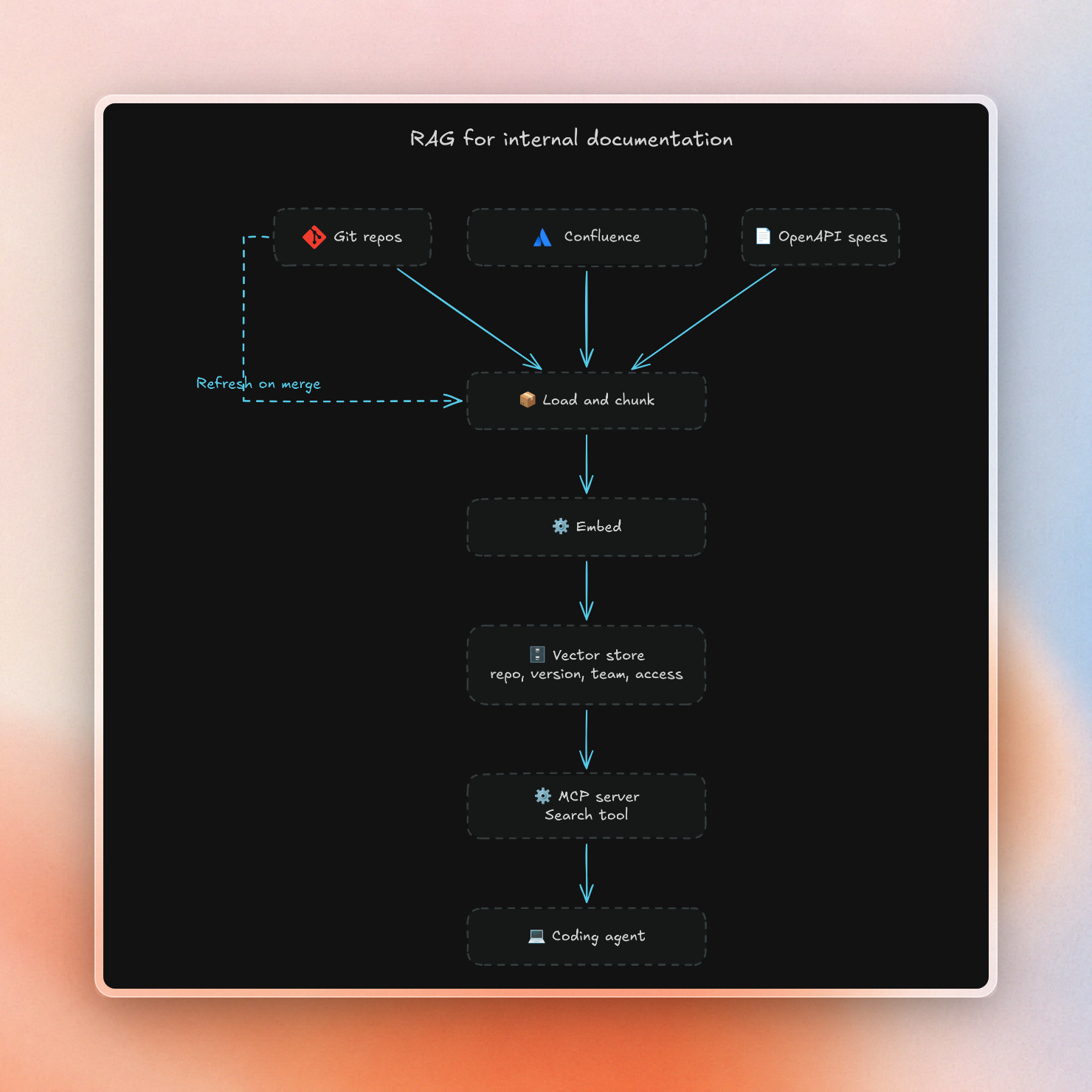
Once the server runs, adding it to an agent is one line. In Claude Code it looks like this:
$ claude mcp add --transport http internal-docs https://docs-mcp.internal.example.com/mcpThe ongoing work is in steps 1 and 5: parsers for every format your teams use, one refresh job per source, and some way of making sure that answers still match the code.
This sort of pipeline is perfect for one team with one SDK and an engineer who owns the pipeline. Once several teams, different versions, and different permission groups share one index, it gets much harder.
What goes wrong with internal docs in an agent
Every option above can feed the agent the wrong thing. These five problems show up once internal docs reach more than one team:
With a single index, version mismatch is easily overlooked. One video game studio, for instance, had several teams on different versions of an internal SDK, and each team needed documentation for their specific version.
The last row relates to the more general question of where the different components of your AI stack run. The self-hosted AI coding assistant guide discusses the docs layer of that stack (Layer 5). The data privacy guide details what each coding assistant sends out of your network by default.
Serving private docs with Context7
Context7 is a documentation server for coding agents. On Pro and Enterprise plans, private sources are served via the same MCP server and REST API as public library documentation.
Here is how it handles the sources and problems above:
- Sources. On Pro or Enterprise cloud teamspaces, private sources can be added from GitHub, GitLab, Bitbucket, other Git hosts, Confluence and OpenAPI specs. PDFs and Word documents can be uploaded via the API. The on-prem version can index Confluence Cloud or Data Center as well as self-managed Git hosts; see the GitLab guide for details.
- Freshness. On-prem automatic updates check each repo's branch on a schedule. Only changed files are re-parsed. Push-triggered updates are available on GitHub.
- Versions. Agents can ask for a particular version, e.g.
/owner/repo/v1.2.3. Teams can use library rules to specify the library version used across all requests. - Permissions. On-prem library access can restrict libraries to specific SSO groups or users. Restricted libraries look identical to nonexistent libraries.
- Network. On-prem houses repos, docs, vector store and MCP server on-site. LLM and embedding provider can also be chosen freely. With the offline license, no data is sent to Context7. With the online license, license checks and search queries are sent to context7.com.
Connecting an agent to an on-prem install is one command:
$ ctx7 setup --mcp --base-url https://context7.internal.yourcompany.com --claudeThis automatic update functionality is limited to Git repos. Confluence spaces and OpenAPI specifications are only updated on-demand. Also note that parsing and embedding is still happening at your configured AI provider. A fully private setup would also require a provider inside your network.
Which option fits your team
The right option depends on how many teams share the docs and where the docs may go:
If you only have one team, writing rules files and documentation, and checking those into your repository will likely get you some mileage. If you have several teams using different versions of the same internal SDK, having a single, versioned index with some access control is likely preferable over each team building their own.
Context7 is free to try in Cursor, Claude Code, and Copilot. Private sources come with the Pro and Enterprise plans, and SSO, library access control and on-premises installation with Context7 Enterprise.