Why AI coding agents use outdated APIs, and how to fix it
 Batuhan Bilgin9 min read
AI coding agents use outdated APIs because of their training cutoff, old examples online and versions they can't see. Here is how often it happens and three fixes: rules files, a docs tool, and lint in CI.
Your coding agent creates a small MCP server in Python. It imports from mcp.server.fastmcp import FastMCP, just like every tutorial from the past year. But when you run the code, you get an import error because version 2 of the SDK renamed that class in July 2026. This is easy to fix. But more subtle errors can compile, pass review, and make it to production using deprecated APIs.
What outdated-API code looks like
Here are two real examples of changes from 2026. The first is a loud break, MCP Python SDK 2 renamed FastMCP to MCPServer and the old import path is no longer valid.
This is what an agent trained on v1 examples writes:
from mcp.server.fastmcp import FastMCP

mcp = FastMCP("Demo")
With the current SDK installed, it fails on the first line:
ModuleNotFoundError: No module named 'mcp.server.fastmcp'. This is mcp 2.x, where FastMCP was renamed to MCPServer (from mcp.server.mcpserver import MCPServer) and other APIs changed; see the migration guide at https://py.sdk.modelcontextprotocol.io/v2/migration/#fastmcp-renamed-to-mcpserver or pin 'mcp<2' to keep running v1 code.The current code:
from mcp.server.mcpserver import MCPServer

mcp = MCPServer("Demo")


@mcp.tool()
def add(a: int, b: int) -> int:
    """Add two numbers."""
    return a + b
The second one ships quietly. It still works in AI SDK 7 and will be removed in the next major version. AI SDK 7 deprecated the response helpers on the streamText result.
An agent that learned from AI SDK 5 and 6 examples writes this route handler for useChat:
import { openai } from '@ai-sdk/openai';
import { convertToModelMessages, streamText, type UIMessage } from 'ai';

export async function POST(req: Request) {
  const { messages }: { messages: UIMessage[] } = await req.json();

  const result = streamText({
    model: openai('gpt-5'),
    messages: await convertToModelMessages(messages),
  });

  return result.toUIMessageStreamResponse();
}
It type-checks and runs. The current version uses the standalone helpers:
import { openai } from '@ai-sdk/openai';
import {
  convertToModelMessages,
  createUIMessageStreamResponse,
  streamText,
  toUIMessageStream,
  type UIMessage,
} from 'ai';

export async function POST(req: Request) {
  const { messages }: { messages: UIMessage[] } = await req.json();

  const result = streamText({
    model: openai('gpt-5'),
    messages: await convertToModelMessages(messages),
  });

  return createUIMessageStreamResponse({
    stream: toUIMessageStream({ stream: result.stream }),
  });
}
The quiet case costs more: nothing breaks, so the old call goes to production and breaks later, on the next major upgrade.
Why do AI coding agents use outdated APIs?
When AI coding agents produce code with outdated API versions, they are using what they learned about the library before the training cutoff date, and these old API examples continue to remain on the internet even after a new release of the API. Unless the agent is explicitly informed about the version of the API, it also can’t know which version of the API you have installed on your system.
There are four sources of information that may cause the agent to output outdated code:
- The training data cutoff. There’s a point in time after which no new information can be learned by the model. Claude Sonnet 5.5 has a training data cutoff of June 2026, which means it never saw MCP Python SDK 2, which was released in late July.
- Old examples outnumber new ones. A single API rename invalidates years of tutorials, Stack Overflow answers, and GitHub code. This content remains online, and even search results may contain the old names. For example, 17% of Context7 results and 31% to 39% of Exa results in our test contained an old API name.
- The API version is invisible. The agent only knows about the prompt you entered and the files it has opened. Unless it has opened your lockfile, it has to guess the major version of the library, and it will guess the version that it’s most familiar with.
- Your own code shows the old pattern. The agent reads nearby files to match your style. If older parts of the repo still call the old API, the agent copies that call into new code.
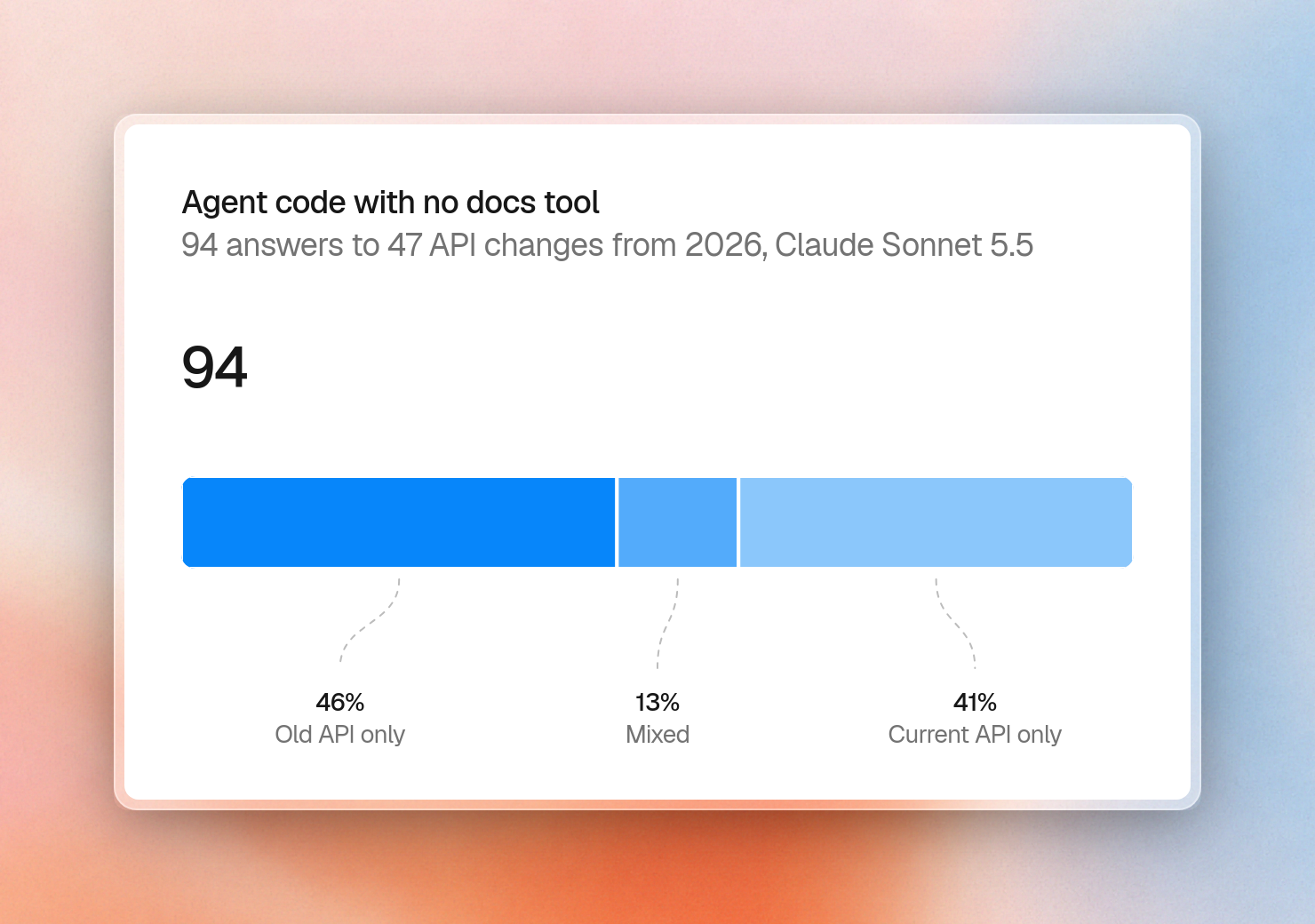
In our test, Sonnet 5.5 without tools wrote old-API-only code for 24 of the 47 changes. Eight of those 24 changes had been made in the library between January and May 2026, so the new API was present in the training data. However, there were years of examples of the old API.
How often it happens: 47 API changes from 2026
We ran this test in October 2026. We collected 47 real-world API renames and removals from 2026 releases of 34 libraries (31 in JavaScript, 16 in Python). Each case was cross-referenced with the library’s official migration guide, changelog, or release notes. The sample spans releases from January 2026 to those shipped the week before the test (e.g., SvelteKit 3 and Polars 2).
We asked Claude Sonnet 5.5 each question twice, using standard developer phrasing without specifying a version number. We requested short code examples using the current API and verified the usage of the old and new API names in the generated code.
Without a documentation tool, Claude used only the old API in 43 of 94 responses. It mixed old and new API usage in 12 responses, and used only the current API in 39 responses.
The three fixes build on top of each other, each catching part of the previous fix’s missing cases.
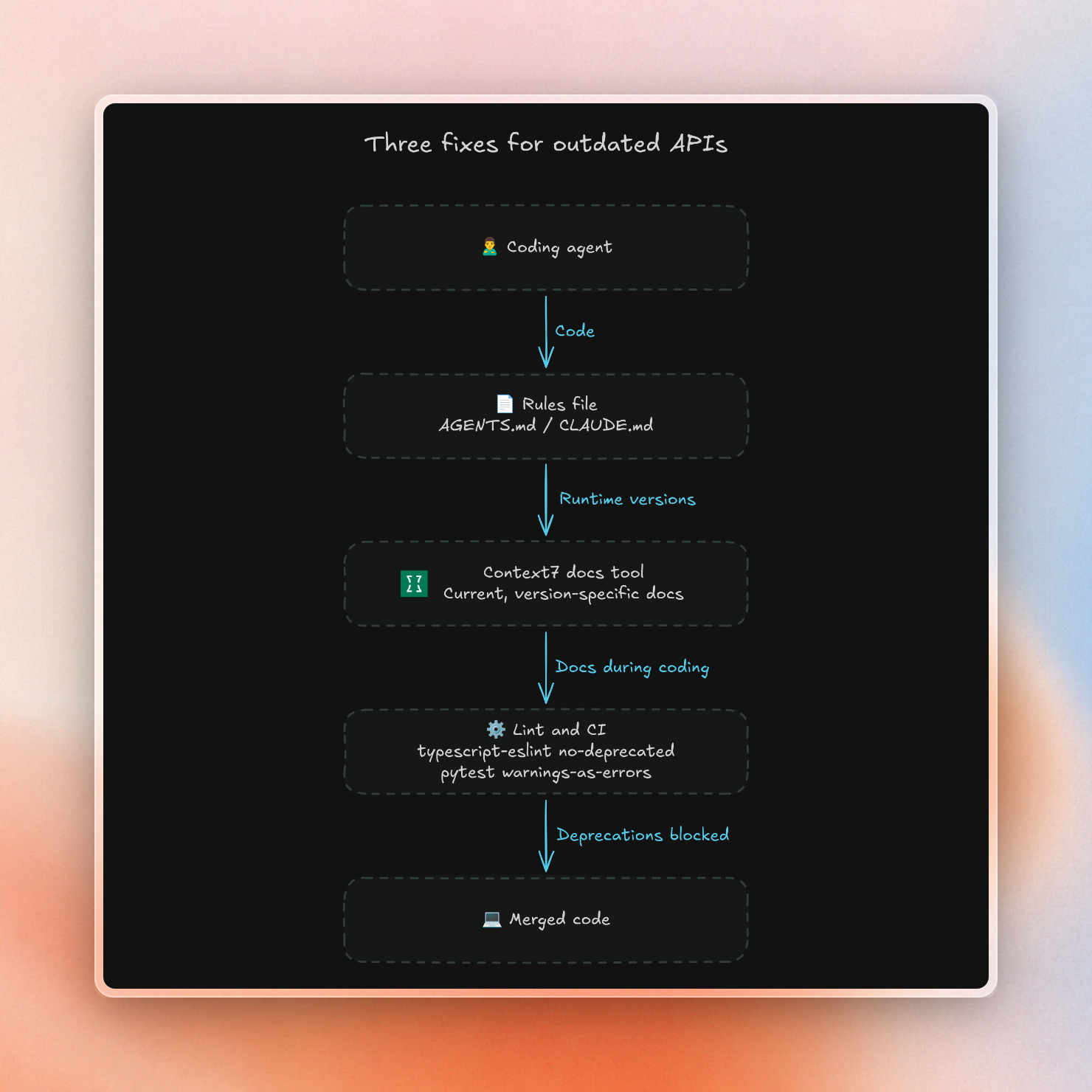
Fix 1: Tell the agent which versions you use
The cheapest way to fix this is to write down what you use. The major coding agents already read a file with your standing instructions for the repo:
- Cursor can read project rules from
.cursor/rulesas.mdcfiles, or just a plainAGENTS.md. - GitHub Copilot can read
.github/copilot-instructions.md. - Claude Code can read
CLAUDE.md, orAGENTS.mdin its place.
Put the major versions you run and the renames that bite you in that file:
# Library versions

- ai 7.x: return chat streams with createUIMessageStreamResponse and toUIMessageStream. Do not call result.toUIMessageStreamResponse().
- mcp 2.x (Python): import MCPServer from mcp.server.mcpserver. FastMCP no longer exists.
The problem with this approach is that we need to write every rename out after the fact. Then the list of renames is stale by the next release. And we have to duplicate the list of renames for each repository. Rules work better for telling the agent which tools to use than for listing APIs.
Fix 2: Give the agent current docs when it writes code
The agent knows what you tell it in the rules. It can also use a docs tool to look up what you don’t tell it, when it’s actually writing code.
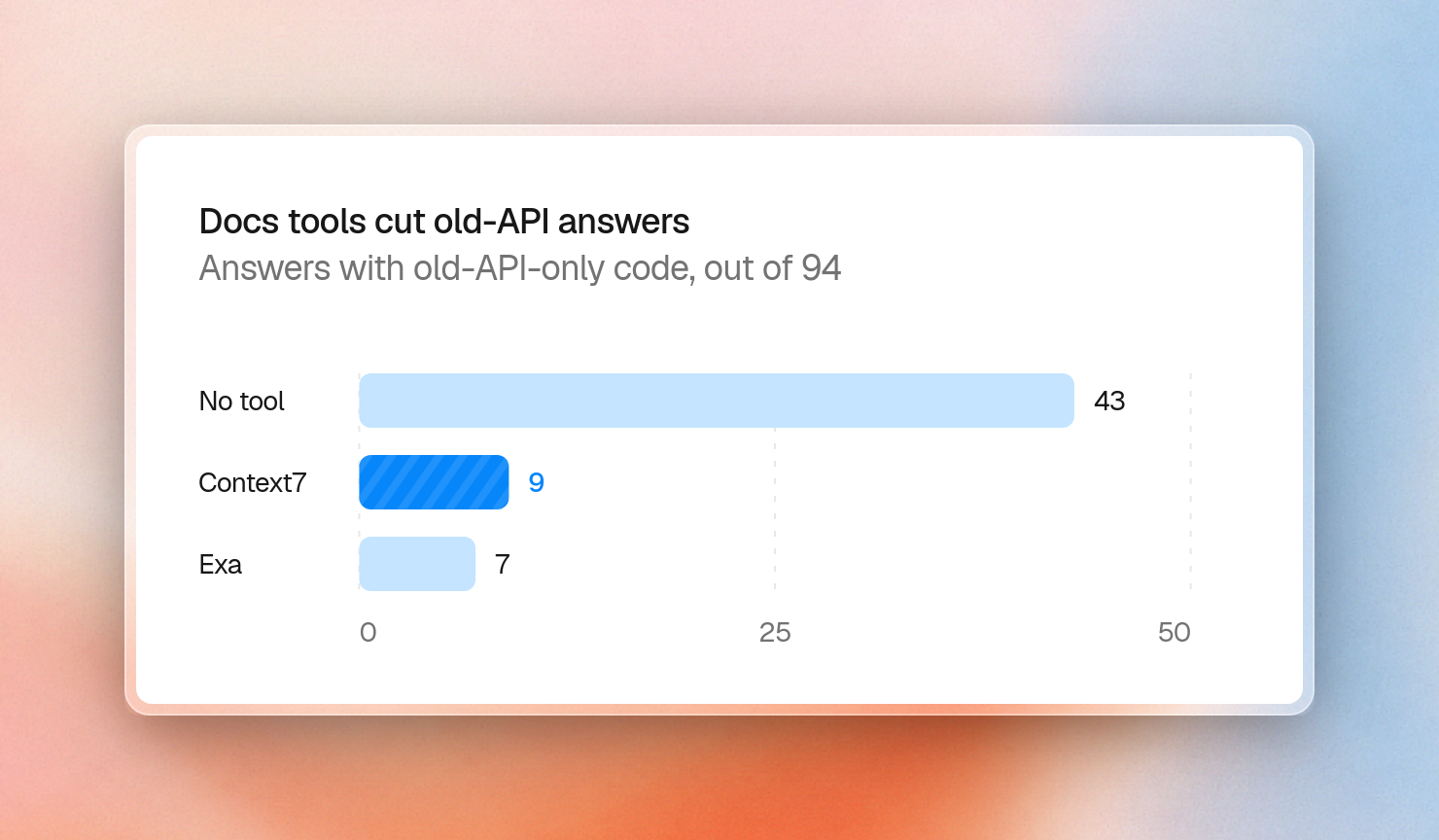
With a docs search tool, the number of answers only using the old API decreases from 43 out of 94 to 9 out of 94 with Context7, and 7 out of 94 with Exa. With either tool, the agent wrote only current code for the majority of the answers, with 66 and 65 answers only containing the current API, respectively. That’s a tie.
The tools differ in how much text they hand the agent:
Our agent with Context7 consumed about 4.6 times less input tokens overall (454K vs 2.08M), while Exa returned search results faster.
Explicitly mentioning the major version of the question would help the agent find more current API results, as the share of Context7 results using only the current API went from 37% to 55%.
Context7 wasn’t perfect either, returning only old API docs in 12 of the 94 queries. These were mostly found in older versioned docs folders and in official docs that still cover the old API.
In Cursor, one command installs Context7:
$ npx ctx7 setup --cursorIt signs you in, creates an API key and installs a skill that tells the agent when to call Context7. Context7 also works with Claude Code, Copilot, Windsurf and other MCP clients.
Agents also skip tools they aren't told to use. A data engineering team found this during a trial: their agents didn't call the docs tool often enough. A one-line rule fixes most of it:
Always use Context7 MCP when I need library/API documentation, code generation, setup or configuration steps without me having to explicitly ask.Add the major versions from your lockfile to the same rule, making sure each lookup retrieves the correct documentation. For a more detailed Cursor walkthrough, check out how to stop Cursor from using outdated APIs.
Fix 3: Catch deprecated calls in lint and CI
Note that, even with a docs tool, 7 to 9 answers out of 94 only use the old API; a linter can catch those before they get merged.
In TypeScript, the no-deprecated rule from typescript-eslint flags any call to code marked @deprecated. It needs type information, so it runs with the project service:
import tseslint from 'typescript-eslint';

export default tseslint.config({
  files: ['**/*.ts'],
  extends: [tseslint.configs.base],
  languageOptions: { parserOptions: { projectService: true } },
  rules: { '@typescript-eslint/no-deprecated': 'error' },
});
Run against the AI SDK route from the top of this post, it fails on the call that type-checked fine:
src/old-route.ts
  12:17  error  `toUIMessageStreamResponse` is deprecated. Use the standalone `toUIMessageStream` and
`createUIMessageStreamResponse` helpers from `'ai'` with `result.stream`
instead. This method will be removed in the next major release  @typescript-eslint/no-deprecated

✖ 1 problem (1 error, 0 warnings)
In Python, libraries mark old APIs by raising a DeprecationWarning at runtime. Pytest can turn those warnings into test failures with one setting in pyproject.toml:
[tool.pytest.ini_options]
filterwarnings = ["error::DeprecationWarning"]
A test that calls a deprecated function now fails:
E       DeprecationWarning: old_api() is deprecated, use new_api()

test_deprecated.py:5: DeprecationWarning
=========================== short test summary info ============================
FAILED test_deprecated.py::test_old_api - DeprecationWarning: old_api() is de...
1 failed in 0.02s
Linters only catch APIs the library marks as deprecated. Removed APIs will fail at import time or during the type checking phase (like the above example with MCP).
Rolling this out across a team
This is great for one developer. To make sure that everyone in your company is using this, the platform team needs to make sure that these fixes are the default.
- Ensure that every team has installed the same docs tool, with the rule that makes the agent call it.
- In the rules file, keep track of the major versions that each repo is using, and update them when you upgrade.
- Don’t forget to cover your internal SDKs. Public docs tools only index public docs. However, different teams may use different versions of the same internal SDK. Therefore, the agent needs to have the docs for the version that each team is using.
- Turn on deprecation lint and warnings-as-errors in CI.
- Finally, test the agent on your own code. Pick a few renames from your last upgrades and ask the agent about each one, with and without the docs tool, the way we did above.
For regulated companies, the docs tool also has to pass a security review, and often has to run inside the network. We cover that setup in self-hosted AI coding assistants: an enterprise guide.
FAQ
Will a newer model fix this? No. While newer models push the cutoff forward, libraries are always shipping new versions. For example, in our test, a model trained through June 2026 still wrote old-API-only code for 8 changes that shipped before June.
Isn't web search enough? We tried using web search to solve these questions and got a similar result to Context7 (7 and 9 old-API-only answers left out of 94). However, the results we got were about 10 times larger than the results we got from Context7 and more of them had mixed old and new API names.
Does this work for internal libraries? This will work for internal libraries only if your docs tool is able to index your private repositories. Context7 Enterprise does index private GitHub and GitLab repositories and can run inside your network.
You can try Context7 for free in Cursor, Claude Code, and Copilot. To deploy Context7 to your team, implement SSO, or run on-prem, use Context7 Enterprise.