How to Give Your Coding Agent Up-to-Date Docs for AWS, Azure, Google Cloud and Apple
 Batuhan Bilgin7 min read
One documentation MCP server can give a coding agent current docs for AWS, Azure, Google Cloud, Apple, OpenAI and Cloudflare. Here is what each vendor's own docs server does, eight real questions run through Context7, and when a vendor server is still worth keeping.
A coding agent that deploys to AWS, runs Azure Functions, ships to Cloud Run and builds an iOS app needs current docs for all four. Most vendors now answer that with their own docs MCP server. AWS alone has three: a local docs server, a remote AWS Knowledge MCP Server and the AWS MCP Server, which also runs AWS API calls. Microsoft hosts one at learn.microsoft.com and Google runs one for its developer docs. OpenAI hosts another and Cloudflare runs a docs server next to its other MCP servers. For Apple, the docs servers in MCP directories are community projects. Each one is a separate config entry and a separate set of tools, meaning the agent has to figure out which server to use before it can even search.
How do you give a coding agent up-to-date docs for every platform?
Connect to a documentation MCP server that indexes the platforms you use. For example Context7 covers AWS, Microsoft Learn, Google Cloud, Apple, OpenAI and Cloudflare. This way, the agent only needs to search in one place with two tools instead of connecting to a server per vendor.
A documentation MCP server gives coding agents the tools to search for current documentation and read them while writing code. You don't need a separate documentation MCP server per vendor to search for documentation.
The full setup:
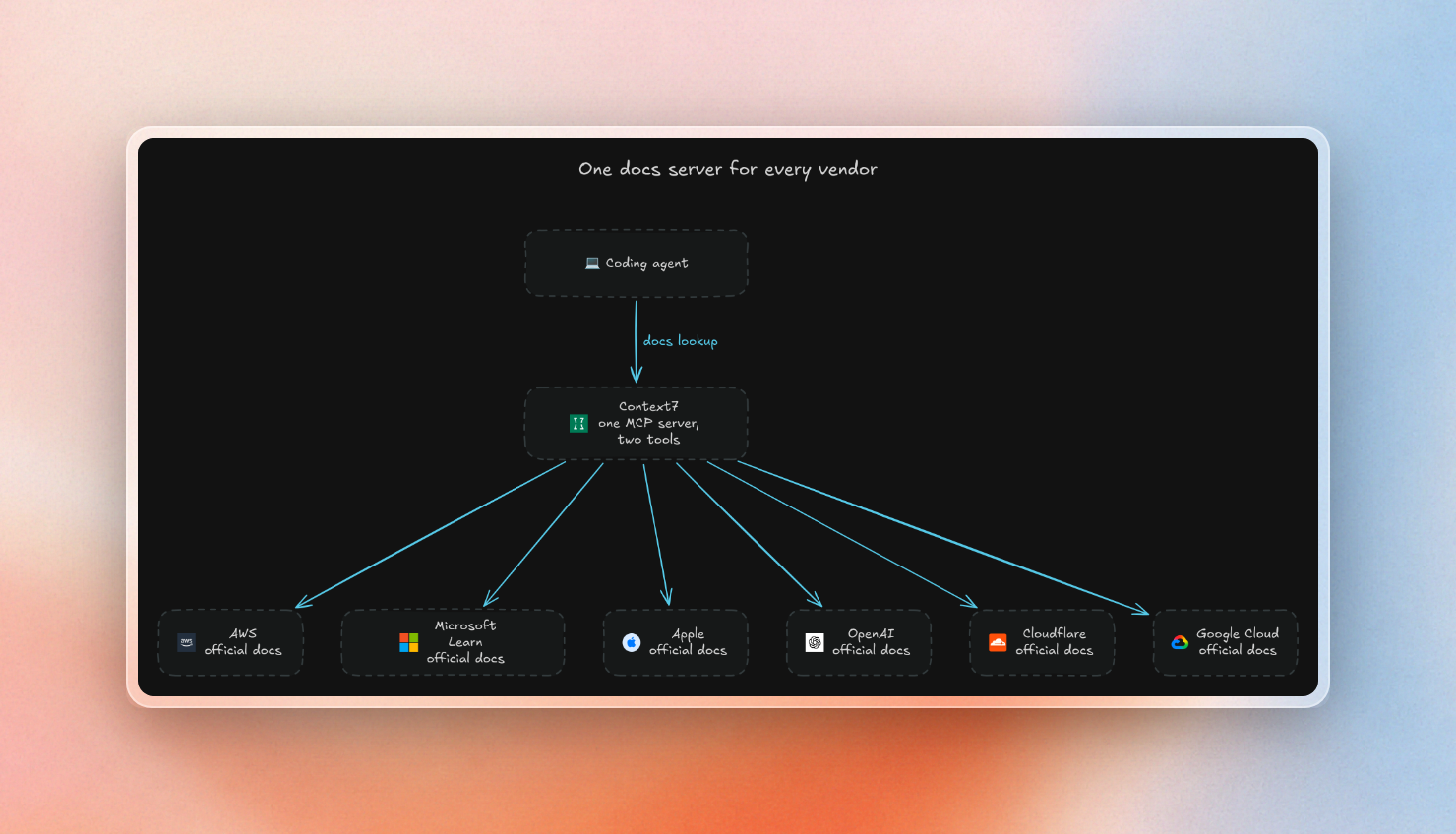
We checked each vendor in Context7's library search on October 22, 2026. Every one has its official docs indexed, and most were refreshed within the last few days:
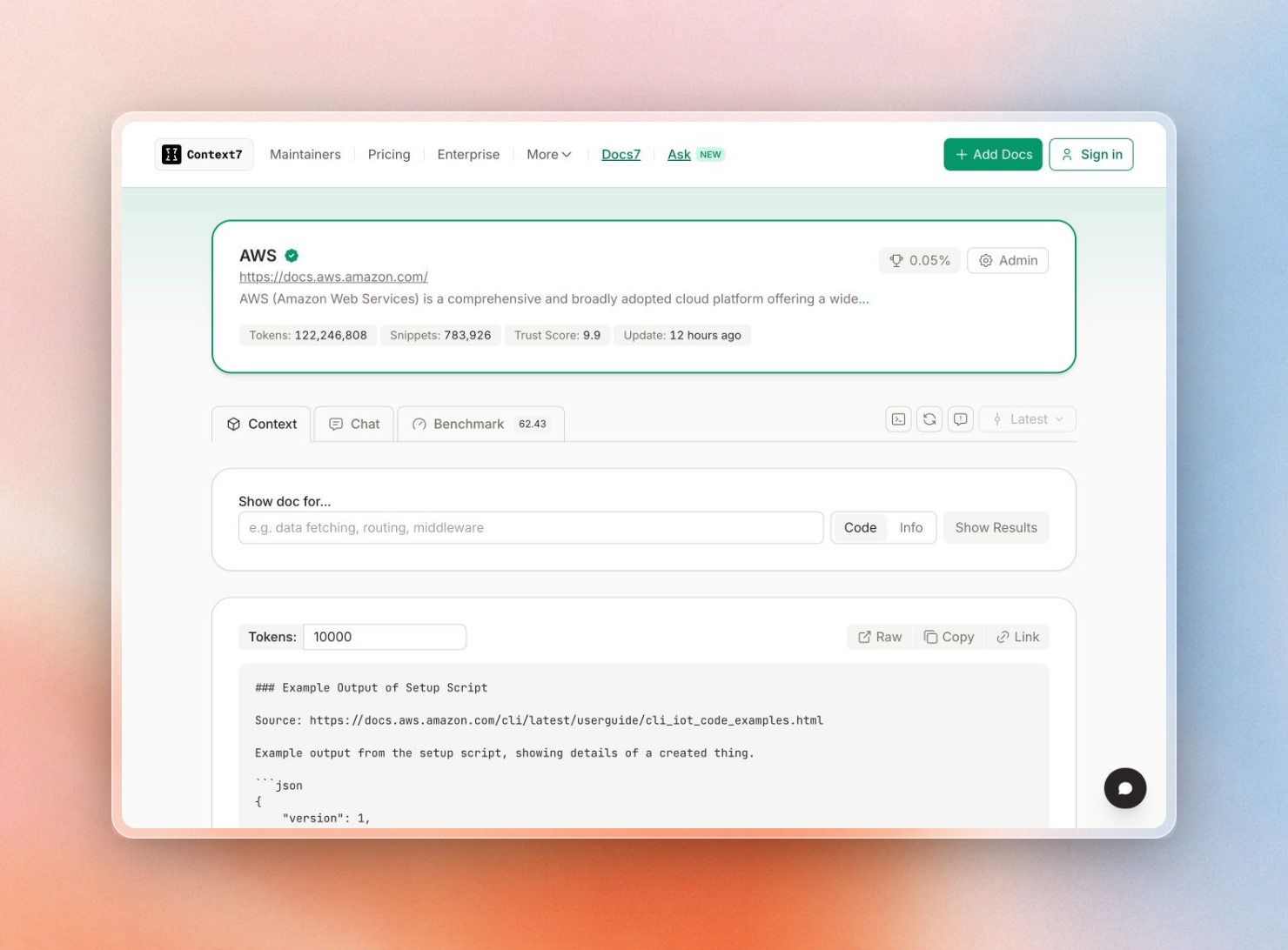
This is the AWS library page on Context7:
However, if you want something that does more than docs search, a vendor server still has merit. The AWS MCP Server, for example, runs AWS API calls using your own IAM credentials, which is different from docs search.
What each vendor's docs MCP server gives you
The vendor servers all do the same basic job: search one vendor's docs and return pages to the agent. They differ in how you run them and what extra tools they add:
With a server per vendor, that means installing and updating six or more entries, with each entry adding its own set of tools the agent can pick from. Context7, by contrast, adds two tools to the list: one to find the library, and another to return the library’s docs and code examples.
Microsoft states that its endpoint is not a traditional API and that its tools may change over time, which may be worth considering if you’re planning to call its endpoint from your own code, as opposed to an MCP client.
Eight vendor questions, one search call
We sent one real question per vendor to Context7's search API. It takes a plain question and picks the matching libraries itself, so the questions name no library ID. This is the script:
import json
import os
import time
import urllib.parse
import urllib.request

API = "https://context7.com/api/v3/search"
KEY = os.environ["CONTEXT7_API_KEY"]

QUESTIONS = [
    ("AWS", "How do I add an S3 lifecycle rule that expires objects after 30 days?"),
    ("Microsoft Learn", "Azure Functions isolated worker HTTP trigger in C#"),
    ("Google Cloud", "Deploy a container to Cloud Run with environment variables"),
    ("Apple", "SwiftUI NavigationStack programmatic navigation with NavigationPath"),
    ("OpenAI", "Stream a response with the OpenAI Responses API in Python"),
    ("Cloudflare", "Set an alarm in a Cloudflare Durable Object"),
    ("LangChain", "Add a checkpointer to a LangGraph graph for persistence"),
    (
        "Supabase",
        "Supabase row level security policy so users only read their own rows",
    ),
]


def search(query: str) -> tuple[dict, float]:
    url = API + "?" + urllib.parse.urlencode({"query": query, "type": "json"})
    req = urllib.request.Request(url, headers={"Authorization": f"Bearer {KEY}"})
    start = time.perf_counter()
    with urllib.request.urlopen(req, timeout=60) as resp:
        body = json.load(resp)
    return body, time.perf_counter() - start


rows = []
for vendor, query in QUESTIONS:
    body, secs = search(query)
    code = body.get("codeSnippets", [])
    info = body.get("infoSnippets", [])
    libs = sorted({s["libraryId"] for s in code + info if "libraryId" in s})
    tokens = sum(s.get("codeTokens", 0) for s in code) + sum(
        s.get("contentTokens", 0) for s in info
    )
    top = code[0]["codeTitle"] if code else "-"
    rows.append((vendor, len(code), len(info), tokens, round(secs, 2), libs, top))

for r in rows:
    print(f"{r[0]:<16} code={r[1]:<3} info={r[2]:<3} tokens={r[3]:<6} {r[4]}s")
    print(f"  libraries: {', '.join(r[5])}")
    print(f"  top snippet: {r[6]}")
It printed this:
AWS              code=6   info=2   tokens=1471   2.82s
  libraries: /websites/aws_amazon_s3
  top snippet: Lifecycle configuration with tag-based filtering and conflicting actions
Microsoft Learn  code=7   info=1   tokens=1410   4.36s
  libraries: /websites/learn_microsoft_en-us_azure, /websites/learn_microsoft_en-us_azure_azure-functions, /websites/learn_microsoft_en-us_azure_azure-functions_durable
  top snippet: C# HTTP trigger template (isolated worker, HttpResponseData)
Google Cloud     code=4   info=1   tokens=733    3.22s
  libraries: /websites/cloud_google_run
  top snippet: Deploy with per-container environment variables
Apple            code=5   info=22  tokens=4307   3.66s
  libraries: /llmstxt/easyapp_site_llms_txt, /websites/developer_apple_swiftui, /websites/swiftpackageindex_siteline_swiftui-introspect_1_4_0-beta_2
  top snippet: Manage navigation state with NavigationPath and NavigationStack
OpenAI           code=8   info=0   tokens=2702   3.75s
  libraries: /openai/openai-openapi, /openai/openai-python, /websites/developers_openai, /websites/developers_openai_api
  top snippet: Streaming responses with synchronous client
Cloudflare       code=7   info=1   tokens=4222   3.23s
  libraries: /llmstxt/developers_cloudflare_durable-objects_llms-full_txt, /websites/developers_cloudflare_durable-objects
  top snippet: Set and handle alarms with setAlarm() and alarm() in Durable Objects
LangChain        code=8   info=0   tokens=2218   3.3s
  libraries: /langchain-ai/langgraph, /llmstxt/langchain-ai_github_io_langgraph_llms-full_txt, /websites/langchain_oss_javascript_langgraph, /websites/langchain_oss_python_langgraph
  top snippet: Construct and compile StateGraph with InMemorySaver
Supabase         code=7   info=1   tokens=801    3.25s
  libraries: /supabase/server, /supabase/supabase, /websites/supabase
  top snippet: Create RLS policy allowing users to view their own todos
The first result for each of the eight queries above was the relevant code sample. This was obtained from the single endpoint with the single API key. All results were between 700 and 4300 tokens long and each took less than five seconds to complete.
For the answer on Apple, we also saw references to two third-party sources, a SwiftUI helper package and an app template site. This can be fine for a quick question, but if you want to make sure your agent only references Apple’s own documentation, then you can use the library ID as a hint to return results that stay within that library. For example, if we sent the same question with /websites/developer_apple_swiftui as the library, we got seven results, all from Apple’s SwiftUI documentation.
When a vendor server is still the better fit
There are still some jobs that vendor servers do better than a docs search. When your agent needs any of these, consider running a vendor server next to Context7:
- Running AWS API calls: The AWS MCP Server can call any of 15,000+ AWS API operations with your existing IAM credentials. A docs server only reads docs.
- AWS regional availability: The AWS Knowledge MCP Server can tell the agent which APIs and CloudFormation resources each AWS region supports.
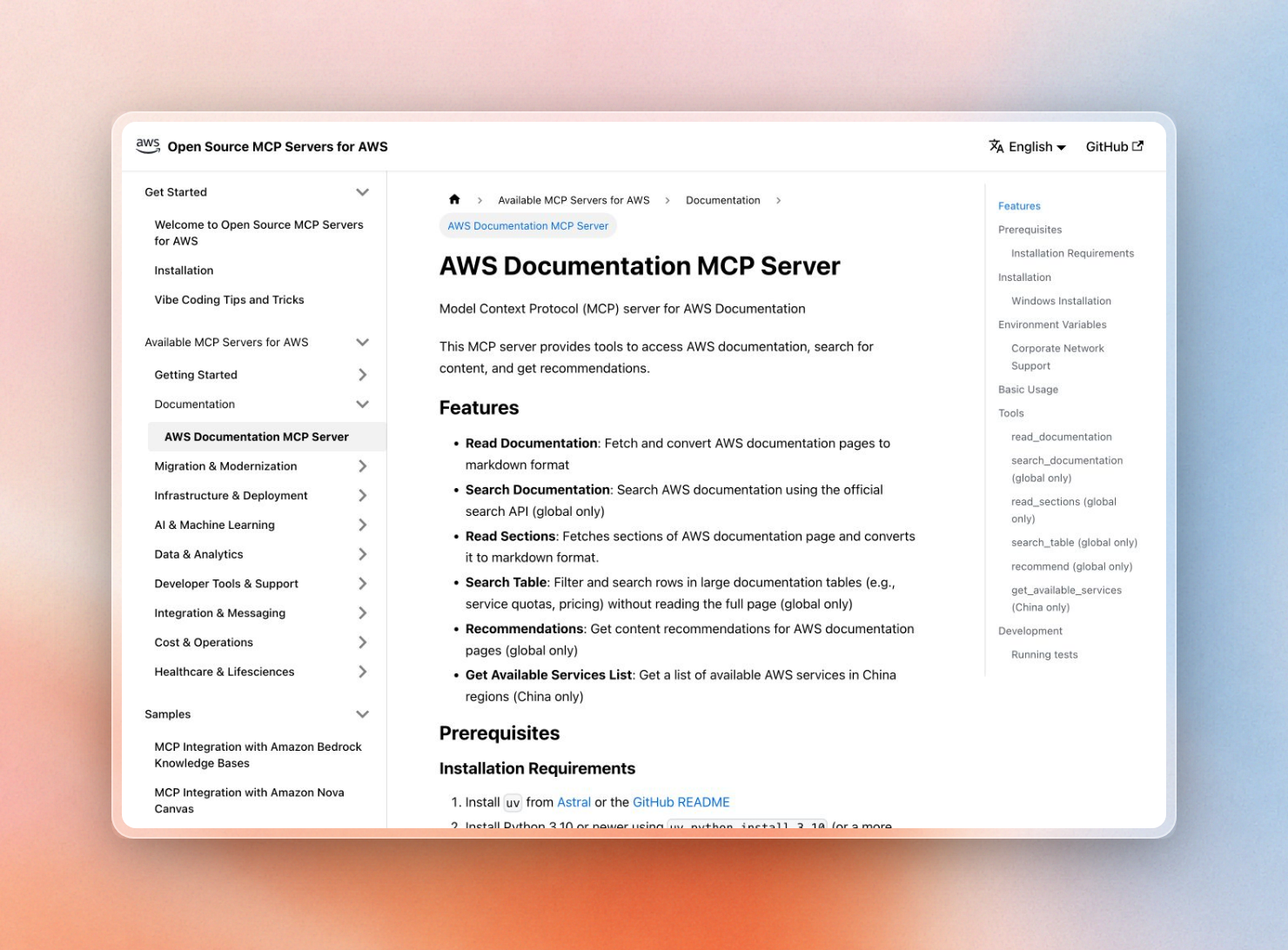
- AWS China docs: The local AWS docs server can switch to the China partition and list the available services.
- Searching big tables on AWS: The same server can find rows in large tables, such as the table of service quotas and prices.
- Related-page suggestions on AWS: It can recommend other pages related to the docs page already read by the agent.
- Microsoft code sample search: The Learn server provides a separate search tool for code samples, which is backed by the same service that runs Ask Learn.
Full feature set of the local AWS docs server:
Other than that, vendor servers and Context7 do about the same thing: "show me the current docs for this API." Having one server for all of them means less to install, and only one place for the agent to look.
Set up one server for all of them
The fastest setup is the Context7 CLI. It signs you in, creates an API key and installs Context7 for your coding agent. It needs Node.js 22.13 or newer:
$ npx ctx7 setupTo add the remote server by hand in Claude Code, pass your API key as a header:
$ claude mcp add --scope user --header "Authorization: Bearer YOUR_API_KEY" --transport http context7 https://mcp.context7.com/mcpOther clients use the same URL and header. The client list has the config for Cursor, Codex and many other clients.
Pipelines that call the search API directly can pin sources the same way that the Apple example above did. The API takes up to four library hints. A pinned version needs at least one hint. With that, one API key can cover the AWS, Microsoft, Google Cloud, Apple, OpenAI and Cloudflare docs, while still enabling you to pin the agent to a vendor’s official pages when needed.