Cursor rules, Copilot instructions and CLAUDE.md: making agents use the right tools
 Batuhan Bilgin12 min read
Cursor rules, Copilot instructions, CLAUDE.md and AGENTS.md all provide additional text to the context of a coding agent, altering its knowledge but not its behavior. To make sure the agent invokes a specific tool when needed, we recommend the use of a shared rule along with good descriptions of tools and skills, as well as the use of hooks where appropriate.
A platform team is trying out a new MCP server across the company. After a few weeks, usage is flat. The developers say the agent never calls the tool, and none of them can think of anything better to do than add the tool's name to all their prompts. We've seen this happen at an airline IT team, a data platform company and an IT consultancy. All of them have asked the same question: how can we make the agent use this tool?
How each agent loads instructions
Cursor rules are .mdc markdown files in .cursor/rules/ that Cursor adds to the start of the agent's context. Each rule is set to always apply, apply to matching files, apply when the agent finds it relevant, or apply only on @-mention. Copilot, Claude Code and Codex work the same way with their own files. The file names, the scoping rules and the moment each file loads are different for each agent:
The following details can make or break the loading of a rule:
- Cursor: This tool only reads files with a
.mdcextension in the.cursor/rulesdirectory. A file with just a.mdextension in that directory is ignored as it doesn't have frontmatter. Also, the older single.cursorrulesfile is considered legacy and will be deprecated. - Copilot: This tool relies on the editor to determine which rules to use. For example, VS Code chat reads
AGENTS.mdbut chat in Visual Studio and JetBrains IDEs only reads the.githubfiles. For GitHub.com, path-specific files are only applicable to the cloud agent and code review. - Codex: This tool stops reading files once the total size is 32 KiB, so rules that are at the bottom of a large file might be ignored.
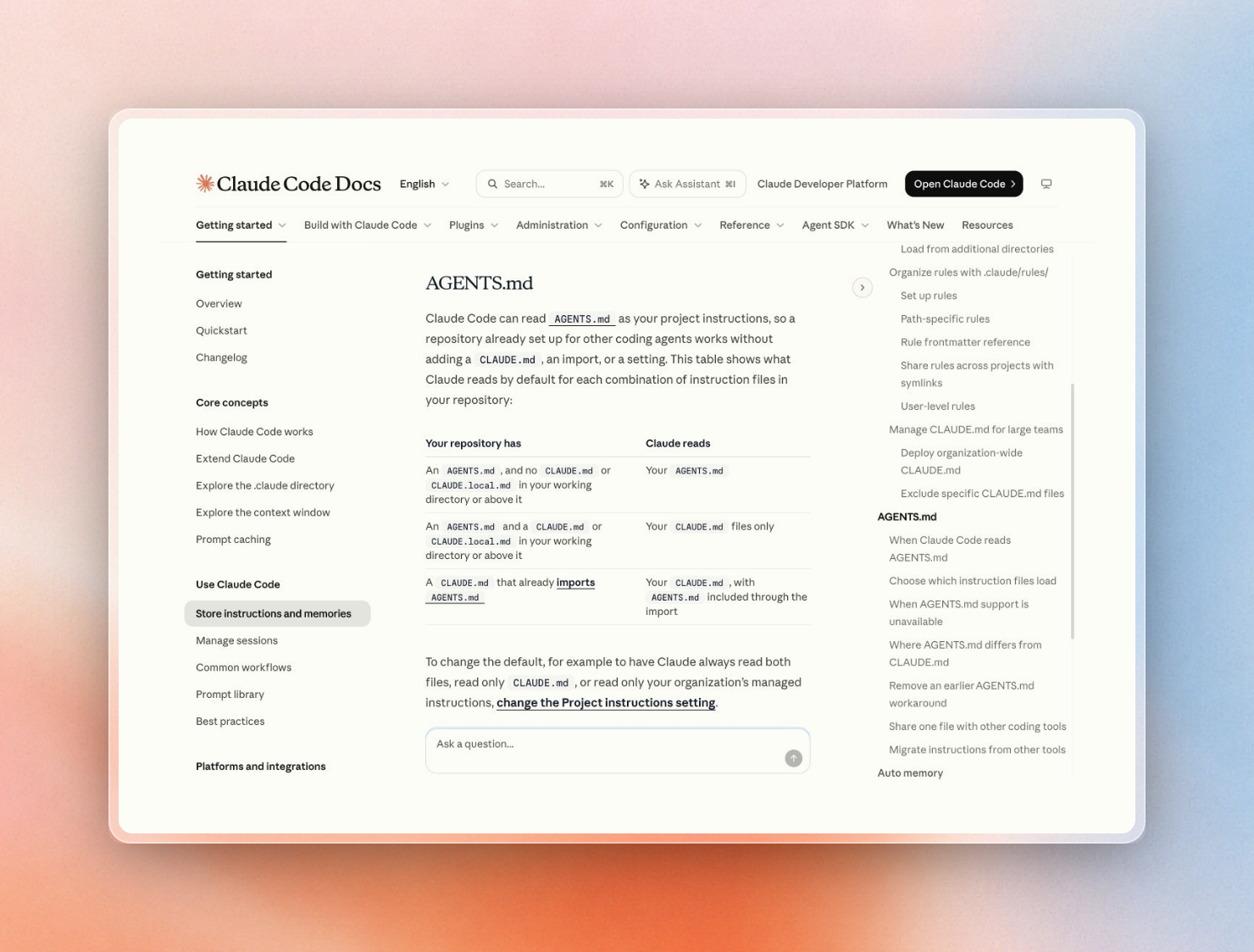
Claude Code has the most unusual behavior. It reads AGENTS.md since v2.1.277, but only if there is no CLAUDE.md or CLAUDE.local.md in the current directory or its parent directories. So if a developer adds a gitignored file CLAUDE.local.md, Claude Code will quietly ignore the team’s AGENTS.md file.
The three cases are:
Why agents skip the tools you installed
A rules file can load without making any changes to the behavior of the model. That is because the model is responsible for deciding whether a tool is worth calling on each turn. This is even explicitly stated in the Claude Code docs for CLAUDE.md files, where they are treated as context, not enforced configuration. Cursor merely adds the rule text at the start of the model context.
The common reasons that a tool rule can load but still not result in the model calling the tool are:
- The rule never loads for that prompt. For example, a Cursor rule with only a
descriptionwill load for any prompt that the agent considers relevant. On the other hand, a rule withglobsonly loads when a file matching one of the globs is in context, which means a new question asked when no files are open will not be subject to the rule. - The rule has no trigger. A rule that says "Use the docs tool when helpful" is still up to the model to follow. Claude follows instructions more consistently when they are more concrete and can be checked, such as "run
npm testbefore committing". - The file is too long. Claude Code recommends keeping CLAUDE.md files under 200 lines, and longer files tend to be adhered to less. Cursor suggests keeping rules under 500 lines per rule.
- Two rules disagree. If there are contradictory instructions, Claude may choose one at random. For example, if there is a tool rule in the project file, but then in a user file there is an instruction "don't use MCP", then the rules will contradict each other.
- The tool is not there. Cursor Cloud Agents use the MCP servers that are set up for the cloud agent, not the local
mcp.json. The Context7 Cursor guide calls this out for its docs server: it can work in the IDE and be missing in a Cloud Agent. The rule may ask the agent to use a tool that is not available to the agent.
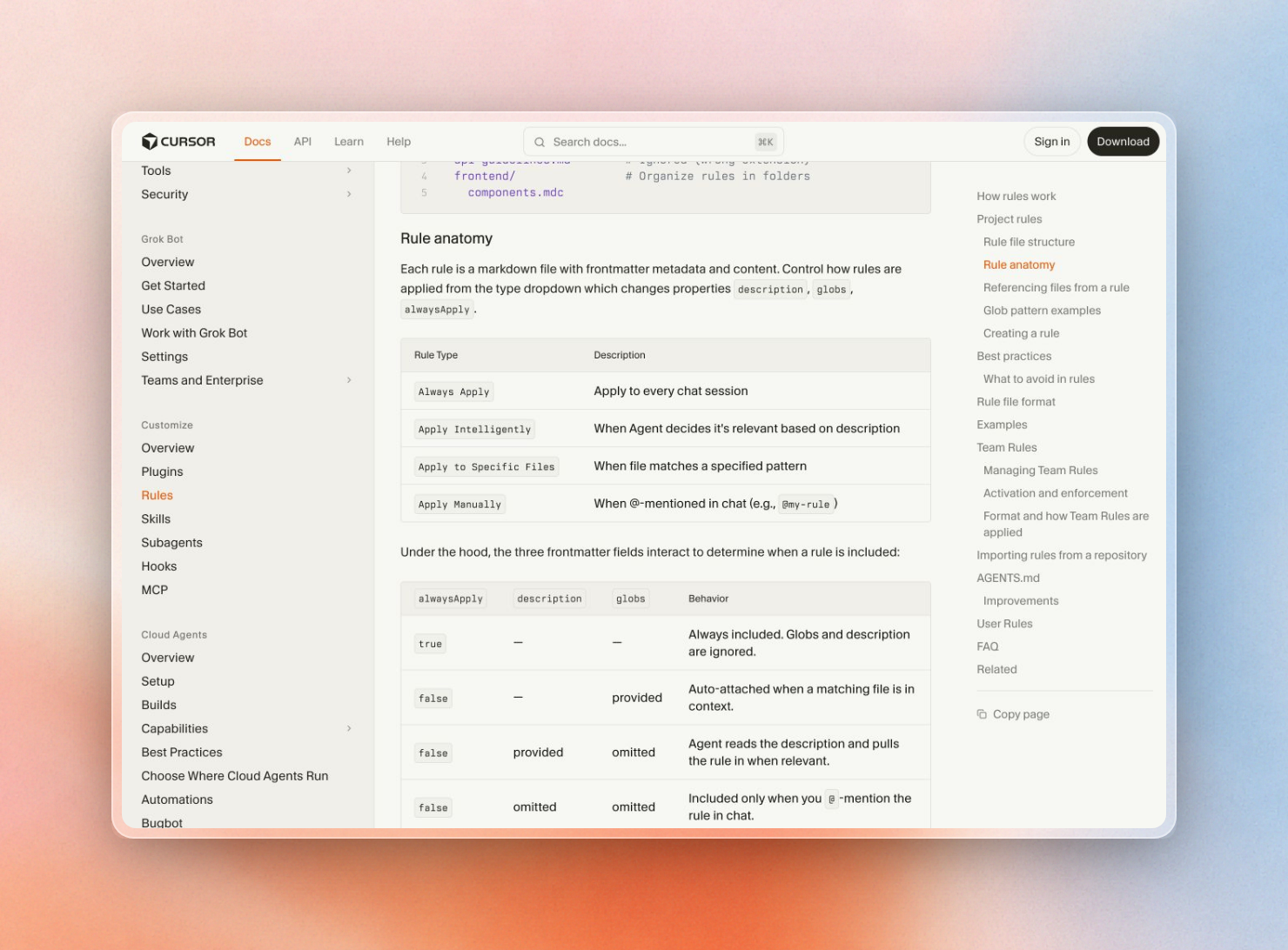
Which case you are in can be determined from the frontmatter in Cursor:
What makes an agent call a tool
The agent uses a tool when its description matches what needs to be done. It also helps to have an always-on rule that specifies the tool and when to use it. If there is a certain step we want to be sure gets completed, we can use a hook to always provide a reminder on each prompt or to block the action that would come after that step.
Four things push an agent toward a tool, from weakest to strongest:
Tool descriptions matter more than they look. Small changes in the description of a tool can have a big impact on which tools an agent chooses to call. When creating internal tools for an MCP server, try to describe them as if you are onboarding a new hire, explaining what the tool covers, when to use it, and what parameters to provide.
In Claude Code, only a skill's description is kept in context until the task matches the skill's description. This means that a long procedure in a skill costs almost nothing to include until it's actually used.
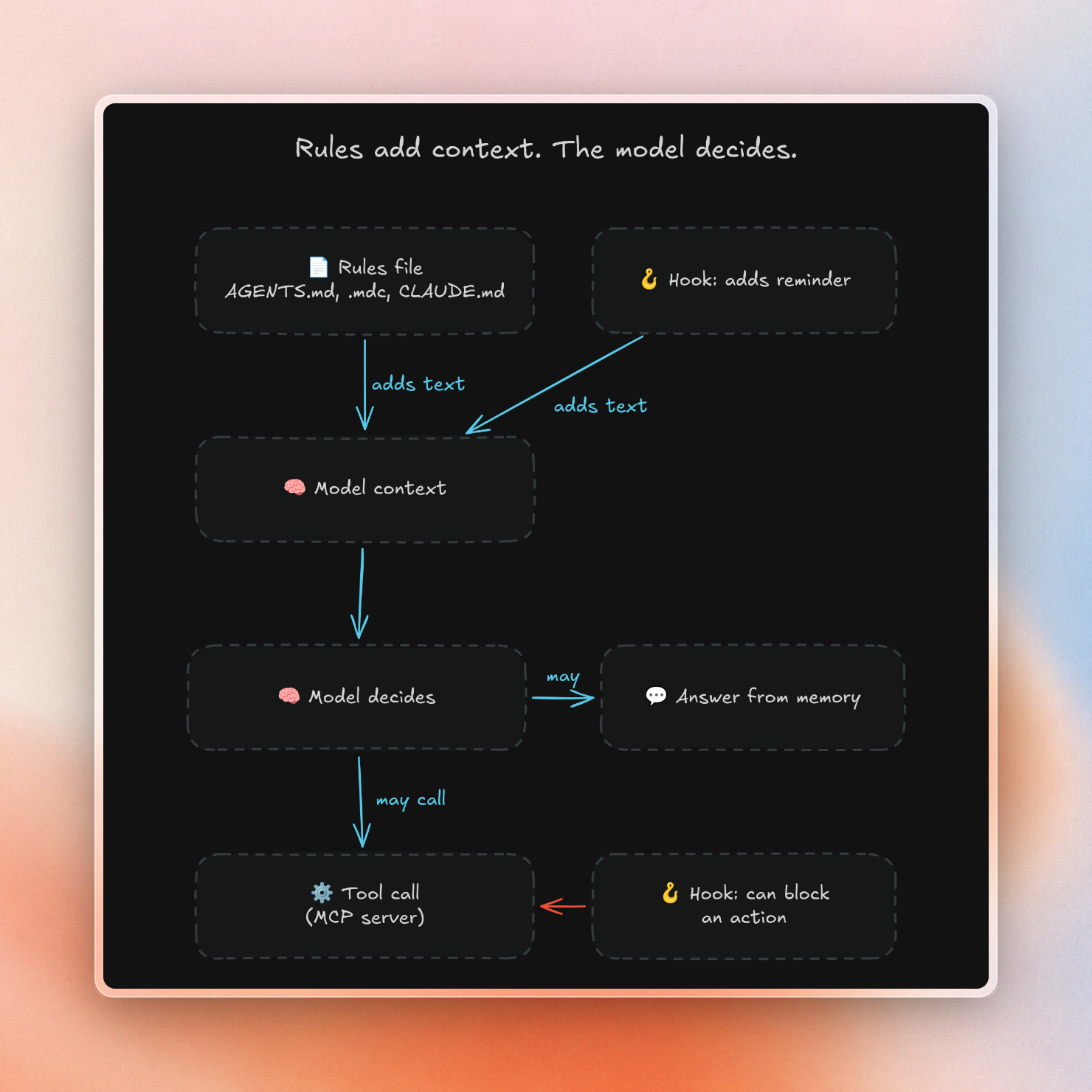
The only tool-like things that run on every turn, regardless of what the model decides, are hooks. However, they cannot be used to run a tool on the model's behalf. For example, a command hook in Claude Code cannot call tools. It can add text to the user's prompt on UserPromptSubmit, and re-add it after compaction on SessionStart. It can also be used to block the use of a tool on PreToolUse. Cursor's sessionStart hook can add context to a new chat, and if a hook returns an exit code of 2, the action is blocked.
This diagram shows how each of these things can act on one turn:
Example: making agents call Context7 every time
The docs tool is a good test case, because the agent can always choose to skip it and answer from memory. The model answers questions using its training data. Because of this, it can write code that uses APIs that were renamed or removed after its cutoff date. This is why coding agents use outdated APIs. A docs MCP server only fixes the problem when the agent calls it.
Context7 is a docs MCP server with two tools, resolve-library-id and query-docs. Its own setup guide suggests a short always-on rule so nobody has to type "use context7" into each prompt. Here is a stricter version as a Cursor project rule, saved as .cursor/rules/library-docs.mdc:
---
description: Look up current library docs before writing code that uses them
alwaysApply: true
---

- Before you write or change code that calls an external library, SDK or
  framework API, use the Context7 MCP tools: call `resolve-library-id`,
  then `query-docs` with the version in package.json or the lockfile.
- Do this for upgrades, migrations, new dependencies and config files.
- Do not answer library questions from memory when the docs tool is
  available. If it returns nothing useful, say so before you guess.
Setting alwaysApply: true makes the rule load in every chat, and Cursor then ignores the description. The bullet text works the same in AGENTS.md, CLAUDE.md or .github/copilot-instructions.md. The rule names the tools, the trigger and the version source, so the model has a clear moment to act. The Cursor walkthrough covers what the agent does with the docs once it calls them.
For Claude Code, a UserPromptSubmit hook adds the same reminder on every prompt that looks like library work. This script reads the prompt from standard input and prints the context to add:
import json
import re
import sys

LIBRARY_HINTS = re.compile(
    r"\b(import|install|upgrade|migrate|sdk|api|library|package|version)\b",
    re.IGNORECASE,
)

REMINDER = (
    "This task touches a library API. Before writing code, call the Context7 "
    "MCP tools: resolve-library-id, then query-docs for the version in use."
)

event = json.load(sys.stdin)
if LIBRARY_HINTS.search(event.get("prompt", "")):
    print(json.dumps({
        "hookSpecificOutput": {
            "hookEventName": "UserPromptSubmit",
            "additionalContext": REMINDER,
        }
    }))
Register it in .claude/settings.json, so it ships with the repo:
{
  "hooks": {
    "UserPromptSubmit": [
      {
        "hooks": [
          {
            "type": "command",
            "command": "python3 \"$CLAUDE_PROJECT_DIR\"/.claude/hooks/docs_reminder.py"
          }
        ]
      }
    ]
  }
}
Running the script on a sample prompt prints the context Claude Code adds:
$ echo '{"hook_event_name":"UserPromptSubmit","prompt":"Upgrade our Prisma client and fix the relation queries"}' \
$   | python3 .claude/hooks/docs_reminder.py
{"hookSpecificOutput": {"hookEventName": "UserPromptSubmit", "additionalContext": "This task touches a library API. Before writing code, call the Context7 MCP tools: resolve-library-id, then query-docs for the version in use."}}A prompt such as “Rename this variable” results in no output, and thus the reminder is only displayed as required.
You may not have to write all of that yourself, though: npx ctx7 setup signs you in, creates an API key for you and then installs a skill that triggers Context7 on library questions in Cursor. The same setup applies to Claude Code, too. The rule above, and the hook above, are for teams that want to have the trigger explicitly in the repo. Neither of them forces the call. The model still can choose not to call the tool, and the keyword-based trigger may not fire on some library questions, so check a few real sessions to see if the agent called query-docs.
One AGENTS.md for every tool
If a team uses more than one agent, the same rule might be copied over four files and then drift apart from each other. But there’s a way around this: if we place one AGENTS.md file at the root of the repository, then Codex and Cursor can read this file natively. Copilot’s cloud agent, VS Code chat, its CLI and many other agents (such as Gemini CLI, Windsurf, Zed, etc.) can also read it. Here is how each agent is pointing to the same file:
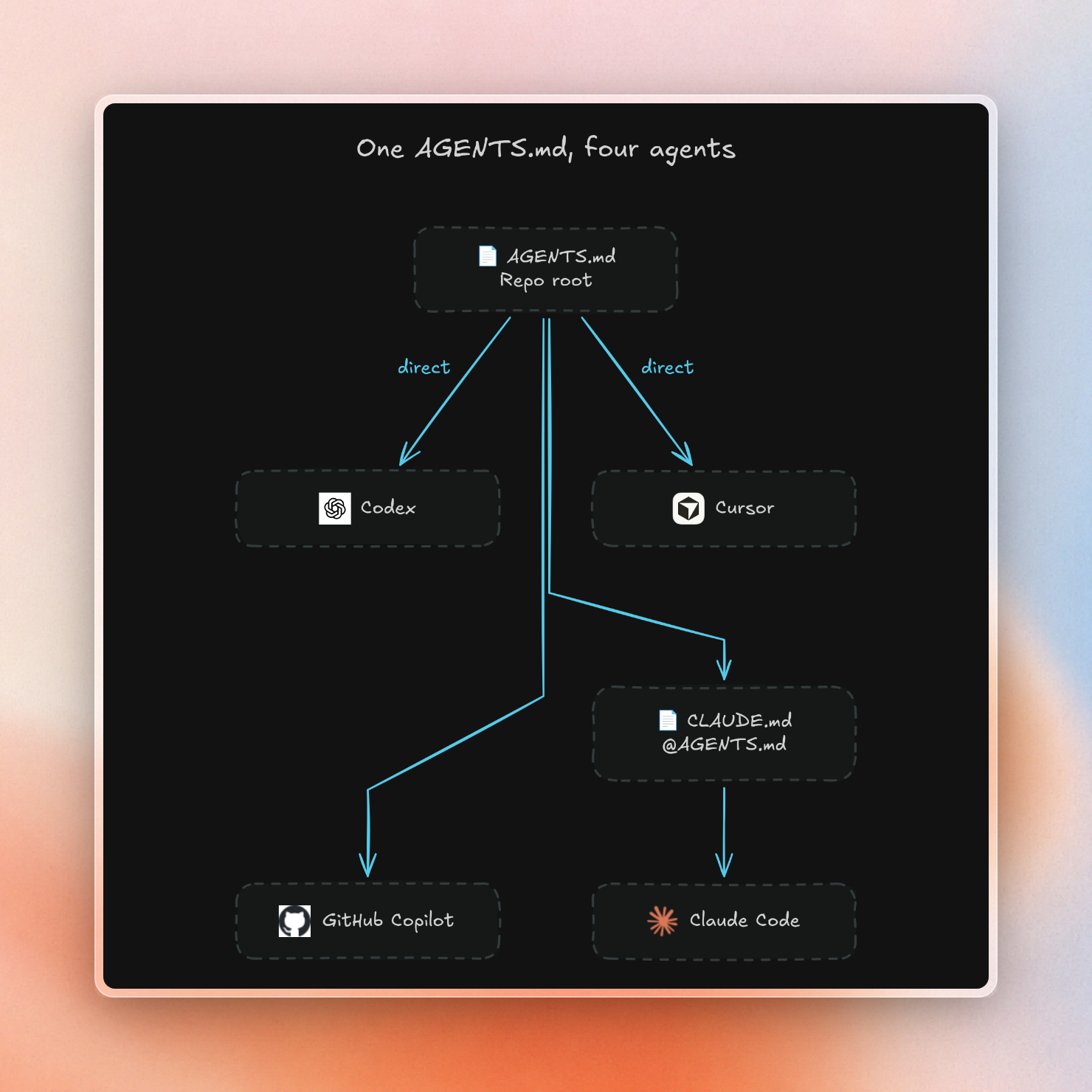
A layout that covers the four agents in this guide:
repo/
  AGENTS.md                         shared rules, including the tool rule
  CLAUDE.md                         one line: @AGENTS.md, plus Claude-only notes
  .cursor/rules/library-docs.mdc    only for rules that need alwaysApply or globs
  .github/copilot-instructions.md   copy of the tool rule for Visual Studio and JetBrains
The extra files handle the gaps in each agent’s behavior for AGENTS.md.
- Claude Code will no longer use
AGENTS.mdonce a CLAUDE.md file is added. If CLAUDE.md has@AGENTS.mdthen both will be loaded (andAGENTS.mdisn’t doubled). This also works in versions of Claude Code before v2.1.277. - Cursor will use
AGENTS.mdat both the root and in subdirectories. Nested files combine with their parent. The.mdcfile is only required if a rule needs to be applied to all chats or on some subset of paths. - Copilot will find the nearest
AGENTS.mdin the directory tree. It doesn’t useAGENTS.mdin chat in Visual Studio and JetBrains, so we must add a copy of the tool rule to.github/copilot-instructions.md. - Codex will use
AGENTS.override.mdinstead ofAGENTS.mdin the same directory. Claude Code doesn’t read override files, so any tool rule there can’t be used by Claude.
By keeping the tool rule as a short, identical block in all of these files, any drift is obvious in review.
Rolling rules out across many repos
A rules file in one repo helps one repo. When a trial covers dozens of repos, the tool rule has to reach developers without a pull request to each one. Cursor, Claude Code and Copilot each have an org-level place for it:
Cursor prefers Team Rules over project and user rules when the rules conflict. Claude Code’s managed CLAUDE.md can be managed and deployed like any other managed file with MDM, Group Policy, or Ansible. Copilot’s organization level instructions don’t make it to the IDE so they will need to be included in each repo or in a template repo used to start new projects. Codex uses AGENTS.md in each repo for the shared rule.
AI instructions should not be your only security control. Claude Code allows you to restrict certain actions with permissions like permissions.deny. These actions will be restricted regardless of the AI’s instruction. The tool rule decides what the agent will try first, and the rest of the restrictions are set in settings and hooks.
If the docs tool also has to run inside your network, the guide to self-hosted AI coding assistants covers where each piece can run. For a team trial, the tool rule belongs in AGENTS.md before day one, so the trial measures the tool and not the setup.
You can try Context7 for free in Cursor, Claude Code, and Copilot. Run npx ctx7 setup to add the trigger. For SSO, private repos, and on-prem, use Context7 Enterprise.