

Cursor privacy mode, Copilot, Claude Code: what AI coding assistants send to the cloud
 Batuhan Bilgin13 min read
AI coding assistants send prompts and code to their vendor and model providers, and MCP servers are a separate data path. Here is what Cursor, Copilot, Claude Code, Windsurf and Codex send, how long they keep it, and whether they train on it.
Your developer team asks for Cursor, Copilot, or Claude Code. Before signing off, security or risk will ask a few simple questions: what data is leaving my laptop? Who is receiving it? How long do they store it? Can they train on it?
Any AI coding tool, of course, sends some data to someone, because the model itself is elsewhere. Here are the answers to those questions for the major assistants, sourced from each vendor's documentation as of October 2026. After that, we’ll dive into a frequently overlooked path in security reviews: the MCP servers called by the agent on its own.
What do AI coding assistants send to the cloud?
For every AI request, AI coding assistants send your prompts and adjacent code to the model provider. How long that data is stored, if at all, and whether it’s used for training, varies by tool and plan.
Business plans and individual plans often follow different rules for the same product. Here is how the main tools compare, based on each vendor's docs in October 2026:
Below are the sources and exceptions for each row.
What Cursor privacy mode does
When using Cursor's AI features, the editor sends prompts and code context to the model provider (OpenAI, Anthropic, Google, etc.). Requests are routed through Cursor's backend, even when users supply their own API key, as Cursor constructs the final prompt on its servers. For latency reasons, Cursor caches file contents on its servers for a short amount of time, encrypted with request-specific keys.
When Privacy Mode is enabled, the following things happen:
- Cursor does not use your data for training.
- Cursor has zero data retention (ZDR) agreements with its model providers, so they will not store or train on your data.
- However, model providers may run abuse classifiers on prompts, and flagged prompts can be stored for investigation (following the provider's own retention policy).
- Models that require data retention are explicitly labeled as such, and will fail (until an admin approves them) for Enterprise teams and Privacy Mode users.
When Privacy Mode is disabled, Cursor may store and train on codebase data, prompts, editor actions, and code snippets.
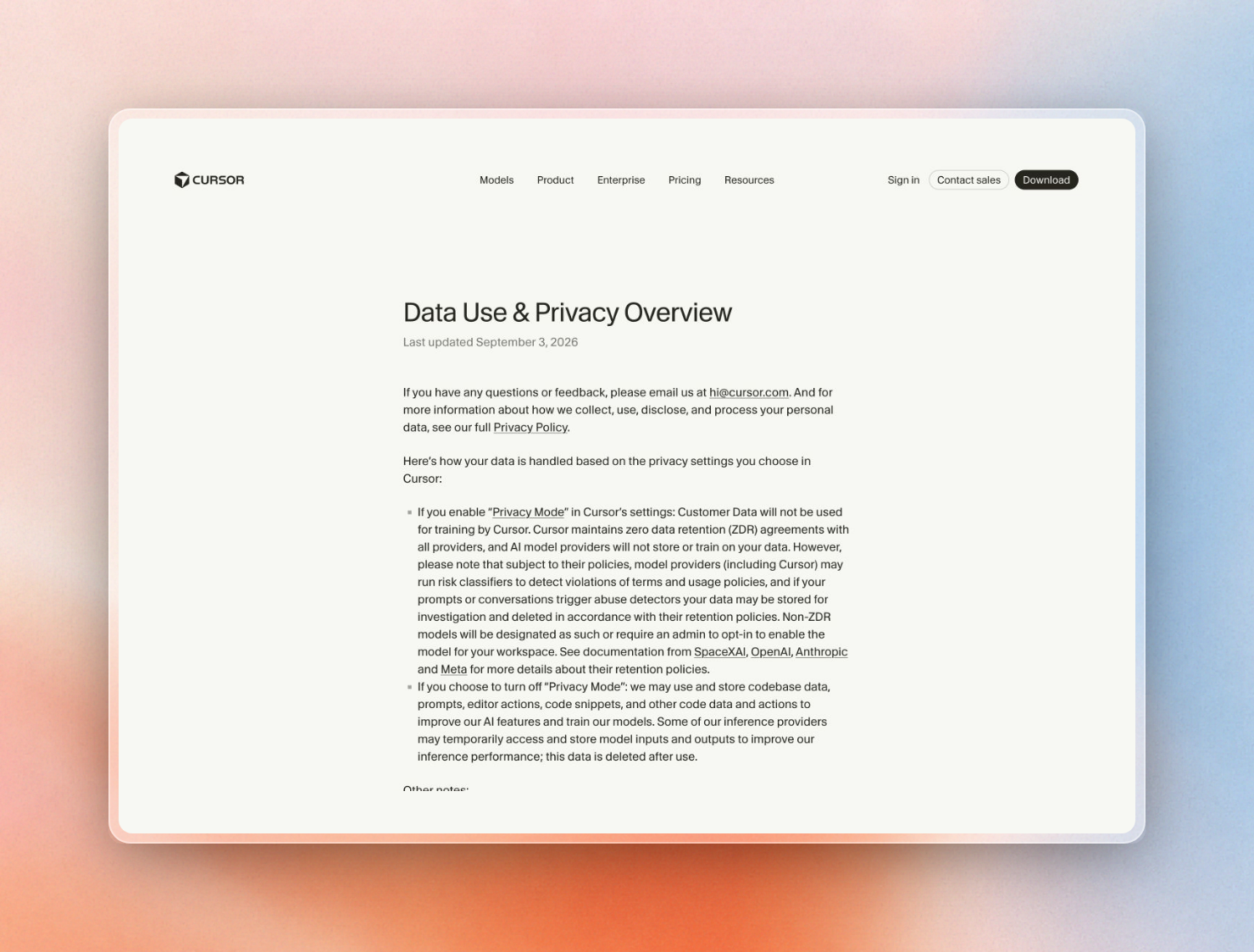 Cursor's data use page, last updated September 3, 2026
One important caveat for teams using their own API keys is that ZDR is not applied when using your own API keys (the requests still go through Cursor, but retention is subject to your contract with the model provider).
Privacy Mode can be enabled by opening Cursor Settings, going to the General tab, and toggling Privacy Mode on. Privacy Mode is enabled by default for Enterprise teams, and team admins can enforce Privacy Mode for all team members (so that they cannot turn it off) on the team dashboard.
Cloud Agents is the only feature of Cursor that stores code. They store encrypted copies of your repository during the agent’s execution, and the copies are deleted when the agent finishes. If your team has a policy that prohibits code storage, you can opt out of using Cloud Agents and still be able to use the editor.
GitHub Copilot: business plans and individual plans differ
Copilot inputs include prompts, attachments, code in the workspace and conversation history and can be transmitted to GitHub's Azure tenant or to another model provider. User engagement data is also transmitted. This data can include accepted or dismissed completions, error messages and usage metrics.
Copilot interaction data is not trained on for Business and Enterprise customers, per GitHub's agreements with those customers. GitHub started using interaction data for training on April 24, 2026 for Free, Pro and Pro+ users unless the user opts out. Interaction data can include prompts, code around the cursor, file names and repository structure. This data is not trained on for anyone who is a member or outside collaborator of a paid organization, even on a personal plan.
For Business and Enterprise, inputs and outputs from chat, code completions and Copilot CLI in the IDE are not retained by default. For other Copilot surfaces, inputs and outputs are retained for up to 28 days by default. User engagement data is kept for two years for both. Session logs for the Copilot coding agent are kept for the life of the account. GitHub can keep data longer to investigate confirmed abuse. These rules are from the GitHub Copilot Trust Center FAQ.
The model provider is another layer. GitHub has zero data retention agreements with OpenAI and Anthropic, with stated exceptions. Anthropic stores prompts and outputs for Claude Fable 5 and 5.1 to run safety classifiers, unless an eligible enterprise gets a time-bound ZDR exemption through the end of 2026. Some Anthropic beta features also do not have zero data retention agreements. Google caches Gemini model data for up to 24 hours and does not train on it.
What Copilot also stores is data on the developer's machine: Copilot CLI and Copilot app store the entire session's record in ~/.copilot/session-state/ and then sync that session to the user's GitHub account by default. For Business and Enterprise accounts this only happens when the administrator sets the "Store local sessions in the Cloud" policy.
Claude Code
Claude Code runs locally on the developer’s machine. All user prompts and model outputs are sent over TLS to the model provider (Anthropic API, Amazon Bedrock, Google Cloud, Microsoft Foundry). Each provider has its own encryption at rest policy.
Retention and training follow the account type:
Feedback takes a separate path, and its transcripts are kept for 5 years. Running /feedback sends a copy of the conversation including the code to Anthropic.
There are two types of telemetry sent from Claude Code: usage metrics to Anthropic and 3rd party logging, none of which contain code, prompts or file paths; and error reports to a 3rd party error tracker, after removing secrets and file paths. Both can be disabled by setting CLAUDE_CODE_DISABLE_NONESSENTIAL_TRAFFIC. Surveys and feature flags are also disabled with this option.
On disk, the transcripts of sessions are stored as plain text under ~/.claude/projects/ and are kept for 30 days by default. These transcripts are used to resume the sessions, so any reviewer concerned with laptops leaving the building should treat this folder as containing stored data.
Windsurf and Codex
Windsurf is made by Cognition. Cognition may use your data for training by default. To opt out, users on paid plans must go to the Data Controls page. This also enables zero data retention with Cognition's model providers. For the Teams plan, only an admin can opt out. For Enterprise customers, Cognition does not use any of your data for training without prior written consent. All data processed through the product will be retained for the length of the customer relationship.
Remote indexing for Teams and Enterprise sends whole repositories, not just snippets. It clones the repository, builds embeddings, then deletes the code, as long as the "Store Snippets" setting is unchecked. The embeddings are stored in a single-tenant instance.
Codex follows the user’s ChatGPT data controls. All local tasks are run on the user’s machine. All cloud tasks are run on OpenAI-managed machines. OpenAI does not use inputs or outputs from business users to train models by default. Business users are ChatGPT Business, ChatGPT Enterprise, and API. For individual ChatGPT accounts, conversations may be used for training unless the user opts out.
MCP servers are a separate data path
While the above applies to the flow from editor to assistant vendor to model providers, the flow for an MCP (Model Context Protocol) server is different. This server can be local or remote, and if remote, its requests go to its own vendor. When an agent decides to use a tool, it fills out its arguments and the client sends them to the server in a tools/call request.
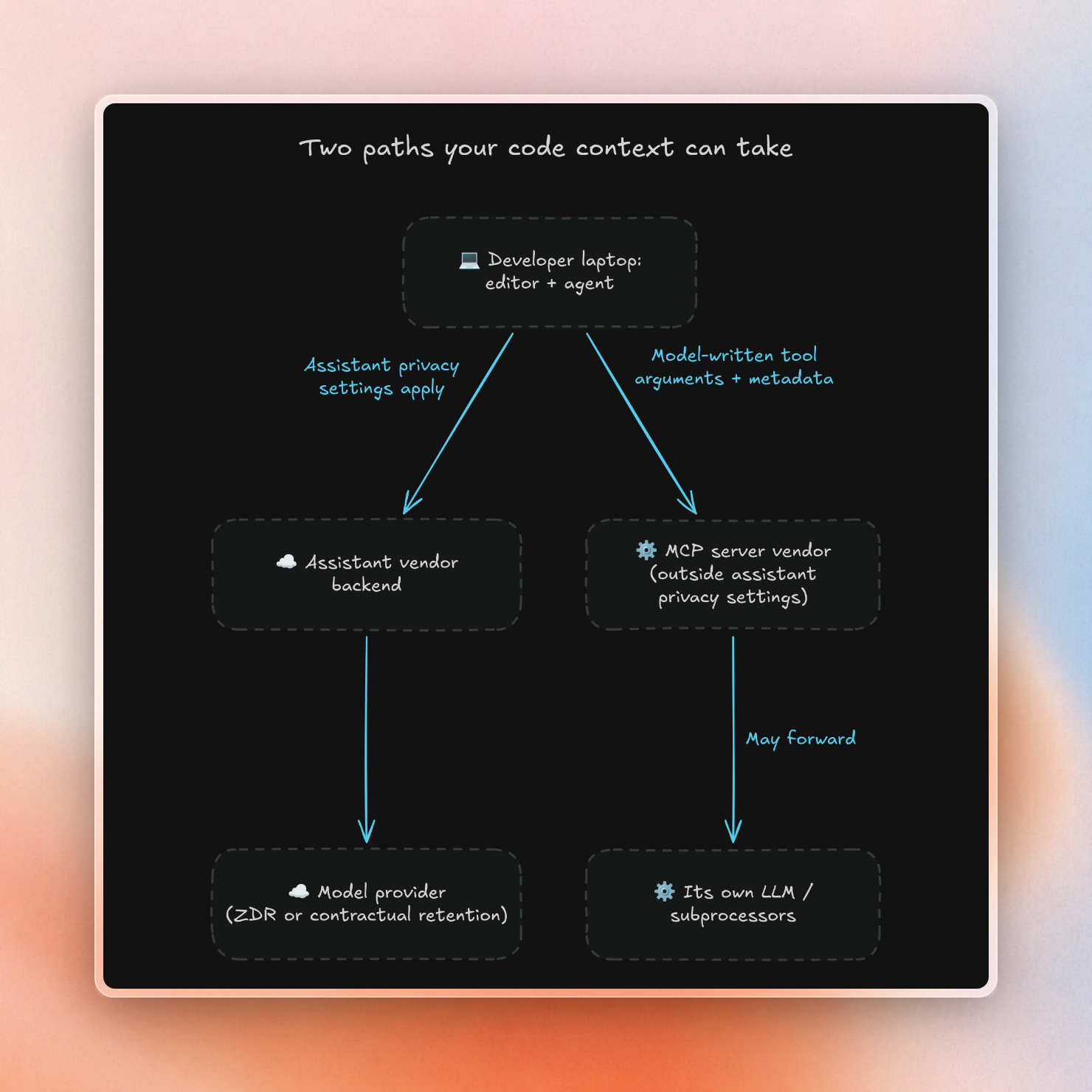
Cursor’s Privacy Mode, Copilot’s business terms, and Claude Code’s ZDR apply to the assistant vendor and model providers, but not to the MCP server. This means that a third party, such as a docs server, ticket tracker, or database tool, will have its own copy of the arguments used by the model, under its own terms. Cursor advises reviewing what data and APIs the server will use prior to installation.
Because the arguments are generated by the model, its contents will be determined by the tool’s schema and description. If a tool has a single free-text argument, its contents could range from a short search phrase to a pasted file. If a tool has several narrow fields (e.g. library name and question), then the arguments can be more constrained.
The following questions can be used to evaluate MCP vendors:
- What are the fields being sent for each tool? Is there a free-text field?
- What metadata is included with the call (e.g. API key, client name, IP address, session ID)?
- How long does the vendor keep arguments for the tools? How long does the vendor keep logs?
- Does the vendor send the arguments to any other subprocessors, such as an LLM? Are they being used for training by any of those subprocessors?
- Is the vendor training its own models with the arguments? Benchmarking its own models with the arguments? Selling them?
- Can the server be run within your own network? If so, does it make any external requests?
Attacks via MCP like prompt injection via tool results are a separate issue, addressed in MCP security risks and in our write-up of ContextCrush, a flaw found in Context7 in 2026.
What a minimal MCP lookup sends: Context7 as an example
Context7 is an MCP server and API for providing coding agents with up-to-date, versioned library docs. Context7 provides a tiny answer to the above questions, as such it serves as a concrete example of a narrow MCP data path.
The Context7 MCP server provides two tools, resolve-library-id which takes a library name and query, and query-docs which takes a library id, query and optional language. The tool descriptions tell the model not to include API keys, passwords, personal data or proprietary code in the query. Your prompt, source files, and conversation remain with the assistant.
Here is the same call the MCP server makes for query-docs, sent straight to the API:
$ curl -s -G "https://context7.com/api/v2/context" \
$   --data-urlencode "query=Set up a Redis client with a REST URL and token" \
$   --data-urlencode "libraryId=/websites/upstash_redis" \
$   -H "Authorization: Bearer $CONTEXT7_API_KEY" \
$   -o ctx.txt -w "%{http_code} %{size_download}\n"
200 3810In the request we can see a 47-character question and the library ID. The answer consists of 3,810 bytes of documentation and code examples.
In addition to those two fields, Context7 receives the API key, the name and version of the MCP client, the transport type and the IP address of the client for rate limiting. API logs are kept for 30 days. To rerank the results Context7 sends the query to LLM providers who do not train on it. For the cloud service Context7 stores queries anonymously to be able to benchmark search quality. Queries from Enterprise teamspaces are never stored for benchmarking, with no setting needed.
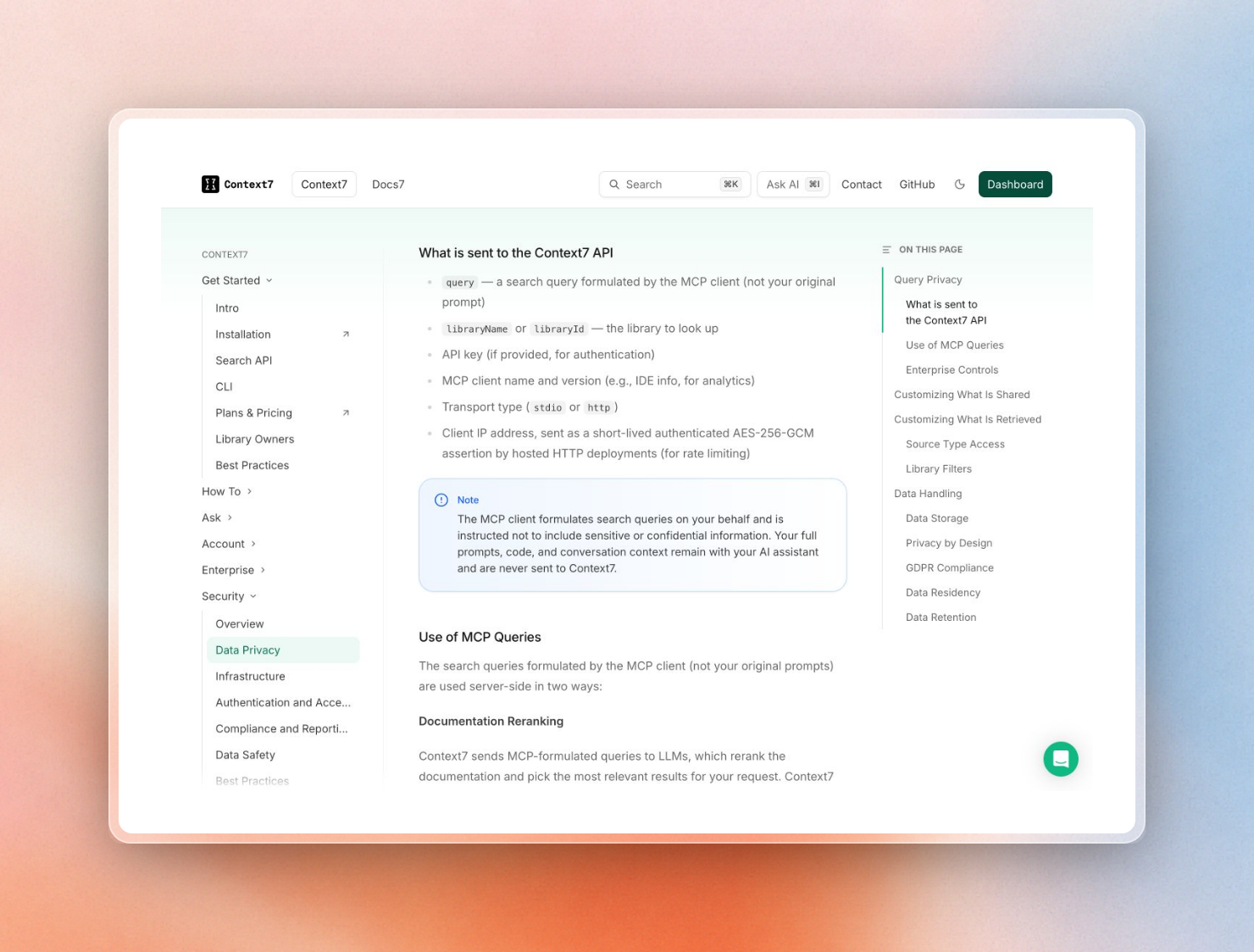 What the Context7 API receives, from the Context7 data privacy docs
On-prem Enterprise moves the whole service into your network: ingestion, the vector store, the MCP server and the API run in one container with the LLM and embedding provider you pick. What still leaves depends on the license:
Our enterprise guide to self-hosted AI coding assistants and our guide to air-gapped AI coding are more relevant if you’re looking to deploy AI coding assistants fully on-premises or completely offline.
A checklist for your security review
A general approach to the checks:
- Confirm the plan tier. Business plans and individual plans for the same tool may have different training and retention rules.
- Check the training setting, and whether it can be locked down by an admin.
- Find the retention period for inputs and outputs, and for any telemetry or engagement data (which can be much longer).
- List the model providers behind the tool, which ones have zero data retention, and which models are exceptions.
- Check whether the vendor's ZDR terms still apply when you use your own API keys.
- Turn off any optional telemetry and feedback uploads if the tool allows for it.
- Locate local files, such as session transcripts and stores, and see if they're synced to the cloud.
- Inventory all MCP servers that can be called by the agents, and ask each vendor the questions in the MCP section above.
- Look for MCP tools that take narrow, structured arguments instead of free-text.
- For data that should never leave, such as health records, select tools that run in your network and do not put that data into prompts.
Want docs lookups that send only a short query, or nothing at all? Start a Context7 Enterprise trial at context7.com/enterprise.