

Air-gapped AI coding: running LLMs and coding agents offline
 Batuhan Bilgin13 min read
An air-gapped LLM is a language model that runs on machines with no network route to the internet. Prompts, source code, and answers stay in the isolated network because there's nowhere else for them to go. Defense and banking teams use this setup for their developer networks, and their developers want the same help with AI coding that everyone else gets.
Getting a model to answer within the gap is well documented. Getting a coding agent to be useful within the gap is harder, because many AI coding tools assume they'll have the internet in a lot of small ways. They might ping home when they start up, download a model when they first run, or do a web search if the model is unfamiliar with some API. Behind a firewall, each of these actions fails silently or leads to a request for a firewall exception.
How can developers use AI coding tools in an air-gapped network?
AI coding tools can be deployed in an air-gapped network by hosting each component within the network: an open-weight model on a local server, an IDE client configured to use that server, internal mirrors of packages and Git, and a local copy of any necessary documentation. Updates can be transferred into the network as checked bundles, as opposed to live connections.
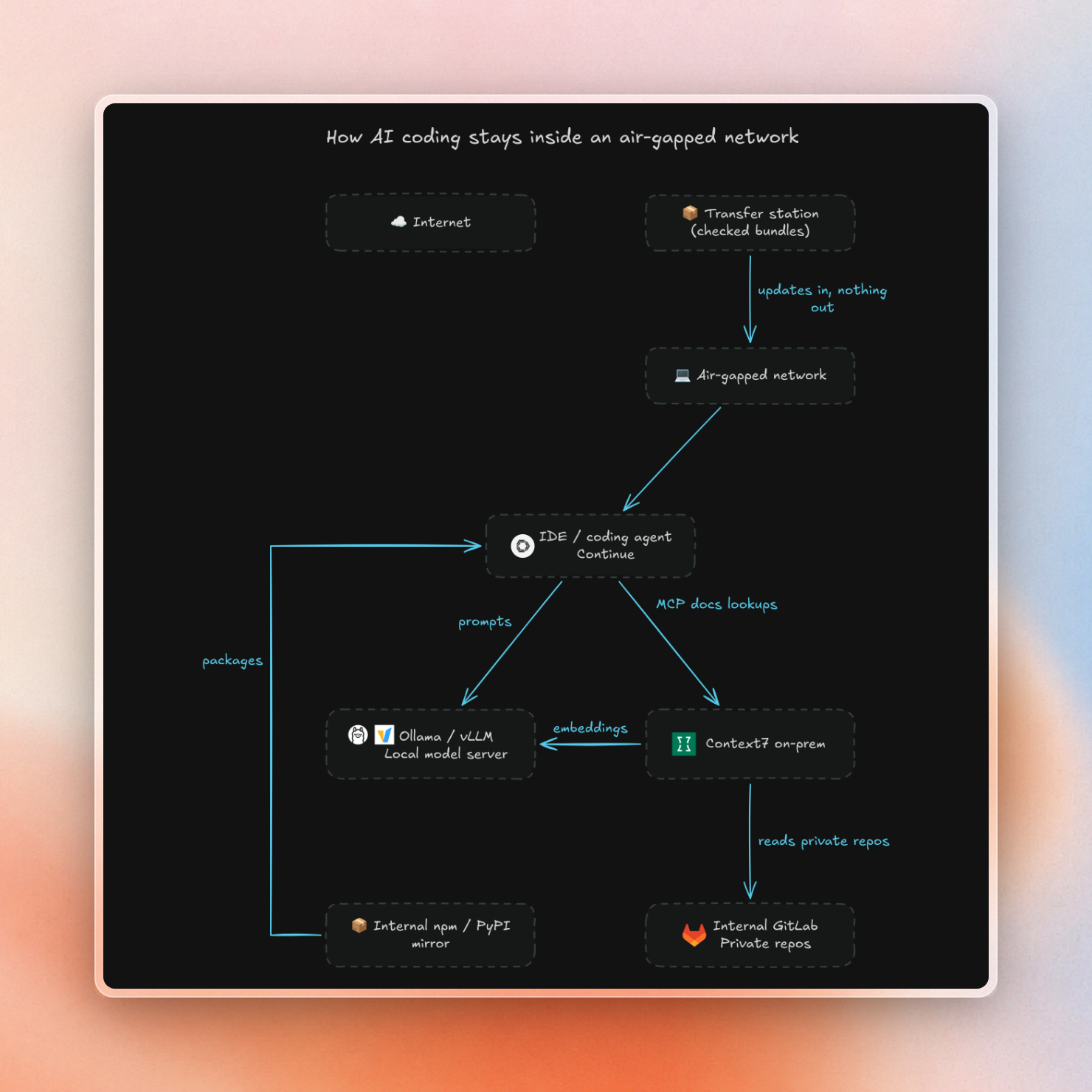
Here are the parts and what goes wrong with each when the internet is gone:
The decision to go with cloud, VPC or fully self-hosted is outside the scope of this article (see our enterprise guide to self-hosted AI coding assistants).
Serving the model inside the gap
The three common model servers work offline as long as the models have been downloaded beforehand. You still need to configure them to not rely on the internet.
- Ollama: Models that you have pulled are stored in a single folder. You can change this using
OLLAMA_MODELS. Ollama also has a local mode which turns off use of Ollama's cloud models and web search. To enable this, either setOLLAMA_NO_CLOUD=1or add"disable_ollama_cloud": trueto~/.ollama/server.json. - vLLM: vLLM loads models using the Hugging Face libraries. To prevent vLLM from making HTTP requests to Hugging Face Hub, set
HF_HUB_OFFLINE=1. Then vLLM will only load models from cache. See the Hugging Face docs for more info. - llama.cpp: llama.cpp is plain C/C++ without any dependencies and ships an OpenAI-compatible server. Inside the gap, instead of providing the Hugging Face model name, you need to point it at a local GGUF model file.
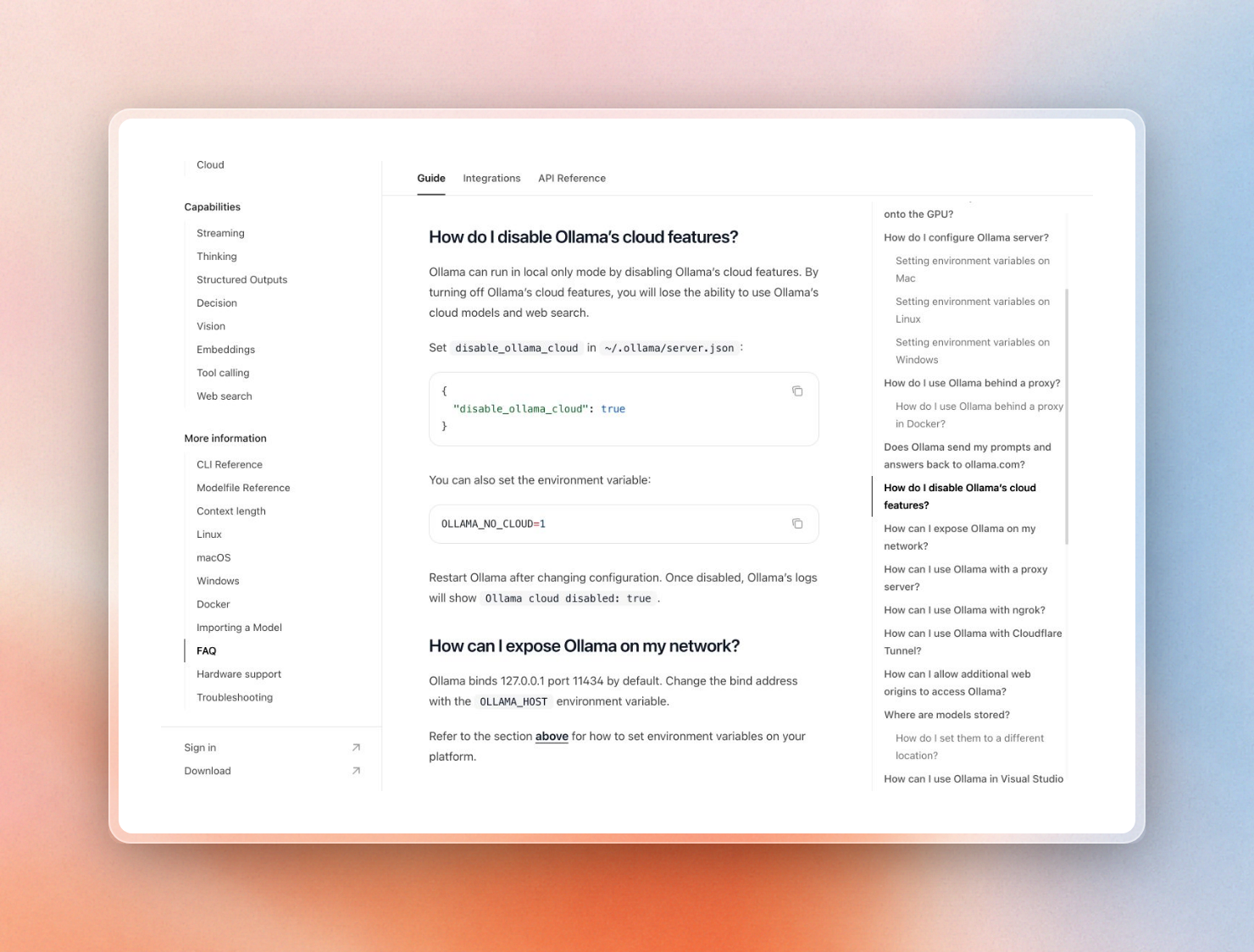
We started Ollama in local-only mode with outbound traffic sent to a dead proxy:
$ OLLAMA_NO_CLOUD=1 OLLAMA_MODELS=./inside/models ollama serveThe startup log confirms the mode:
msg="Ollama cloud disabled: true"
msg="Listening on 127.0.0.1:11434 (version 0.40.8)"
Asking that server for a cloud model fails right away with a clear error, instead of hanging on a network call:
$ ollama run qwen3-coder:480b-cloud hi
Error: ollama cloud is disabled: remote model details are unavailable
Hugging Face downloads need one more setting. Even when a file is already cached, a download call still sends an HTTP request to check for a newer version. Offline mode skips that request. This script asks for a model's config file:
from huggingface_hub import hf_hub_download

try:
    path = hf_hub_download("Qwen/Qwen2.5-Coder-0.5B-Instruct", "config.json")
    print("loaded from cache:", path)
except Exception as e:
    print(type(e).__name__)
We ran it three times: offline with an empty cache, online once, then offline again:
# offline, empty cache
LocalEntryNotFoundError
# online, fills the cache
loaded from cache: .../models--Qwen--Qwen2.5-Coder-0.5B-Instruct/snapshots/ea3f.../config.json
# offline, cache filled
loaded from cache: .../models--Qwen--Qwen2.5-Coder-0.5B-Instruct/snapshots/ea3f.../config.json
The connected side downloads the model to the same cache layout as the gap side uses.
The size of the model is more determined by your GPUs than any leaderboard. For model choice and GPU sizing, see self-hosted LLMs for coding agents. Use ollama ps to see where the model was loaded: 100% GPU, 100% CPU, or some split like 48%/52% CPU/GPU indicating that some portion of the model had to be loaded into system memory instead of GPU memory.
Coding clients that work with no internet
After setting up a model server that can answer inside your network, you need a client on the IDE side that will talk to it and only to it. There are two open-source options that have documented setups for this.
Continue reads its models from a config.yaml. Its Ollama provider takes an apiBase, so it can point at a shared Ollama server on the internal network:
name: Air-gapped
version: 0.0.1
schema: v1

models:
  - name: Qwen2.5 Coder (local)
    provider: ollama
    model: qwen2.5-coder:0.5b
    apiBase: http://ollama.internal:11434
Tabby is a coding assistant, self-hostable with its own server. Its air-gapped deployment approach is to package the models into the Docker image on the internet-connected side:
- Create a Dockerfile starting from
tabbyml/tabby, setTABBY_MODEL_CACHE_ROOT=/models, then invoke the download command for Tabby, specifying a completion model and an embedding model. - Build the Docker image and then export to a tar file using
docker save. - Transfer the tar file across the air gap and load into Docker with
docker load. - Run the container with
serveand the same model name. It will load the models from the image, rather than try to download them.
Coding agents also introduce another thing to check. If the agent has web search or URL fetch tools, they’re just going to fail in the air-gapped environment, costing the agent valuable turns. These should be disabled, forcing the agent to rely only on the sources it can reach.
What still calls home by default
Several of the tools above send usage data or check for updates out of the box. Inside a real air gap those calls fail. On a network that is only "mostly closed", they go out. These are the defaults we found in their docs, and the setting for each:
What vendors say they’re doing is only half the picture. The network tells the rest of the story. Use a default-deny egress rule and logs of DNS queries and blocked connections to see everything that tries to leave your environment, regardless of the tool.
We recommend running any new tool with these logs enabled for a normal work day, prior to handing it over to your developers. Every item in the logs then becomes a task to track down the configuration setting or ask the vendor about.
License checks warrant a separate question because a check that only runs once at startup can easily be missed in a single-day test. Ask vendors what the license check sends, where it sends it, and if there is an offline license available.
As one hosting provider told us: can the product stop calling out to the cloud on its own, or does it have to be blocked at the network level? In an air gapped environment, the answer should be both.
And to find out what assistants send when they are connected to the internet, see what data AI coding assistants and MCP servers send to the cloud.
Library docs: the part an offline agent gets wrong
With the model, client, and egress rules established, the agent now needs to write some code. But the agent is working from memory, the model was trained some time ago, and inside the gap the agent can't search the web. What if the libraries have changed? For example, what if some APIs have been renamed or removed? An open-weight model might generate obsolete API calls, which the developer then finds out about during the build.
To resolve this issue, the team can use one of several ways to store and use docs:
- Offline doc dumps: Teams can create static copies of docs for libraries that their code depends on and store them on an internal web server. Developers can read these, but agents can't search them unless someone indexes them.
- RAG pipeline: Teams can write their own docs-gathering pipeline. They can then chunk the docs and create embeddings for them, and then use those embeddings to answer questions. This works, but the team will need to handle the parsing, updates, and the MCP server on top.
- Docs server built for agents: This is a service that lives in the team's network, indexes library docs, and answers the agent's questions over MCP (Model Context Protocol, the standard way agents call tools).
Context7 Enterprise on-prem is an example of the third approach. It's a single container that holds the repositories, generated docs, vector store, and MCP server inside your infrastructure. Parsing and embedding is done with the AI provider of your choice, which can be the same custom OpenAI-compatible endpoint such as the Ollama or vLLM server from earlier.
The license type determines what is allowed to leave the network:
- Offline license: This is the license for air-gapped installs that can't reach Context7 Cloud. There are no calls to Context7. All traffic goes to your Git host and your model provider, which can be inside your network.
- Online license: The install connects to context7.com to validate the license. It also connects to Context7 Cloud to download public library documentation, and to perform searches. This can work in a restricted network, but not in an air-gapped network.
The license key is passed as the LICENSE_KEY environment variable in the container. To change the license (e.g. if the evaluation key expired), set the environment variable and restart the container.
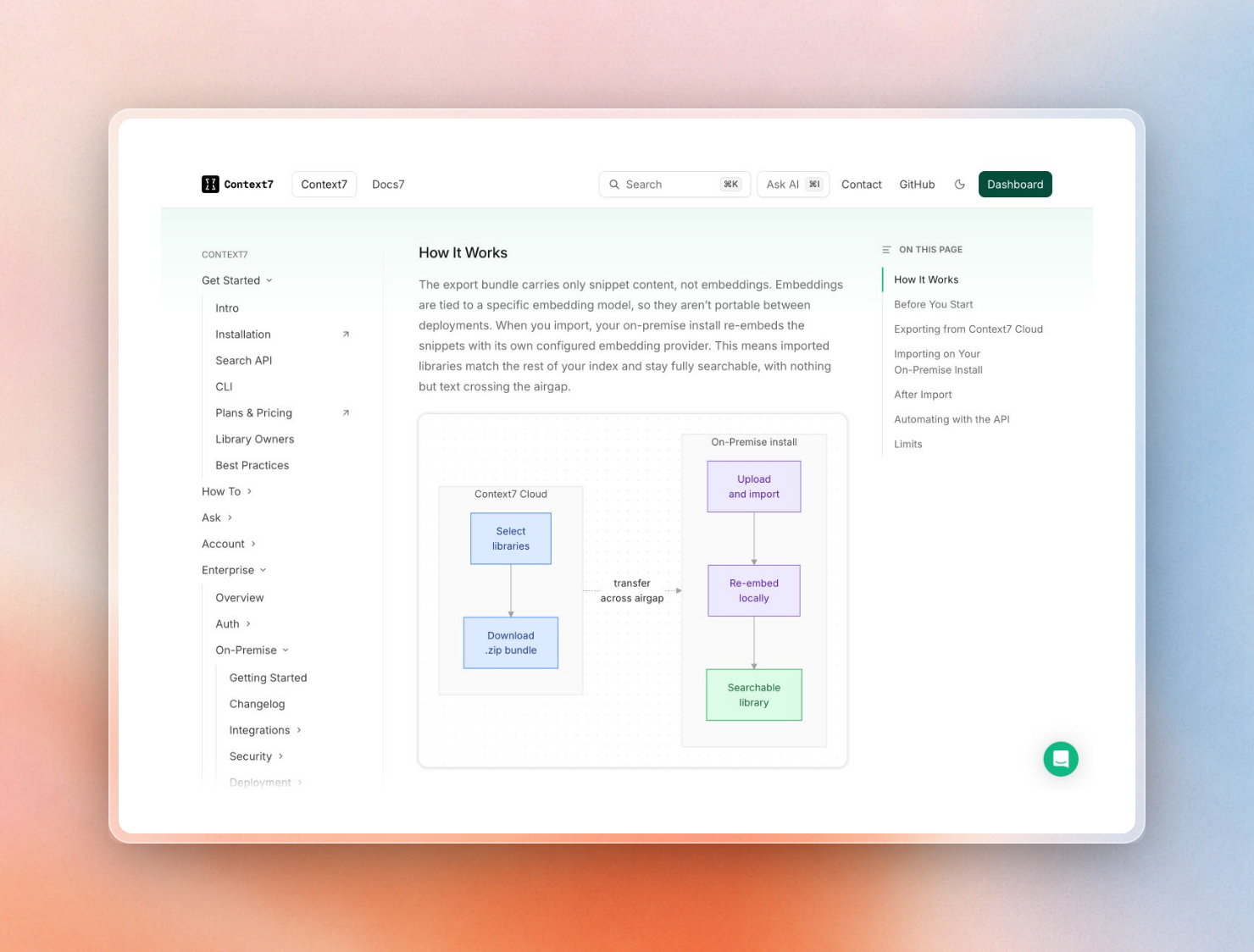
In an offline install, you can still import public library documentation via Library Import:
- On the connected side, go to the Export Libraries page in the Context7 Cloud dashboard (this page is only visible to accounts with an offline license).
- Select up to 50 libraries and download them in a single
context7-libraries.zipfile. - Bring the file across the gap by any means approved by your security policy.
- On the on-prem dashboard, add a repo using the Context7 Export source, and upload the exported file (up to 100 MB).
- All snippets in the imported libraries will be re-embedded using your own embedding provider, so that search behaves exactly the same way as on your private repos.
Note that the bundle only contains the text of the snippets; the embeddings are not bundled because they are specific to a given embedding model. They will be generated by your own install. Imported libraries cannot refresh themselves. To refresh an imported library, simply export a fresh bundle and import it again, making sure to select "Overwrite existing libraries".
The only thing developer machines need from the outside world is the ctx7 CLI that provides the connection between the coding agents and the deployment. Copy the ctx7 package and its dependencies to your internal npm registry. Once installed, on-premise setup contacts only your deployment and not npm, GitHub or Context7 Cloud. A defense agency once asked us if our on-prem installation would still need internet to get docs for popular frameworks. No, it doesn’t with an offline license and Library Import.
Moving updates across the gap
Anything inside the air gapped world ages from the time it first crosses the gap. Whether it’s new versions of models, security patches, new package versions, or documentation for libraries, everything is created on the connected side, checked and imported on the air gapped side.
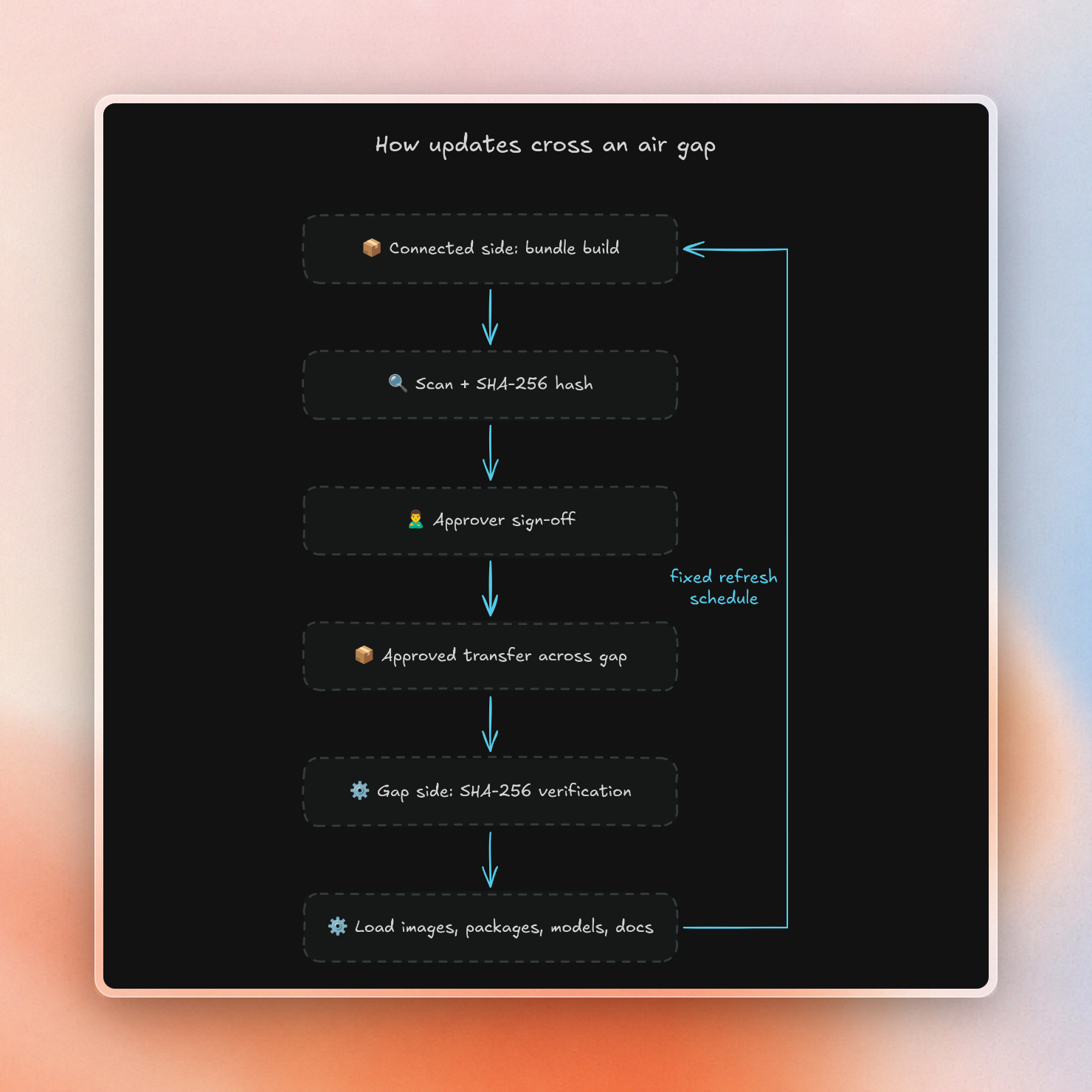
Each kind of update has its own bundle format:
We ran the Python step for one package, huggingface_hub, with a SHA-256 hash so the gap side can check nothing changed on the way:
$ # connected side
$ pip download --destination-directory wheelhouse -r requirements.txt
$ tar czf wheelhouse.tgz wheelhouse
$ sha256sum wheelhouse.tgz > wheelhouse.tgz.sha256

$ # inside the gap
$ sha256sum -c wheelhouse.tgz.sha256
$ pip install --no-index --find-links wheelhouse -r requirements.txt
The one-line requirements file pulled 15 wheel files, because every dependency has to cross too:
wheelhouse.tgz: OK
Successfully installed anyio-4.15.1 click-8.5.0 filelock-4.2.4 fsspec-2026.9.0 h11-0.16.0 hf-xet-1.7.0 httpcore2-2.16.0 httpx2-2.16.0 huggingface_hub-2.2.0 idna-3.20 packaging-26.3 pyyaml-6.0.3 tqdm-4.70.1 truststore-0.10.5 typing-extensions-4.16.0
On the gap side, we use --no-index with --find-links to instruct pip to install from local files only. This eliminates traffic to PyPI.
This is similar to how we moved the Ollama model earlier: tar up the 397 MB models directory, create a hash file, and run sha256sum -c on the other side. Finally, we set OLLAMA_MODELS to the unpacked directory.
To ensure this doesn't become a flurry of one-off requests, we do refreshes on a fixed schedule. Each run bundles the same list of images, models, packages, and doc libraries, and goes through the same approval process. This ensures that stale library docs get fixed with the same treatment as stale containers.
Security review checklist
The security team can approve the stack after the following checks have been run:
- Egress test. With default-deny enabled, run each of the tools for a working day and examine the DNS and connection logs. The expected result is an empty log.
- Settings in the deployed config. Each of the switches in the table above is set in the config that’s deployed to developer machines, not just on the test machine.
- Scans before crossing. All container images and package bundles on the connected side are scanned. An SBOM (software bill of materials, a list of all components inside) is kept for each.
- Hash checks. Each bundle crosses with a SHA-256 file, which the gap side verifies before loading any files.
- Offline licensing. Each vendor verifies that its license can be verified without internet access. Each vendor also explains how to rotate keys.
- Access control. Default credentials are changed on day one. A Context7 on-prem install, for example, starts with
admin/adminand MCP authentication off. Turning on “Require MCP authentication” requires each developer to connect with a personal API key. - Transfer approvals. Each type of bundle has a named approver. A log is kept of what crossed and when.
- Agent-level risks. An air gap removes the network as a way out, but prompt injection in imported content and agents with too many permissions still work inside it. Our MCP security checklist covers the controls for those.
To test the docs layer within your own gap, you can request a 30-day on-prem evaluation of Context7 Enterprise. Ask for an offline license so the trial runs with zero egress.