

Self-hosted LLM for coding agents: models, GPUs and serving
 Batuhan Bilgin10 min read
A self-hosted LLM is a model run on your own hardware, so your code and prompts don't leave your network. For coding agents, pick the open-weight model by the hardware you have, size GPU memory for the context of each agent, and serve it with vLLM or SGLang with tool calling enabled.
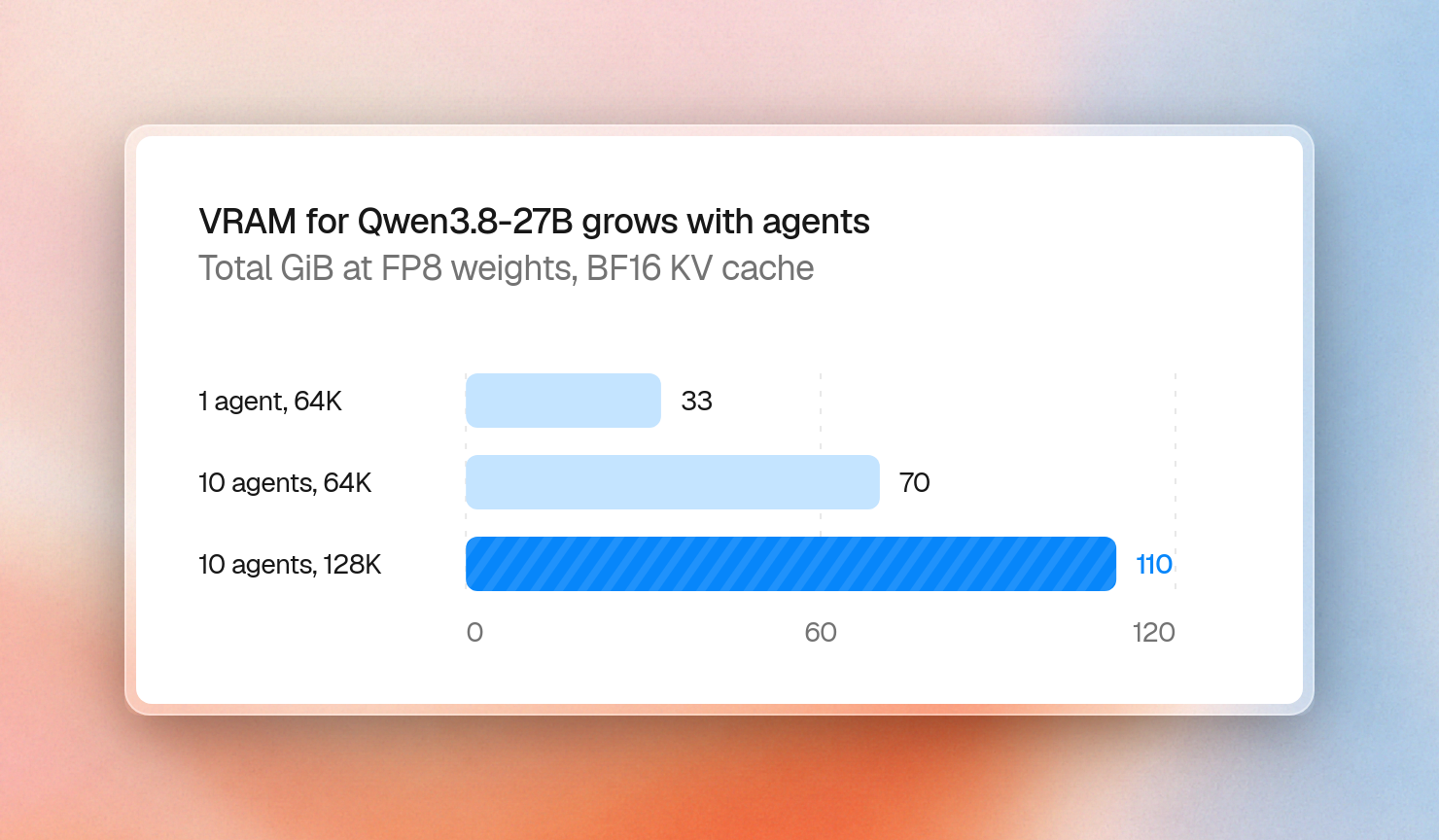
Qwen3.8-27B runs on a single 32 GB RTX 5090 for one developer. Ten coding agents, each with 64K tokens of repository context, need about 70 GiB at FP8. This extra memory is mostly the KV cache, which holds the attention keys and values for all the tokens in the context. As you add agents, the KV cache grows, and so does the memory requirement.
Which open-weight models are worth self-hosting for coding?
The choice of open-weight coding model to self-host is based on how many GPUs you have available: Qwen3.8-27B for 1 GPU, GLM-5.3-Flash for a single multi-GPU machine, MiMo-V2.6-Pro or GLM-5.3 for a single node with 8 GPUs.
Here are the main options as of October 22, 2026. Parameters and licenses come from each model's Hugging Face card, and the smallest setups come from vendor recipes and Unsloth guides collected by Pinggy:
For a coding agent, the license is just as important as the score. Apache 2.0 and MIT are standard open source licenses that legal departments are familiar with. GLM-5.3 and Kimi K3 use their own licenses with conditions for large companies reselling the model as a hosted service. Thus, legal departments should read them even for internal use.
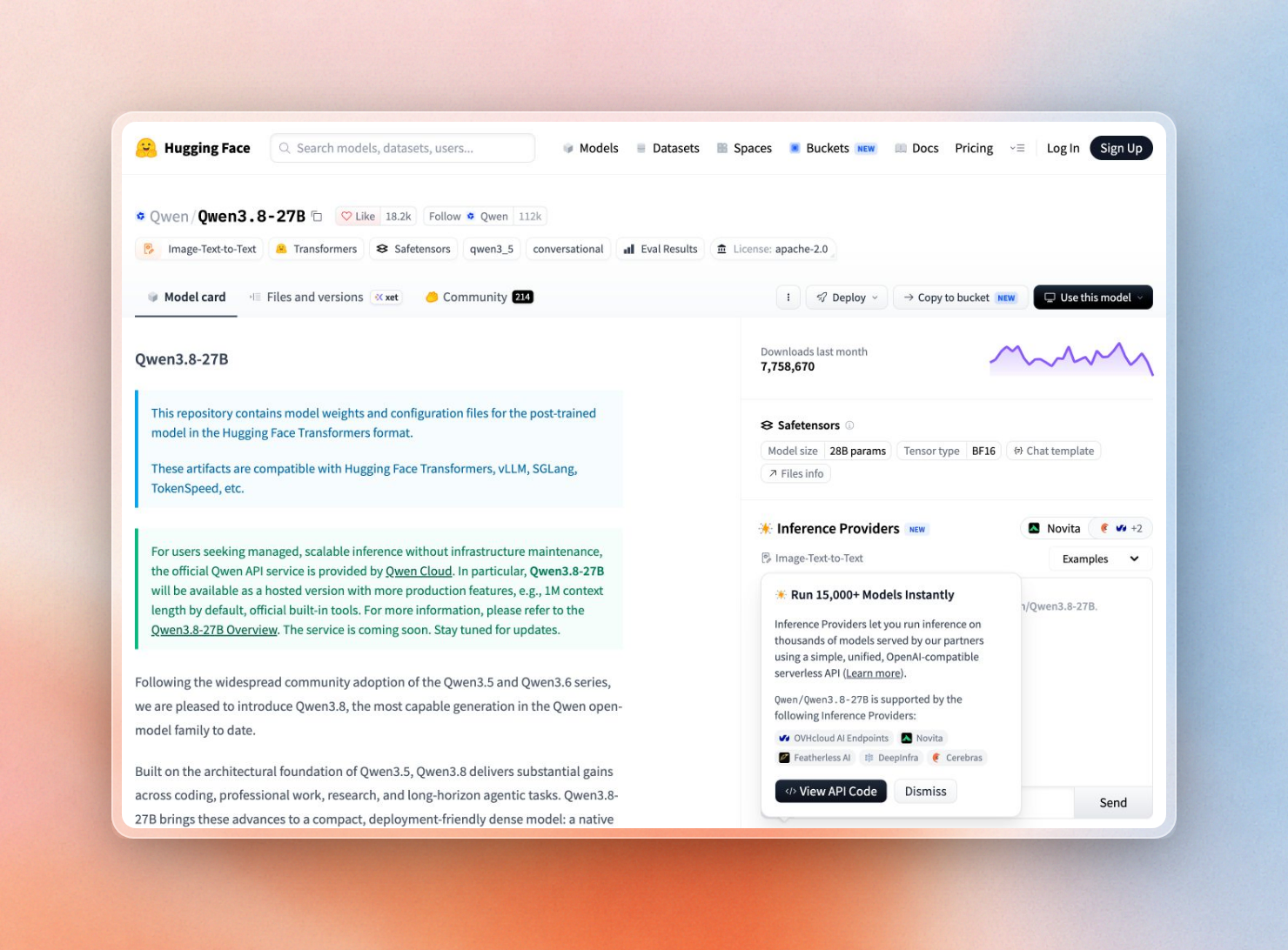 The license sits in the tag row of every Hugging Face model card.
Ranking lists change every few weeks. That’s why we link to the actual boards instead of copying numbers. Artificial Analysis runs every model itself. LiveBench has an agentic coding category that tries to avoid test contamination.
No matter the model, it won’t know about library releases that came after its training cutoff date. This is why you should also run a docs layer in the same network as your model, such as Context7 On-Premise (covered below).
How much VRAM does a self-hosted LLM need?
For a self-hosted LLM, the required VRAM is the size of the model’s weights plus the size of the KV cache for each token stored by the agents. For Qwen3.8-27B, the model has BF16 weights of 51.7 GiB, and each token takes 64 KiB. Ten agents with 64K tokens each would require 93 GiB of VRAM at BF16, or 70 GiB at FP8.
The weight sizes are easy to get from the vLLM recipe for Qwen3.8-27B. At BF16, the model weighs 51.7 GiB. At FP8, it weighs 28.6 GiB. At NVFP4, the 4-bit format for newer NVIDIA GPUs, the model weighs 21.3 GiB.
The KV cache is the number that grows. You can work it out from the model's config.json:
KV bytes per token = attention layers x KV heads x head size x 2 (keys and values) x bytes per value
total VRAM = weights + KV bytes per token x context length x concurrent agents
Coding agents keep long contexts open: files, tool output, test logs. This script runs the math for one agent and for a team of ten:
# Qwen3.8-27B, values from its config.json on Hugging Face
full_attention_layers = 16  # 64 layers, every 4th one uses full attention
kv_heads = 4
head_dim = 256
bytes_per_value = 2  # BF16 KV cache
state_per_agent_gib = 153.9e6 / 1024**3  # linear-attention state per request (SGLang cookbook)

kv_per_token = full_attention_layers * kv_heads * head_dim * 2 * bytes_per_value  # K and V
print(f"KV cache per token: {kv_per_token // 1024} KiB")

# Weight sizes vLLM reports for each checkpoint (vLLM recipe for Qwen3.8-27B)
weights_gib = {"BF16": 51.7, "FP8": 2 * 14.28, "NVFP4": 2 * 10.64}

for agents, context in [(1, 65_536), (10, 65_536), (10, 131_072)]:
    cache = kv_per_token * context * agents / 1024**3 + agents * state_per_agent_gib
    totals = ", ".join(f"{name} {w + cache:.0f}" for name, w in weights_gib.items())
    print(f"{agents:>2} agent(s) x {context:,} tokens: cache {cache:.0f} GiB | total GiB: {totals}")
KV cache per token: 64 KiB
1 agent(s) x 65,536 tokens: cache 4 GiB | total GiB: BF16 56, FP8 33, NVFP4 25
10 agent(s) x 65,536 tokens: cache 41 GiB | total GiB: BF16 93, FP8 70, NVFP4 63
10 agent(s) x 131,072 tokens: cache 81 GiB | total GiB: BF16 133, FP8 110, NVFP4 103One developer can fit the 4-bit build on a 32 GB card and run the vLLM recipe on a single RTX 5090 with 32K tokens. But ten agents at 128K tokens require a cache bigger than the weights and even the 4-bit build needs multiple 80 GB GPUs.
Qwen3.8-27B is cheap on the cache because only 16 of the 64 layers have full attention. The other 48 are linear attention with a fixed size state (the small per-agent term in the script). A dense model with the same heads on all 64 layers would have 4x larger cache. DeepSeek-V4.1-Flash goes even further, with its card saying the KV cache is 890 bytes per token (less than 2% of Qwen3.8-27B’s 64 KiB).
Storing the cache in FP8 halves the cache again. The SGLang cookbook lists 32.8 KB per token for Qwen3.8-27B with FP8 cache, and vLLM can use the same setting with --kv-cache-dtype fp8.
Ollama, llama.cpp, vLLM or SGLang
Each of the four common servers exposes an OpenAI-compatible API, so the same agent config works with any of them. They differ in how many requests they run at once and in how they handle tool calls:
The better options for a team are vLLM or SGLang. For each new model, they provide some tested launch commands: vLLM recipes and SGLang cookbook.
Ollama is great to use on one machine. Its defaults make it hard to use on a shared server, though. For example, it only handles one request per model at a time. This can be increased with the environment variable OLLAMA_NUM_PARALLEL but then memory usage grows with OLLAMA_NUM_PARALLEL * context length. Also its OpenAI-compatible chat endpoint does not support tool_choice, which is needed to force a tool call by an agent.
llama.cpp is a compromise between the two. Its server supports function calling for all models. It uses native formats for many model families, and falls back to a more general format (using more tokens) if not supported.
Tool calling for coding agents
Coding agents work by invoking tools (e.g., read a file, run tests, edit a line). It’s up to the server to translate the model’s raw output into well-structured tool calls, and each model family outputs these calls differently. To enable this in vLLM, you pass two flags to vLLM, choosing the appropriate parser for the model.
This is the launch command from the vLLM recipe for Qwen3.8-27B on one H200:
$ vllm serve Qwen/Qwen3.8-27B \
$   --tensor-parallel-size 1 \
$   --enable-auto-tool-choice \
$   --tool-call-parser qwen3_coder \
$   --reasoning-parser qwen3 \
$   --mm-encoder-tp-mode data
The reasoning parser is also crucial to get right. For example, Qwen3.8 produces a thinking block at the beginning of each of its answers. If you do not set the --reasoning-parser qwen3 argument, the entire thinking block is included in the content of the message. Other families of models have different parsers, such as mimo for MiMo-V2.6 in the vLLM tool calling docs.
Once the server is up, any OpenAI client can send it tools. This TypeScript example gives the model one shell tool and prints the call it makes:
import OpenAI from "openai";

// Any OpenAI-compatible server: vLLM, SGLang, llama.cpp or Ollama
const client = new OpenAI({
  baseURL: process.env.LLM_BASE_URL ?? "http://localhost:8000/v1",
  apiKey: process.env.LLM_API_KEY ?? "local",
});

const response = await client.chat.completions.create({
  model: process.env.LLM_MODEL ?? "Qwen/Qwen3.8-27B",
  messages: [{ role: "user", content: "Run the test suite in packages/api and tell me what fails." }],
  tools: [
    {
      type: "function",
      function: {
        name: "run_command",
        description: "Run a shell command in the repository and return its output",
        parameters: {
          type: "object",
          properties: { command: { type: "string" }, cwd: { type: "string" } },
          required: ["command"],
        },
      },
    },
  ],
});

const call = response.choices[0].message.tool_calls?.[0];
console.log(call?.type === "function" ? call.function : response.choices[0].message.content);
With Qwen3.8-27B behind an OpenAI-compatible endpoint, it printed:
{
  name: 'run_command',
  arguments: '{"command": "cd packages/api && npm test 2>&1 | tail -100"}'
}
In our example, the model chose not to include the optional cwd field, instead putting the directory change into the command itself. An agent would want to validate such arguments before execution.
If the agent always wants to call a tool, it can set tool_choice to "required". Then, vLLM will use structured output to enforce adherence to the tool schema, so the call always parses, though not always a good one.
Keep a local model current with Context7 On-Premise
Another issue is that any model’s knowledge is limited by its training cutoff, so an AI coding agent may use APIs that were renamed or removed since the training cutoff. A cloud-based coding agent can search the web and find recent information, but a self-hosted model running on a closed network has no way to do that and is limited to what it learned during training.
A self-hosted coding agent can use Context7 On-Premise to access up-to-date documentation from within your network. Context7 On-Premise stores the repositories, generated documentation, database, vector store, and MCP server in your own infrastructure. Additionally, it indexes your private GitHub and GitLab repositories, making both private and public libraries available to agents through a single MCP server.
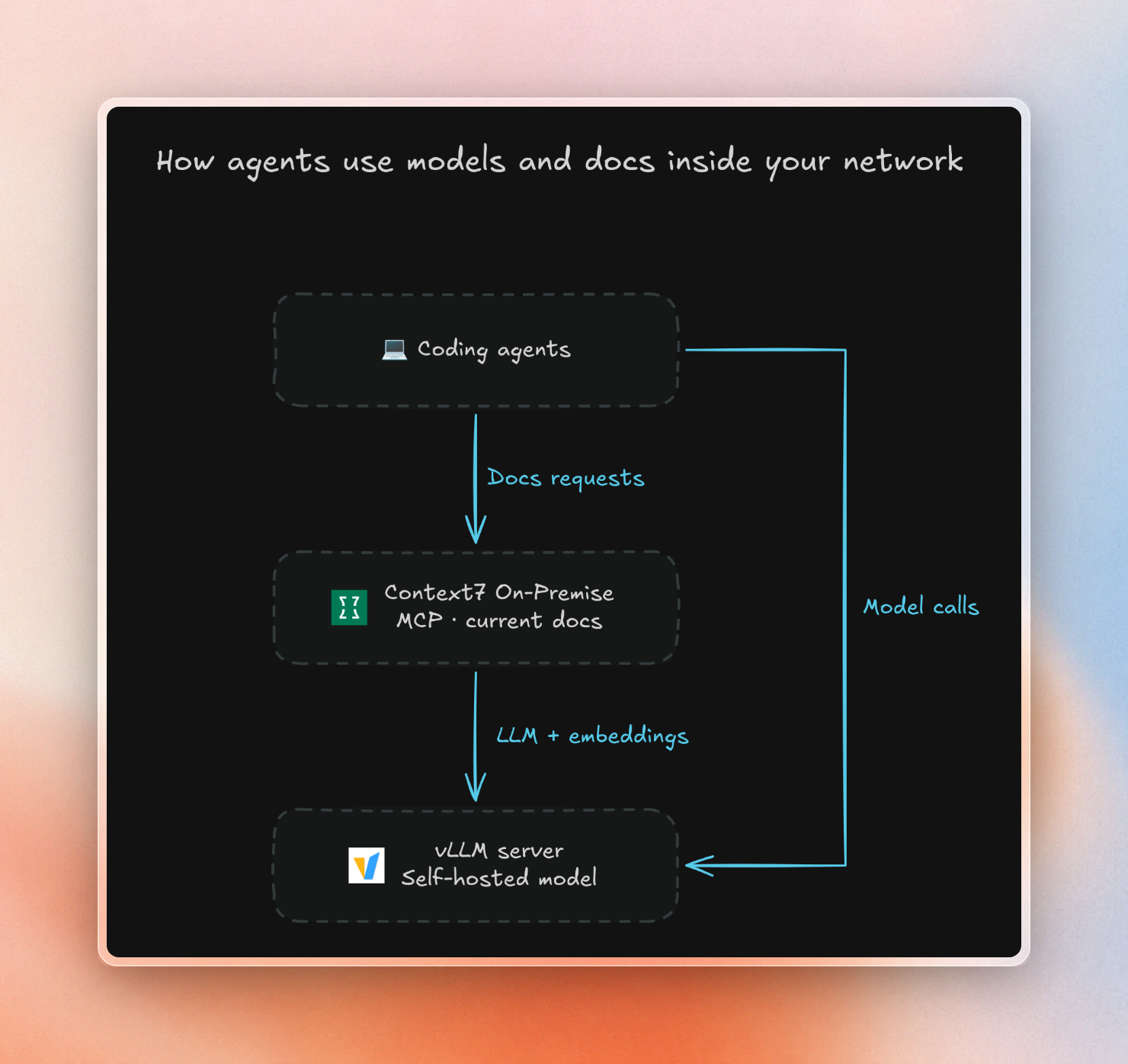
It can use the model you just deployed. The setup wizard offers OpenAI, Anthropic, Gemini, AWS Bedrock or a custom OpenAI-compatible endpoint, and the docs show the custom option pointed at a local Ollama server. A vLLM server takes the same fields. Embeddings use the same provider by default, or a separate one if your chat server doesn't serve them:
Provider: custom
Base URL: http://vllm.internal:8000/v1
Model: Qwen/Qwen3.8-27B
API Key: local
The license you hold decides what leaves your network:
- Offline license: no license check with Context7 Cloud, and no other calls are made to Context7. Public library docs are imported via the Library Import feature, where you can export public library docs from the Context7 Cloud and import them into your installation.
- Online license: License is checked with context7.com. Search queries are sent to context7.com to pull public library docs from the Context7 Cloud.
The trade-off is GPU time: indexing sends many requests to your model, and they compete with your agents for the same GPUs. If your agents are running slower during re-indexing, you can always lower the value of Max concurrent parses in the Settings > Indexing page. See the guide on air-gapped AI coding and the guide on building a self-hosted AI coding assistant.
Checklist before you roll it out
These are the decisions in order:
- Select model based on available hardware, Qwen3.8-27B for single GPU, GLM-5.3-Flash for single 4-GPU server, MiMo-V2.6-Pro or GLM-5.3 for 8-GPU node.
- Read the license on the model card before building on top of the model.
- Size VRAM as weights plus KV cache times context times concurrent agents, using the model’s
config.json. - Save KV cache in FP8 if you need space for more agents.
- Use vLLM or SGLang for team workloads, use Ollama for single machine.
- Enable tool-call parser and reasoning parser for the used model family.
- Provide up-to-date documentation to agents using a documentation source located in the same network as the used model.
Context7 is free to try in Cursor, Claude Code and Copilot. To run it next to your own model, with an offline or online license, see Context7 Enterprise.