

Connecting self-hosted GitLab, Bitbucket, Azure DevOps and Gerrit to AI coding agents
 Batuhan Bilgin12 min read
GitLab Self-Managed comes with its own MCP server built-in, Atlassian and Microsoft have official MCP servers that work only with their cloud-hosted products, and Gerrit provides a server from the Gerrit project. This means that each self-hosted Git host will need a different network path, token and version to communicate with coding agents, and that it may be easier to simply index docs within your network.
A platform team at an energy trading firm was running Bitbucket Data Center that couldn't be exposed to the internet; this was also where all internal packages were hosted. A team at a healthcare tech company found that a cloud connector only worked with public GitLab, but their internal GitLab was behind a firewall. An ad tech team had all their repositories on an internal Gerrit. Private repositories on Git hosts other than GitHub are one of the most common topics in our enterprise conversations.
All four of these hosts can be used with coding agents, but the options provided by the vendors are very different, and for two of them, the MCP server provided by the vendor does not support the self-hosted edition.
What each self-hosted Git host offers coding agents today
Each vendor shipped an MCP (Model Context Protocol) server, the standard way coding agents like Claude Code, Cursor and Copilot call outside tools. What matters for a self-hosted install is where that server runs and whether it can reach your edition:
Only GitLab and Gerrit have official routes to a self-hosted install.
Is there an official GitLab MCP server for self-managed GitLab?
Yes. GitLab Self-Managed provides a built-in MCP server at /api/v4/mcp on your own instance, which is generally available as of GitLab 19.5 and was first made available to Free tier users in GitLab 19.2.
Since the server is baked into GitLab, the agent's MCP client talks directly to your GitLab instance's URL, making it immediately available to developers on corporate networks or VPNs without any additional firewall configuration. It is controlled by a single instance-wide setting, Allow access to the MCP server. If you upgrade to GitLab 19.5, the setting will be enabled by default, unless an administrator disabled it prior to the upgrade.
The server supports two kinds of tokens:
- OAuth access tokens with the
mcpscope. These can be generated by dynamic client registration when the client first connects, or by an OAuth application configured once and shared by all developers. - Fine-grained personal access tokens, with the MCP tool resource and the Execute permission.
Legacy personal access tokens, project access tokens and group access tokens are all rejected with a 403 error, even if they have the api scope. None of these token types can have the mcp scope attached to them, so if you have a token currently in use by your CI, it won’t work with the MCP server.
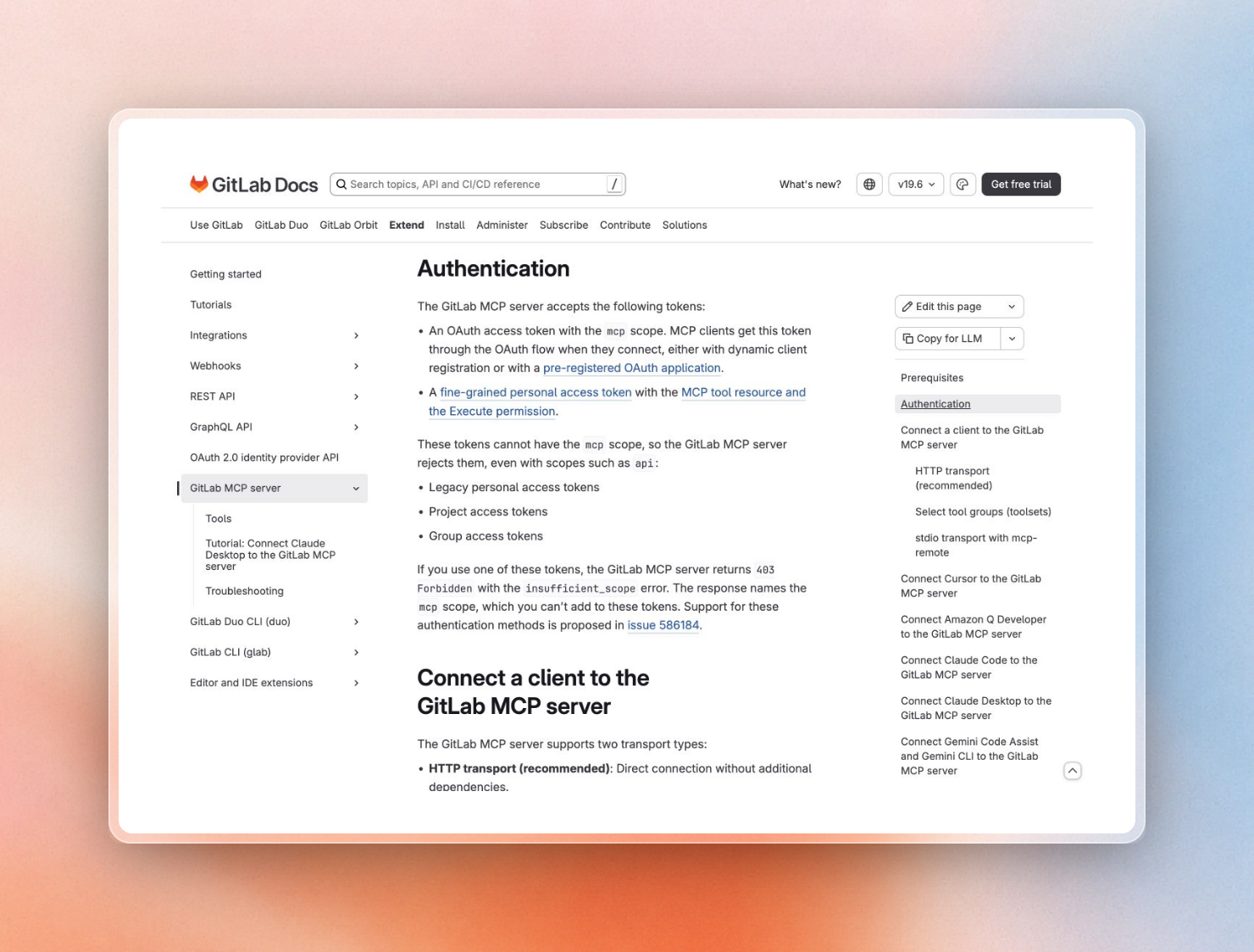 GitLab's list of accepted and rejected tokens for the MCP server
This script checks whether an instance exposes the server and which scope it asks for:
$ #!/usr/bin/env bash
$ # Usage: ./check-mcp.sh https://gitlab.example.com
$ GITLAB="${1:-https://gitlab.com}"

$ curl -s -o /dev/null -D - -X POST "$GITLAB/api/v4/mcp" \
$   -H 'Content-Type: application/json' \
$   -H 'Accept: application/json, text/event-stream' \
$   -d '{"jsonrpc":"2.0","id":1,"method":"initialize","params":{"protocolVersion":"2025-06-18","capabilities":{},"clientInfo":{"name":"probe","version":"0"}}}' \
$   | grep -i -E '^HTTP|www-authenticate'

$ curl -s "$GITLAB/.well-known/oauth-protected-resource/api/v4/mcp"
$ echo
Run against gitlab.com, it prints:
HTTP/2 401
www-authenticate: Bearer realm="GitLab", scope="mcp", resource_metadata="https://gitlab.com/.well-known/oauth-protected-resource/api/v4/mcp"
{"resource":"https://gitlab.com/api/v4/mcp","authorization_servers":["https://gitlab.com"],"scopes_supported":["mcp"]}
A 401 that lists the mcp scope means the server is running. Then you add the URL to your client. GitLab lists the config for Claude Code, Cursor, VS Code, Gemini CLI, etc.
By default, the server returns core, merge request, work item, repository, and CI tool groups. To add wikis, you need to opt in. You can also narrow down the list with the X-Gitlab-Enabled-Mcp-Server-Toolsets header. All tools also check user permissions on projects. GitLab says it’s your responsibility to guard against prompt injection attacks on GitLab content, which is the risk that we cover in our MCP security checklist.
There are two other routes that only work with GitLab. GitLab Duo Self-Hosted (Premium and Ultimate) runs GitLab’s own agents on your own models, behind your own AI Gateway. With an offline GitLab license, the instance doesn’t talk to GitLab billing services at all. GitLab Orbit builds a graph of code, merge requests, and pipelines and exposes it as MCP tools, but it is still in beta and runs on its own Kubernetes stack next to the instance.
Bitbucket Data Center
Atlassian's Rovo MCP Server is hosted in the cloud at mcp.atlassian.com and works with Bitbucket Cloud. An Atlassian support engineer confirmed that the Rovo MCP Server needs an active Atlassian Cloud site and doesn’t work with Server or Data Center. There is no supported way to use MCP with Bitbucket Data Center instances behind firewalls.
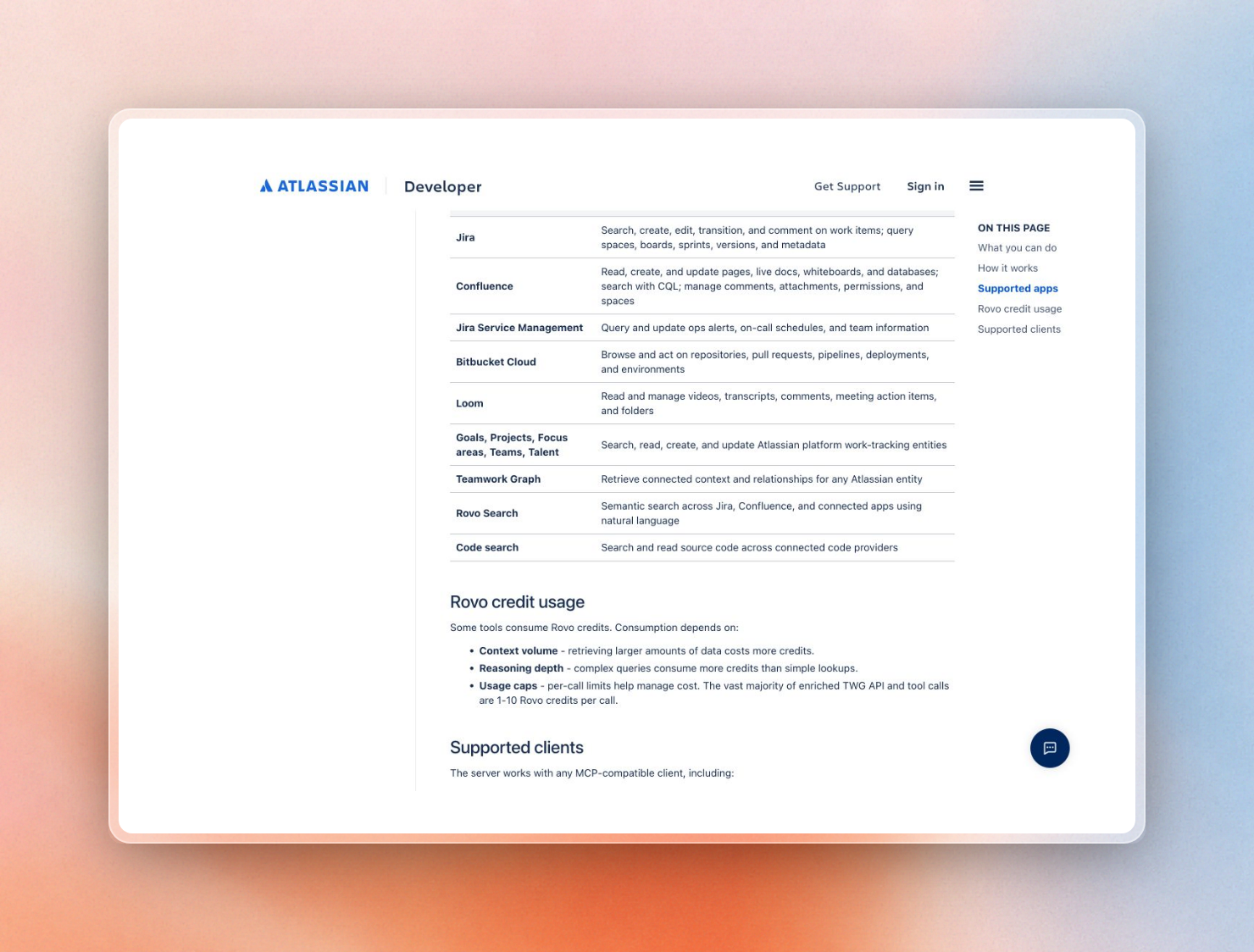 The apps Atlassian's Rovo MCP Server supports
Teams on Bitbucket Data Center behind a firewall can use:
- A community MCP server for Bitbucket Server and Data Center, either locally on a developer’s machine or within the network. There are a few of them on GitHub and npm. Since this is third party code with access to your repos, you need to go through the usual review process for dependencies.
- Indexing by cloning repos inside the network. It would need to be given a project or repository HTTP access token with read permissions in Bitbucket Data Center. These tokens allow pull and clone but nothing else. They can also have an expiry date.
Azure DevOps Server
The Azure DevOps MCP Server from Microsoft is provided in two variants: as a remote server hosted by Microsoft under mcp.dev.azure.com (which requires a Microsoft Entra ID-backed organization) and as a local variant that runs via npx and signs in with a Microsoft account or a personal access token. Unfortunately, neither of them works with Microsoft’s Azure DevOps Server (the on-premises variant of Azure DevOps). The FAQ for the project mentions that only Azure DevOps Services are supported (since many of the API endpoints used by the server are not available on-premises) and that Microsoft has no plans to support the on-prem variant.
Thus, for an Azure DevOps Server team, the two options are: use a community-written MCP server that accesses the on-prem REST API, or use an indexer to clone the repositories (via HTTPS) using a read-only token.
Gerrit
Unlike the other servers, Gerrit doesn’t have its own cloud. The gerrit-mcp-server is offered by the Gerrit project, and runs as an HTTP server or as a child process of the agent (STDIO). It uses curl to make calls to the Gerrit REST API, and requires Python 3.12+, uv and curl.
The server configuration includes a JSON file listing the various Gerrit hosts the server is allowed to make calls to, and their URL. Each host can optionally also have an internal URL. Each host can configure how it wants to do authentication. Supported authentication methods include using the existing .gitcookies file used by Git for pushes (recommended), HTTP basic auth with a Gerrit HTTP password (either in a netrc file or inline), and a Google-internal authentication method only applicable on Google’s corporate network.
The MCP server is focused on Gerrit’s code review functionality. This means the MCP agent can query for changes, get details of a change, and interact with the review process. This provides review context, rather than searchable documentation for the repository’s code.
Open a path to a cloud vendor, or index inside the network?
The common thread behind all of these is: Is there any inbound connection from outside your network to your Git server, or is everything reading the repos inside?
- To allow inbound access, you either have a cloud MCP server, or a cloud indexer that hits your Git server. This usually looks like an inbound allowlist for the vendor's IP addresses, a reverse proxy, or the host exposed to the internet. All of your repo content gets processed by the vendor's systems. A gaming studio asked us for the opposite of this, where their CI pushes out docs on a schedule to prevent inbound connections from outside.
- To avoid any inbound connection, you have the MCP server run in your GitLab instance, on your developer's machine, or in your own cluster. Same with any indexer, for example Context7 On-Premise, a documentation index for coding agents that clones your repos from inside the network. This is the only way to run an air-gapped setup.
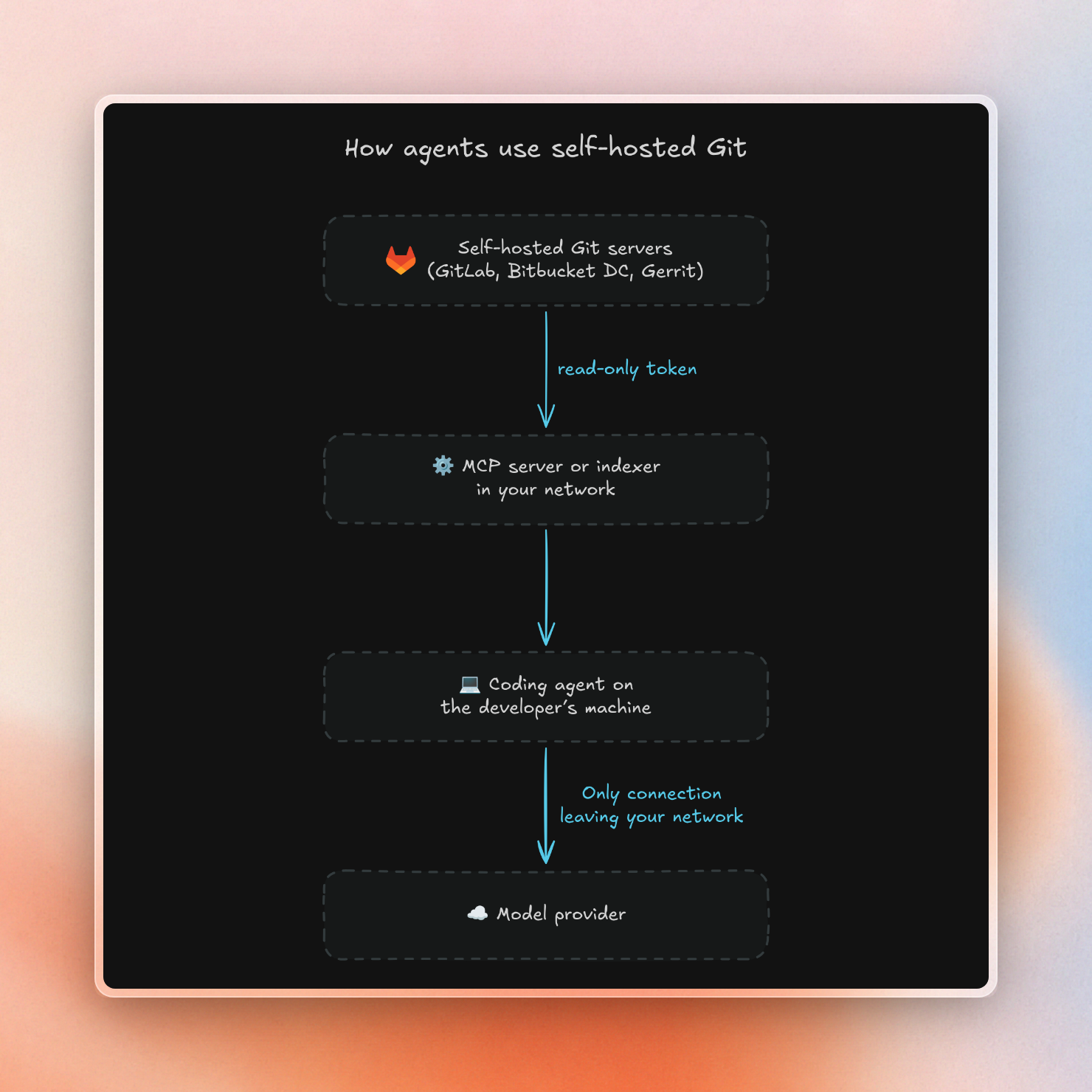
One constant across both scenarios: Anything returned by an MCP tool is appended to the agent's context. That means any files, diffs, or doc snippets returned by the tool are visible to the model provider. A self-hosted Git connection keeps the Git server closed, but the model provider is still a choice, which we discuss in what AI coding assistants send to the cloud.
Code context vs documentation context
These MCP servers provide code context to the agent. When the agent requests a file, merge request, or Gerrit change from the Git API, the server returns the raw object. This can be used to answer questions like “what changed in this merge request” or “why did this pipeline fail”. However, the agent must know where to look. In addition, the raw file is charged at a token cost that is proportional to its length.
By contrast, for documentation context an indexer reads the repos before the agent gets to them. It turns READMEs, docs folders, and code into short snippets. When the agent asks “how do I call the internal payments client”, it gets back the few snippets that answer the question. This can be used by the agent when writing new code against an internal SDK.
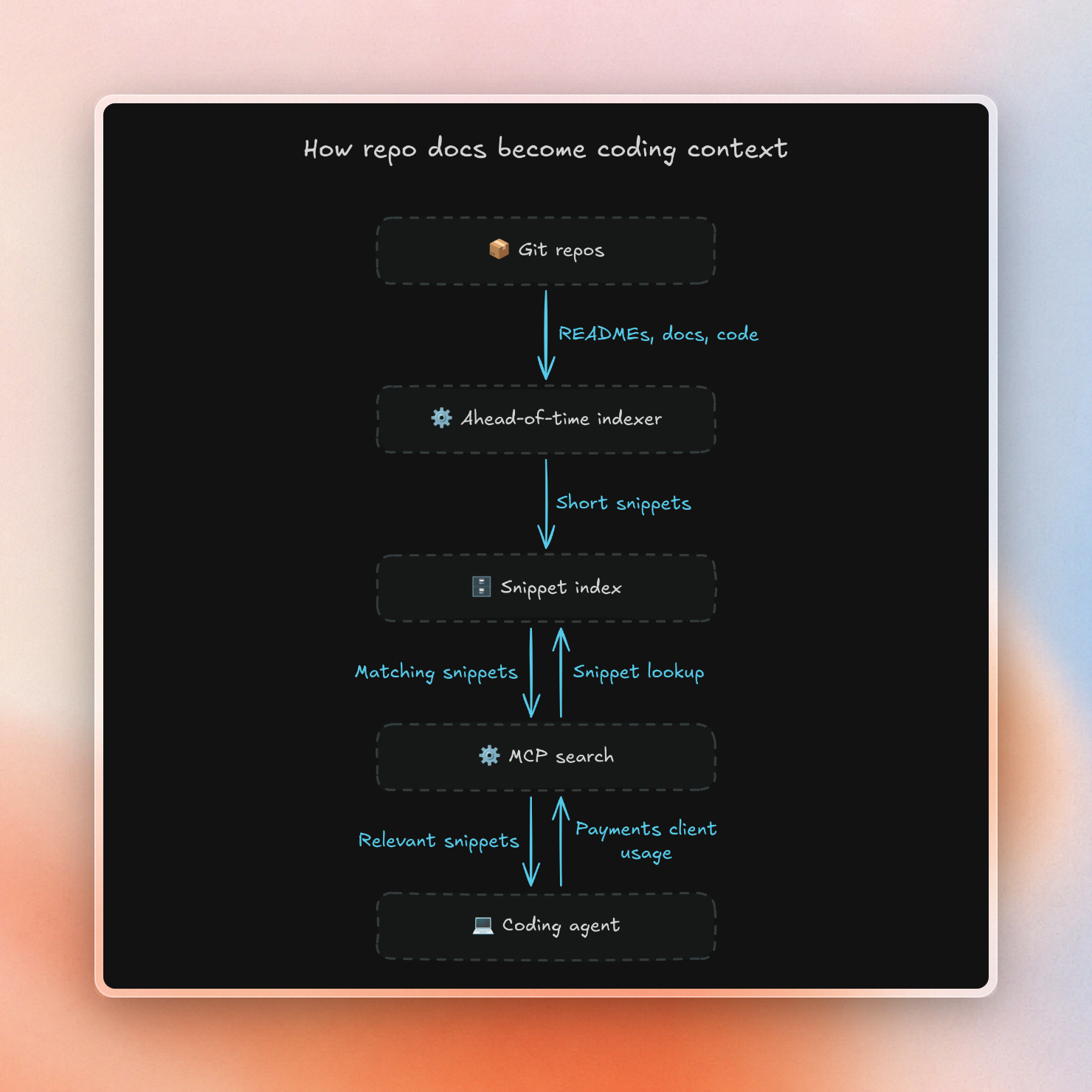
Many teams need both the MCP server of their Git host to help answer questions about review and the pipeline, and an index for "how do I use this internal library" questions.
Indexing self-hosted repos inside your network with Context7
Context7 On-Premise is a self-hosted documentation index, which you can run with Docker Compose or Kubernetes. Your Git server doesn't need to have an inbound path from outside because the parsing pipeline, the vector store, and the MCP server are running on your infrastructure. Context7 can index private repositories from:
- GitHub and GitLab, including self-hosted GitLab, with an access token (
read_repositoryscope is enough on GitLab) - Other Git hosts such as Gerrit, Gitea and self-hosted Bitbucket, over HTTPS with a username and HTTP password or token, or over SSH with a deploy key
Each developer points their agent at the internal deployment once:
$ ctx7 setup --mcp \
$   --base-url https://context7.internal.yourcompany.com \
$   --claude
You can swap --claude for --cursor, --vscode, --codex or --opencode. The agent then gets short fragments of your internal SDKs via MCP instead of whole files.
To keep things up-to-date, there are scheduled automatic repository updates for every Git provider. However, only the GitHub App can do updates on a push event. For GitLab, Gerrit or Bitbucket, you need to call the refresh endpoint in your CI after a merge.
The following limits are worth knowing: Content is still sent to your AI provider for parsing, embedding and reranking. The online license sends license checks and search queries for public library docs to context7.com. The offline license does not make any calls to Context7, and you import public docs using Library Import. Gerrit, Gitea and self-hosted Bitbucket are listed as Other Git hosts in the docs. If you use another Git provider such as Azure DevOps Server, you should test it before you rely on it. Context7 is just one layer of a self-hosted AI coding assistant, next to a model and an agent.
A checklist for the platform team
We recommend that companies consider these decisions before exposing self-hosted Git servers to any agent:
- Identify all self-hosted Git servers and editions. For example, a company running GitLab Self-Managed and also one older Gerrit system would answer the following questions for both.
- If GitLab, identify the instance version and whether the MCP endpoint is enabled. Run the script above against your instance URL.
- Identify the token type for each host. GitLab offers OAuth tokens with the
mcpscope, as well as more fine-grained tokens. Bitbucket Data Center and Gerrit can be accessed with a read-only service account. - Limit the available tools. For GitLab, use the toolset header, and use read-only service accounts so that agents don’t accidentally merge or edit anything.
- Identify the network path for each host. Is there an inbound path from a cloud vendor, or is everything inside the company network?
- Identify which model provider should be used, since any result from the MCP endpoint is part of the prompt.
- Treat all Git content as untrusted input. Any README or merge request description could contain prompt injection.
- If an index is used, decide how it should be refreshed. Do you set up a schedule, or run a CI hook? You want to make sure agents don’t read last month’s docs.
Context7 is free to try in Cursor, Claude Code, and Copilot. For indexing self-hosted repositories such as GitLab, Gerrit, or Bitbucket within your own network, we offer Context7 Enterprise.