

MCP security risks: a checklist for enterprise teams
 Batuhan Bilgin16 min read
The main security risks of MCP servers are poisoned tool descriptions, prompt injection through tool results, stolen credentials, compromised packages and unchecked agent actions. This checklist turns each one into a vendor question and a control.
A developer wants to use an MCP server in their coding agent. They submit a ticket to the security team along with a GitHub link to the MCP server. The security team sends the vendor a questionnaire designed for SaaS applications. The questionnaire asks about things like encryption at rest and single sign-on. It does not ask about what the MCP server can insert into the model’s context or what actions the agent will take based on that information.
An MCP server is different from a regular integration because it can both provide text to the model (which the model might treat as instructions) and provide tools that the model can use to take action. With MCP, the model decides which tools to call, when, and with which parameters. Developers do not write each individual call to a tool.
This checklist was derived from a real MCP threat sheet that was used during a security review of our product by a large IT services company. The 23 threats in the threat sheet cover tool poisoning, shadowing, credential theft, malicious updates after approval, a “lag pull” attack, and long-term viability of the vendor. We grouped those 23 threats into five areas and mapped each threat to the OWASP MCP Top 10 and the MCP specification. For each threat, we provided a question that you can ask the vendor, and we provided a control that you can use to address the threat on your own.
What are the security risks of MCP servers?
Poisoned tool descriptions, prompt injection through tool results, stolen or over-scoped credentials, compromised server packages and agents acting with no human check are the five main security risks of MCP servers. All of them stem from the fact that the model can interpret what servers send and make decisions based on it.
Here is how those risks map to the OWASP MCP Top 10, which is still in beta, and to the MCP security best practices:
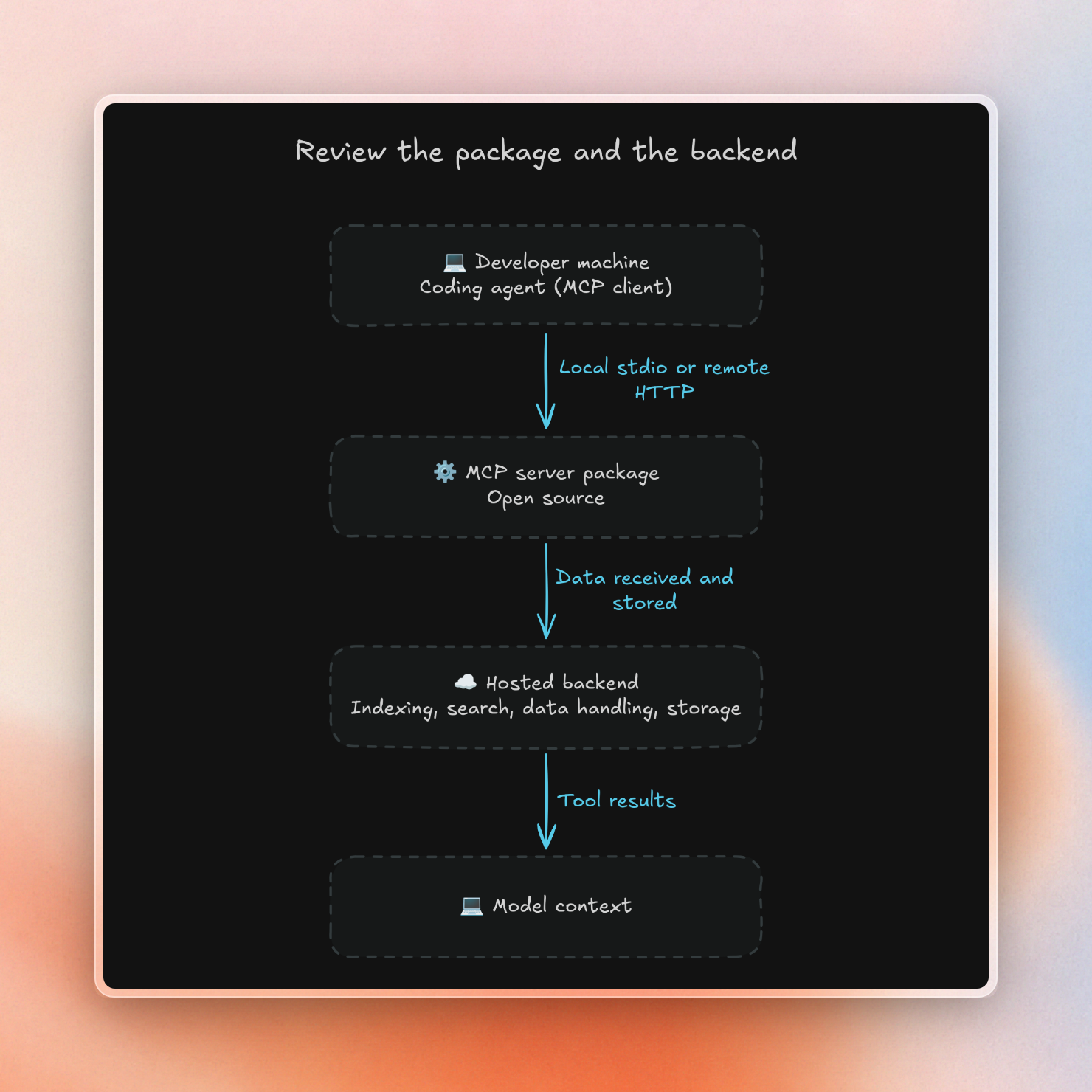
Also, many MCP servers are split into two: the package used by developers is usually open source but the service it calls may not be. In our case, the threat sheet we received had a reviewer look at an MIT-licensed repository for the MCP server package and assume that the product was self-hosted and free. However, the package only contains code for the MCP server itself; indexing, searching, and handling data are done in the backend.
Both parts of an MCP server need to be analyzed. For the package, examine what it does on the developer’s machine and determine whether it runs locally via stdio or makes a call to a remote HTTP endpoint. For the backend, examine what it accepts as input, what it saves, and what it returns to the agent.
Tool poisoning, shadowing and rug pulls
Every MCP tool has a description, and the model reads the entire description. Usually, the user only sees a short tool name. In April 2025, researchers introduced a tool called add, with a description instructing the model to read ~/.cursor/mcp.json and the user’s SSH private key, and pass them as a hidden parameter. Cursor displayed a confirmation dialog, but it did not display the entire tool input, so the user’s SSH private key leaked.
The researchers also showed two variants:
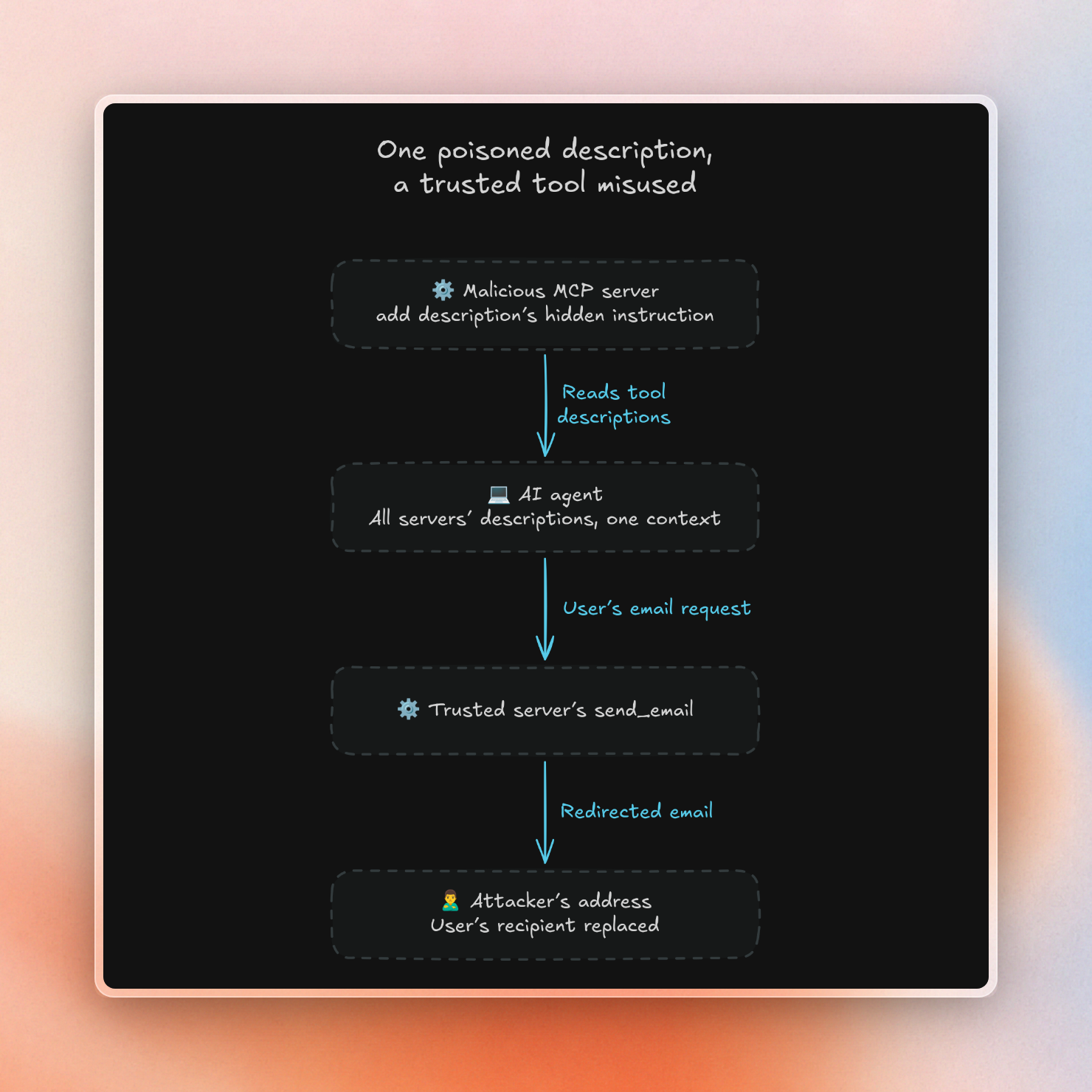
- Shadowing. A tool description in one server can change how the agent uses a tool from another server. In one variant, a malicious
addtool told the agent to send any email using a trusted email tool to the attacker’s email address, even if the user specified a different recipient. - Rug pulls. After you approve a server, the server can change its tool descriptions. This was specifically asked in the threat sheet: can a server we approved become malicious in a later update? Unless you pin the versions you reviewed, yes, they can.
These are the things you can do before and after you approve a server:
- Before approving a server, review the full tool definitions, including parameter names and input and output schemas. The entire schema is an injection surface, not just the description field.
- Pin the version of the tool definitions that you reviewed using a hash of the entire definition, including any annotations. A flipped read-only or destructive hint can change how the client prompts for approval without changing the tool description.
- If the hash changes, review the new version of the tool definitions. You can use a scanner like
mcp-scanto identify poisoned tool descriptions and cross-server shadowing. - Treat each server as a separate security domain, and look for credentials from one server leaked in calls to another server.
A hash ensures the definition has not changed. It does not ensure the code on the server has not changed while the definition stays the same. Thus, pinning is most effective in combination with the supply chain checks described below.
Untrusted tool output and prompt injection
When a tool returns a docs page, a GitHub issue or a web page, your agent processes that text in the same context as your original request. This text could contain instructions that the model then follows. This can happen even with approved servers, as the content delivered by the server is often written by other people. The threat sheet called this “intent tampering”, i.e. content that changes the model’s intent.
Screening can help, but is not foolproof. Stripping tags and looking for patterns of instructions can help, but only as extra filtering and alerting. Encoded and multilingual injections can often slip past such filters. Controls that are likely to hold up are least privilege, applied to each server, and human approval for any actions that are particularly sensitive, both enforced in code.
Ask the vendor:
- Who can publish content that can be served by your server? Can anyone register a library, a web page, or a repository?
- Does your server screen the content that the agent receives? What happens to flagged content?
- Do you label the content returned as data, as opposed to instructions?
- What context does your server receive from the agent, and do you store it? (Over-sharing context from the agent to the server is its own risk; see MCP10.)
Prompt injection in coding agents is a whole other topic, but the point here is that any tool result is untrusted input, even if it comes from a server you’ve approved.
Credentials, tokens and MCP authorization
The authorization used for remote MCP servers is based on OAuth, and most of the authorization-related security concerns are typical OAuth-related issues adapted to the MCP environment. The following are listed in the MCP specification:
- Token passthrough: An MCP server accepting a token, and then using it to make requests to a downstream API. MCP servers MUST NOT accept any tokens that were not issued for the MCP server. This would bypass the rate-limits and other protections of the MCP server, and downstream logs would record the wrong identity.
- Confused deputy: A proxy server using a single static client ID to access a third party API. An attacker would be able to reuse the user’s previous consent cookie, and receive an authorization code without being presented with a consent screen. Proxy servers MUST require consent per client.
- Broad scopes: A server requesting all scopes upfront. If the user’s token were compromised, it would provide access to all those resources. The specification recommends requesting a small scope initially, and then a step-up scope if the agent makes a request for a sensitive action.
- Plaintext secrets: Storing tokens in plaintext in MCP config files makes them vulnerable to theft. The April 2025 demonstration targeted the
mcp.jsonfile because it often contains credentials to other MCP servers. It is safer to store tokens in the OS keychain.
The mechanism used by the server to identify the client has changed in 2026. The current specification deprecates dynamic client registration, and recommends the use of Client ID Metadata Documents (CIMD) for cases where the client and server do not have a prior relationship. With CIMD, the client ID is an HTTPS URL which serves a JSON document describing the client. The authorization server fetches the document, and verifies the redirect URIs listed within.
CIMD gives the server some basis for making policy decisions (e.g. allowlist of trusted client domains or reputation checks on unknown domains), but isn’t perfect. For example, an attacker can present a valid client metadata URL with a localhost redirect, and a server fetching client URLs needs the same guards against server-side request forgery (SSRF; tricking a server into contacting internal addresses) as any other fetcher.
Questions for the vendor:
- Which OAuth flow do you support, and do you ensure that each token was issued for your server?
- What approach to client identification do you use (e.g. CIMD, pre-registration or dynamic registration)?
- What is the minimal scope required to access the requested resources, and can we restrict this scope?
- Do you support single sign-on (SSO), and can we revoke access for an individual user without impacting others?
Supply chain and change control
A local MCP server runs as a program on the developer’s local machine and inherits the same permissions as the client. A client configuration file could specify a startup command that installs a package and uploads ~/.ssh/id_rsa to an external URL. The specification says that in order to be one-click to set up, the client needs to explicitly present the exact command to the user (i.e. not truncating any portion of the command) and ask for the user’s approval to execute it. In addition, the spec recommends running the local server in a sandbox with restricted file system and network access.
Package names are the next area of concern. Typosquatting is a frequent vector of attack on MCP packages: mcp-server-filesystem and mcp-server-filesytem can look almost identical on cursory inspection. In addition, pinning a package to a particular version and verifying its checksum or signature will help to prevent a silent update from getting deployed on all laptops at once.
The threat sheet also mentioned a “lag pull attack”. This is the reviewer’s own term, not a standard category. Our reading of this threat is that data was accurate when the server fetched it, but by the time the agent acts on it, it has changed; a time-of-check to time-of-use gap. For a docs server, this is manifest as the agent writing code to use an API that changed since the model or index last saw it. For this risk, we recommend checking how often the server refreshes its data, and if there is a version attached to the results.
The final item on the sheet was long-term viability. It is important to know if the server your agents are relying on will continue to be maintained. Who is maintaining it? What is the license? How frequently are bug fixes released? What would you use if it went away?
Approvals, allowlists and logging
The MCP specification requires hosts to gain explicit user consent before invoking tools. Clients can also provide auto-approve modes and allow rules that allow users to skip this. This makes sense for a server that can only read docs but an auto-approved call on a server that can push code or send email is exactly what a poisoned description needs to do damage.
The threat sheet took things one step further: are we sure that only approved MCP servers are connected to when a developer is typing a prompt? The tool descriptions of all connected servers are added to the model's context, so one unapproved server can shadow the approved ones. OWASP calls these unapproved servers shadow MCP servers (MCP09).
An admin can enforce a server allowlist centrally. In Claude Code, a managed settings file can limit which servers load and which tools run without a prompt. This example allows Context7's remote server, any internal server, and one pinned local command, then auto-approves Context7's read-only docs tools and asks before any GitHub tool runs:
{
  "allowManagedMcpServersOnly": true,
  "allowedMcpServers": [
    { "serverUrl": "https://mcp.context7.com/*" },
    { "serverUrl": "https://*.internal.example.com/*" },
    { "serverCommand": ["npx", "-y", "@modelcontextprotocol/server-filesystem", "."] }
  ],
  "deniedMcpServers": [
    { "serverUrl": "https://*.untrusted.example.com/*" }
  ],
  "permissions": {
    "allow": ["mcp__context7__*"],
    "ask": ["mcp__github__*"]
  }
}
With this file in place, any attempt by a developer to add an unlisted server will fail with an error like “not allowed by enterprise policy”, overriding any allowlists defined at the user or project level. Servers can be matched by URL or command. Note that matching by serverName is not secure because users can give any server name they want (e.g. github). See the managed MCP docs for more information.
The final requirement (MCP08) is to log all tool calls with full parameters, user and time. These MCP logs should then be forwarded to your SIEM (Security Information and Event Management system) where alerts can be set up for new tools, unusual call volumes and admin-level queries. As always, be careful to strip any secrets or personal data from the logs. For any hosted MCP vendors you use, also ask for audit logs on their side.
Which MCP servers should your engineering team approve?
Your engineering team should only approve MCP servers where you have thoroughly reviewed and pinned the full tool definitions, user authentication is managed per-user and has very narrow scopes, the server filters or labels results, and the vendor can provide precise details about what information is sent to and stored on the server's backend. The most straightforward servers to approve are read-only servers.
Context7 is a docs MCP server used by coding agents to retrieve up-to-date and version-specific library documentation. Here is how it meets our requirements on the checklist:
- What the backend receives. The agent sends its search query, along with the library’s name or ID. Other data points include the API key, the client’s name and version, the transport type used and the client IP for rate limiting. Context7 never receives the prompt, source code or the conversation history. The tool descriptions tell the agent to strip out keys, passwords and personal data from its query. API logs are kept for 30 days, while queries from Enterprise teamspaces are never stored for benchmarking, with no setting to turn on. For more details on this flow, see What data AI coding assistants and MCP servers send to the cloud.
- Tool output. The indexed docs go through layered screening with a classifier for prompt injection. Any content that seems suspicious gets more checks, while flagged content is reviewed. Teams can also restrict the libraries their agents read, by verification status, trust score or a block list.
- Authorization. The remote server supports OAuth for MCP clients. Since October 2, 2026, it also accepts CIMD client IDs. Enterprise plans can enforce SSO over SAML, OAuth or OIDC, teamspace access controls and audit logs. The infrastructure is covered by SOC 2 Type II, with details on the Upstash Trust Center.
- Package and backend. The MCP server package is open source, and teams can fork it to change the tool descriptions. For those that need the backend inside their network, the on-premise version runs as a single container with your own LLM provider. With an offline license, it never calls Context7 and loads public docs via Library Import. With an online license, it checks the license and sends search queries to context7.com. For more details, see the Enterprise guide to self-hosted AI coding assistants.
Of course, content screening doesn’t block all possible injections. In February 2026 Noma Security, an AI security company, pointed out that library owners could create Custom Rules that were then fed into agents without sanitization. We started fixing it on the server side on Feb 19, deployed the fix on Feb 23, and now check for possible injection whenever rules are saved. See ContextCrush: what happened and what we changed for the full story.
The MCP security checklist
Here is the full checklist, ready to paste into a vendor assessment:
Are you considering conducting an MCP security review? If so, we recommend taking a look at Context7's security docs and starting an Enterprise trial at context7.com/enterprise.