

MCP gateways explained: SSO, Entra ID and Okta for MCP servers
 Batuhan Bilgin13 min read
An MCP gateway is a proxy which places your identity provider, an allowlist and audit logs in front of the MCP servers that your AI coding agents communicate with. This guide covers how a gateway works, the options you have available, integration with Entra ID and Okta and finally a simple approval process for MCP servers.
When a developer adds an MCP server to Cursor with their personal API key, and then another developer adds a different key into Claude Code, there are suddenly many keys floating around for various servers. Then, a month later, when the security team asks, “What MCP servers are being used? Who is using them? What can they do?”, there is no single source of truth. The keys are spread across configuration files on laptops, outside of the identity provider’s scope. If someone leaves, their account is turned off, but their keys live on.
By introducing an MCP gateway, the platform team can provide a single answer to those questions. They can also provide a single way to approve new servers, without issuing more keys.
What is an MCP gateway?
An MCP gateway is a single endpoint that sits between MCP clients such as Cursor, Claude Code, and VS Code with Copilot, and the MCP servers they use. It works as a reverse proxy that routes each tool call to the right server. It signs users in through your identity provider, decides which servers and tools each person can call, logs every call, and handles the tokens so developers never paste a key.
An MCP gateway should be able to:
- Sign-in through your IdP. Developers can sign-in through your IdP (Entra ID, Okta, etc.) using their company account. This will enforce MFA and your conditional access rules for those logins.
- An allowlist of servers. Only servers that the platform team has added are available to use. For example, Azure API Management allows you to validate tokens from Entra ID, rate-limit calls and filter by IP address on an MCP server basis.
- Per-team tool access. Tools from a server can be available to some teams and not to others. For example, Kong allows you to allow or deny each MCP tool to a user or group.
- Audit logs. All tool invocations can be traced back to the user who requested it. For example, Cloudflare logs each request made with the tools in a portal.
- Token handling. The gateway will validate the token presented by the user and then fetch/inject the correct token for the underlying MCP server. This allows developers to login to the gateway on their machine and have a short-lived token instead of a long-lived API key.
Cloudflare and Docker gateways also allow you to merge many servers into one endpoint, which means developers only have to add one entry to their client config instead of one per server.
Do you need one?
When developers interact with remote MCP servers that access company data or company accounts, you need an MCP gateway to verify who called what. But if your agents only access a couple of read-only servers, a client-side allowlist might be sufficient for now.
While a client-side allowlist is used to control which servers a developer's tool is allowed to start, an MCP gateway is used to control access to a remote server and audit its use.
The Enterprise MCP allowlist in GitHub Copilot is a good example of the limitations of such client-side controls. Enterprise admins can specify allowed and denied servers in a managed-settings.json file. Copilot will match allowed and denied servers by name, server URL, or command. Denying from any source will take precedence. If the managed-settings.json file is broken JSON, GitHub Copilot will block all servers except for the built-in servers.
These are the evaluation rules applied by Copilot clients (in order):
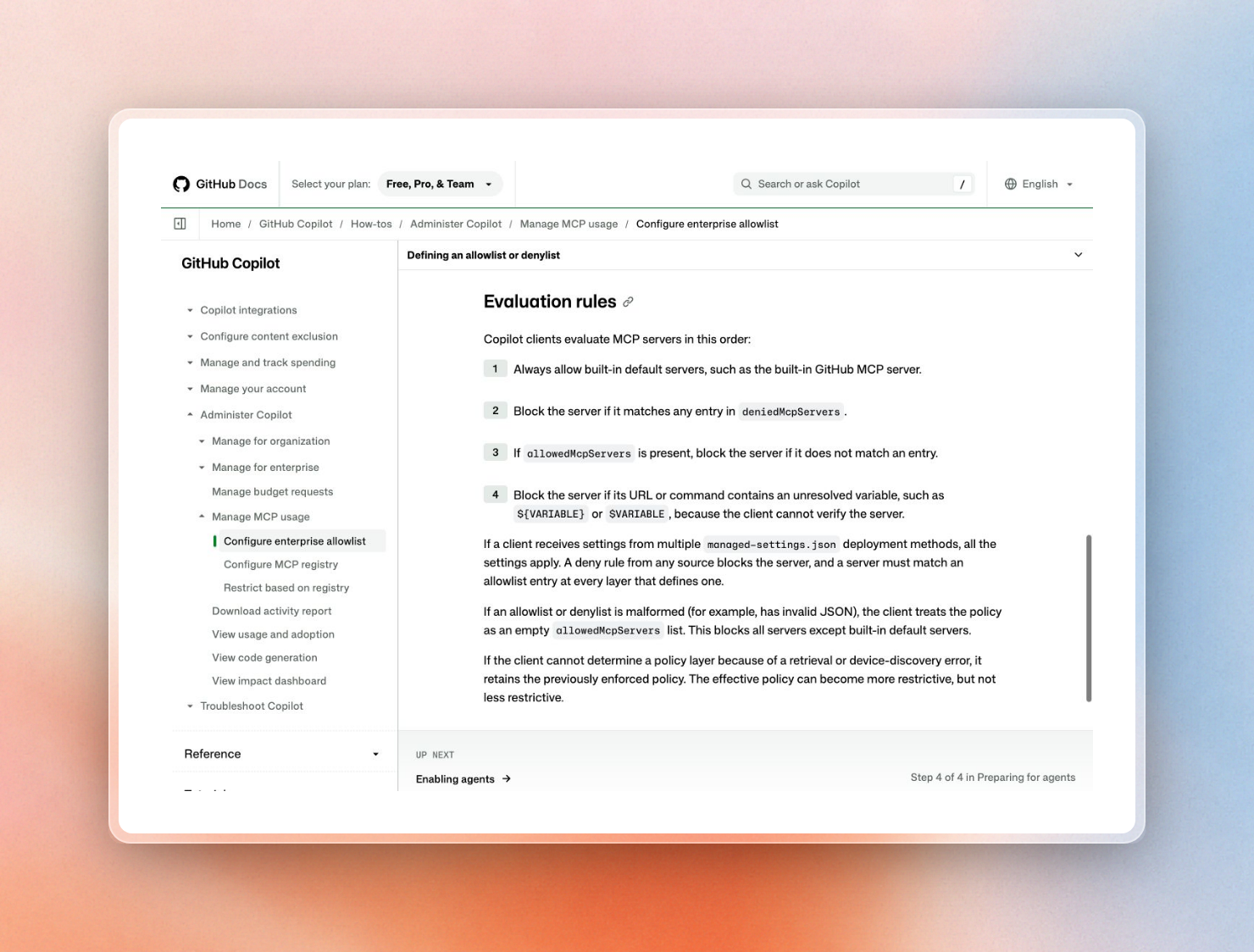 GitHub Copilot’s evaluation rules for the enterprise MCP allowlist
While this file can prevent users from starting unknown servers, it does nothing to authenticate users with the server, provide different tokens to different users, or audit the server calls. GitHub’s older approach using registry-based control is even weaker. According to GitHub, it is susceptible to circumvention by editing the config files because GitHub only matches on the server name.
Here is a simple way to decide:
When working with a regulated team, the two are better together. The allowlist will only allow clients to access the gateway URL, and then the gateway can take over. We've got a great checklist of potential MCP security risks each of these layers can defend against.
How a gateway fits the MCP authorization spec
Because a gateway sits in the login flow as defined by the MCP spec, it must conform to the rules for an MCP server. For Remote MCP, this means following OAuth 2.1 for authorization, while local servers (running over stdio) can use authorization credentials injected via their environment instead.
Let’s review the four rules from the spec that dictate how a gateway must behave:
- Discovery: MCP servers must provide a way to publish protected resource metadata, a small JSON file that informs clients about the authorization server to use. If a client accesses the server without a token, the server returns a 401 error and provides a reference to this file. In our case, the gateway publishes this file on behalf of the servers that it represents.
- Client registration with CIMD: The client needs a client ID at the authorization server. The current version of the spec stipulates that clients and authorization servers should support Client ID Metadata Documents (CIMD), which means the client ID must be a URL that points to a document hosting the client’s metadata. Dynamic client registration (where each client registers with the authorization server on demand) is deprecated in the current version of the spec and kept only to allow clients to interact with older servers.
- Audience: Servers must only accept tokens that were issued for them. This means a token issued for one server cannot be used for another.
- No token passthrough: Servers must not accept or pass on any other tokens. This means that a gateway cannot accept the user’s token and then pass it along to the server on behalf of the user. It must exchange that token for a new token issued to the server or inject a separate credential.
This last rule is the reason why gateway products mention token exchange. Kong’s MCP OAuth plugin, for example, does not pass access tokens to upstream services to prevent token theft and confused deputy attacks (where a trusted service is coerced into performing an action using its own credentials).
Rule 2 is most relevant for Entra ID, as it does not support dynamic client registration. On first connection to an Entra-backed gateway, VS Code prompts users to paste a client ID by hand.
CIMD removes this step, provided that the authorization server supports it.
The full request path looks like this:
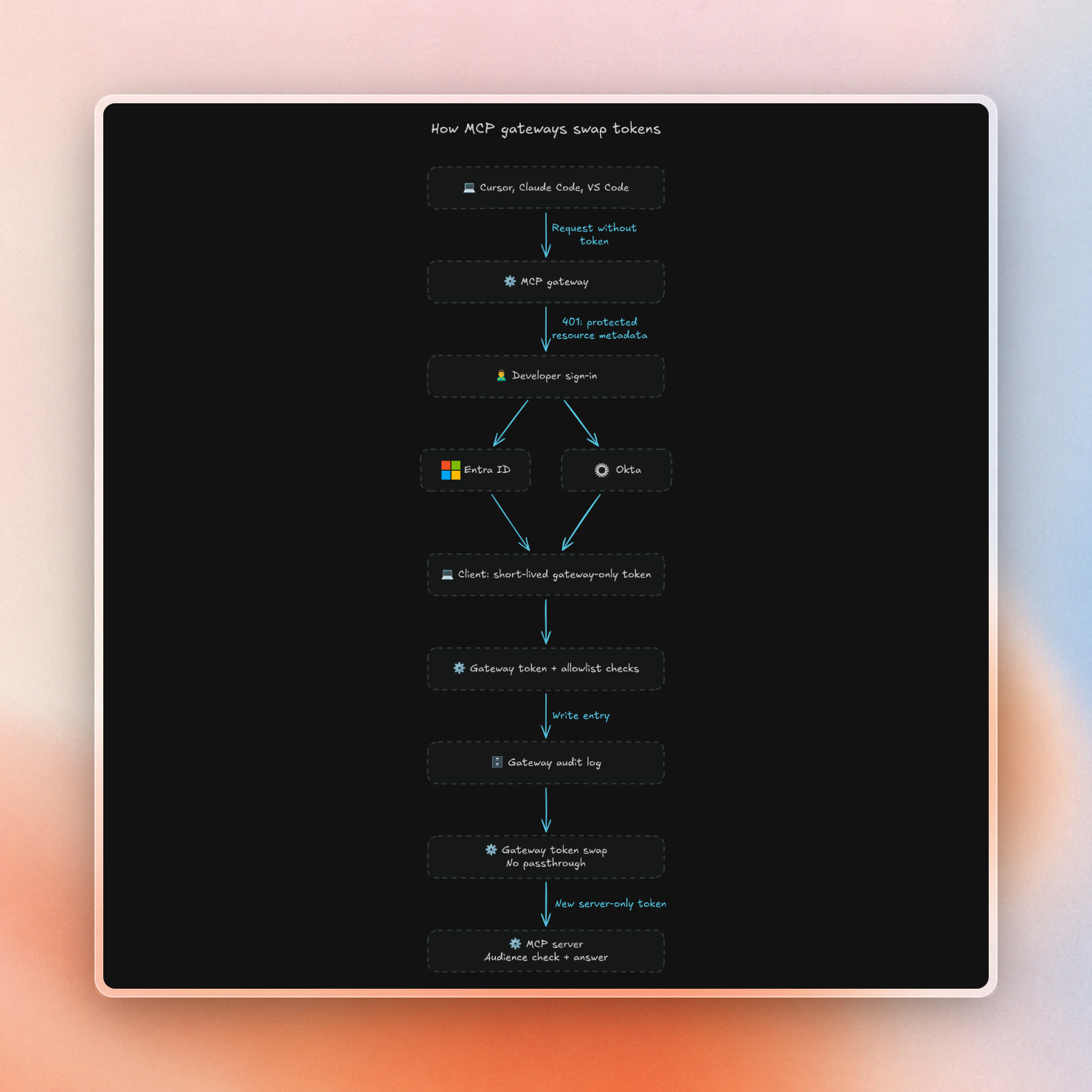
MCP gateway options
An MCP gateway can take the form of: a capability of a cloud or security vendor you’re already paying, an open source project you run yourself, or an MCP plugin on top of your existing API gateway. The right MCP gateway is often the one that works with your identity provider and is connected to where your logs already go.
There are several details to be aware of when choosing one of these tools:
- Docker’s gateway runs MCP servers as containers with limited privileges and network access. This can be more convenient than running them on a user’s laptop directly. The enterprise governance features are currently available by invitation only.
- Policies on Azure API Management MCP servers apply to all tools exposed by the server. If some tools should only be accessible by a subset of users, you’ll need to create separate MCP APIs or use a gateway that allows per-tool policies.
- Kong’s MCP OAuth plugin is only available with an enterprise license as part of AI Gateway Enterprise (tech preview).
Interestingly, Cloudflare does not enforce MFA required by policies on MCP servers during user authorization through a portal. Instead, the portal login counts. If you’re relying on a policy that enforces a second step of MFA for a particularly sensitive MCP server, you should test how this interacts with the portal before approving the MCP server.
Here’s the path of a request through a Cloudflare portal:
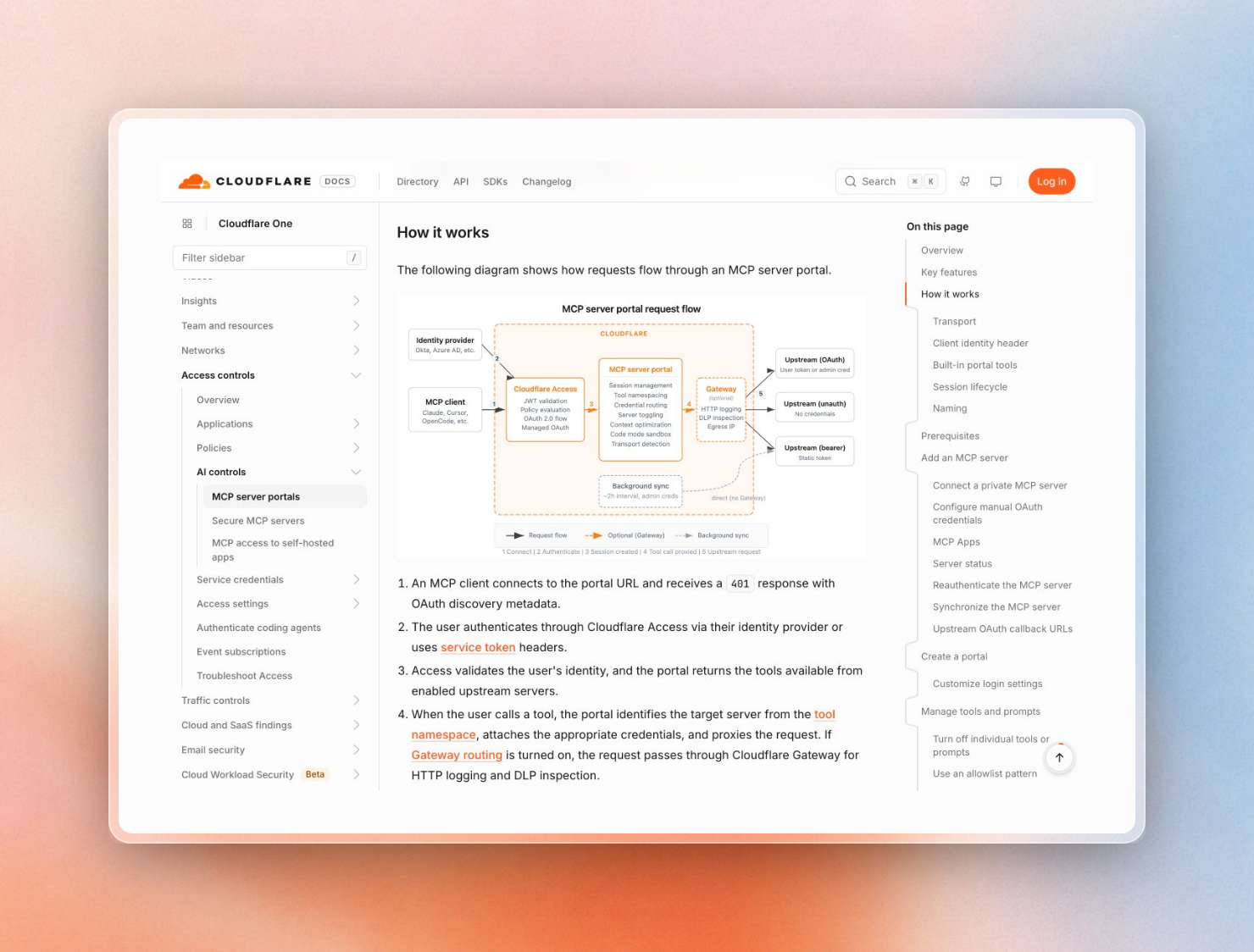 Request flow through a Cloudflare MCP server portal
Entra ID and Okta: two ways to wire SSO
The basic idea is that Entra ID and Okta get MCP access to a single location (a short-lived token bound to a single named user) via two different means: Entra ID swaps a user’s token at the gateway, and Okta allows a client to request a grant from Okta directly to access a single server.
Entra ID: on-behalf-of exchange at the gateway. The developer logs into Entra ID from their MCP client and receives a token bound for the gateway, which verifies it and exchanges it for a second token, bound for the MCP server, via Entra’s on-behalf-of (OBO) flow. The spec’s no-passthrough rule is upheld, and the server still sees the identity of the user. MFA and conditional access policies are applied at the time of the Entra login.
Okta: Cross-App Access. Okta’s Cross-App Access implements the MCP Enterprise-Managed Authorization extension. A client requests from Okta a short-lived ID-JAG (identity assertion) for a single MCP server, which Okta returns after applying the access policy of that server; the client exchanges the ID-JAG with the server for an access token. This flow eliminates the developer consent screen, and admins can manage access in the Okta console. Cross-App Access is currently in Early Access in Okta.
Putting Context7 behind your gateway
Context7 is an MCP server providing up-to-date library docs to coding agents. It supports both SSO patterns above, but either requires a Context7 Enterprise teamspace.
- Entra ID through Azure API Management. Context7 describes in detail how to set up APIM with the OBO policy. APIM will validate the developer’s token, exchange it for a token issued to the Context7 MCP API app, and then send it to
mcp.context7.com. Context7 will validate this token with your tenant and then associate the developer’s Entra object ID (oid) with a member of your teamspace. You can add people to the teamspace yourself or have them synced from an Entra security group every 30 minutes. If someone is removed from the security group, they will be removed from the teamspace. Note that nested groups are not expanded. Plan for 45 to 60 minutes for this setup. APIM Basic v2 works, but the Consumption tier does not support MCP backends. - Okta with Enterprise-Managed Auth. Your Okta admin registers Context7 as a resource app and assigns users. These users will then be added to your teamspace upon first sign-in. If a user is removed in Okta, they will no longer be able to sign in. Any existing session will be invalidated within an hour when its token expires. This flow currently only supports Claude Code.
- Plain OAuth without a gateway. Clients can authenticate against Context7’s OAuth endpoint instead of providing an API key, and Context7 accepts CIMD client IDs.
The server has limited capabilities: it exposes two tools, which only read data (to find a library and to read its docs), and receives limited input: only a short search query and the name of the library are shared with the server, while the prompt, source code and conversation are never sent. Queries from Enterprise teamspaces are never stored for benchmarking. However, the server’s output is public documentation text and is therefore considered external content in step 5 of the review below. To understand your on-prem options for running everything within your own network, see our self-hosted AI coding assistant guide.
Which MCP servers should your team approve?
Approve MCP servers after a short review of what data they send, what their tools can do, and how they sign users in. The servers you approve can only be accessed through your gateway. Use a list of popular servers as a starting point for requests, but the review makes the decision.
This workflow fits on one page:
- Request. A developer requests a server, specifying the team and task that requires it.
- Check what leaves your network. Read the server’s privacy documentation. Understand exactly what data the client is sending to the server (e.g. short query, entire files, full conversation). Our guide on what AI coding assistants send to the cloud shows what to watch out for.
- Check the tools. Make a list of all tools exposed by the server. Identify which tools are read-only and which tools write, delete, send messages or run commands. Writing tools require stronger justification and more limited access.
- Check sign-in. Look for servers that support OAuth and your IdP (either via the gateway or directly). Servers that only support a shared API key are candidates for credential injection at the gateway so that the API key never hits a developer’s machine.
- Check where the content comes from. The results of any tools are fed directly into the agent’s context. This means that any server that returns text written by external parties (e.g. web pages, public documentation) can introduce prompt injection into the agent. Ask the vendor how they sanitize external content.
- Put it behind the gateway. Add the server, grant access to the requesting team’s IdP group, and disable tools that are not needed by the team.
- Add it to the client allowlist. Make sure to use the gateway URL instead of the server’s own URL to prevent bypass.
- Review the logs and re-review. Review the call logs after a few weeks of use. Re-review the server if the vendor adds new tools or changes the sign-in mechanism.
Steps 2 to 5 are the same questions you would ask any vendor. The only difference is that the tool is invoked programmatically by an agent and no human reads the call before it’s made. A read-only docs server such as Context7 is a quick pass on steps 2 to 4: it receives a short query, its two tools only read, and it signs users in with OAuth or your IdP.
Context7 is free to try in Cursor, Claude Code and Copilot. To get Context7 behind Entra ID or Okta SSO for your entire team, please see Context7 Enterprise.