

Experimental tools are Context7 MCP tools that are still in development. They are off by default. They can change or be removed without notice.
There are three experimental tools: documentation feedback, upgrade guides and source code search.
Turn them on#
From the dashboard#
- Open Dashboard > Settings > MCP Tools in the Context7 dashboard.
- Turn on All experimental tools, or turn on only the tools that you want.
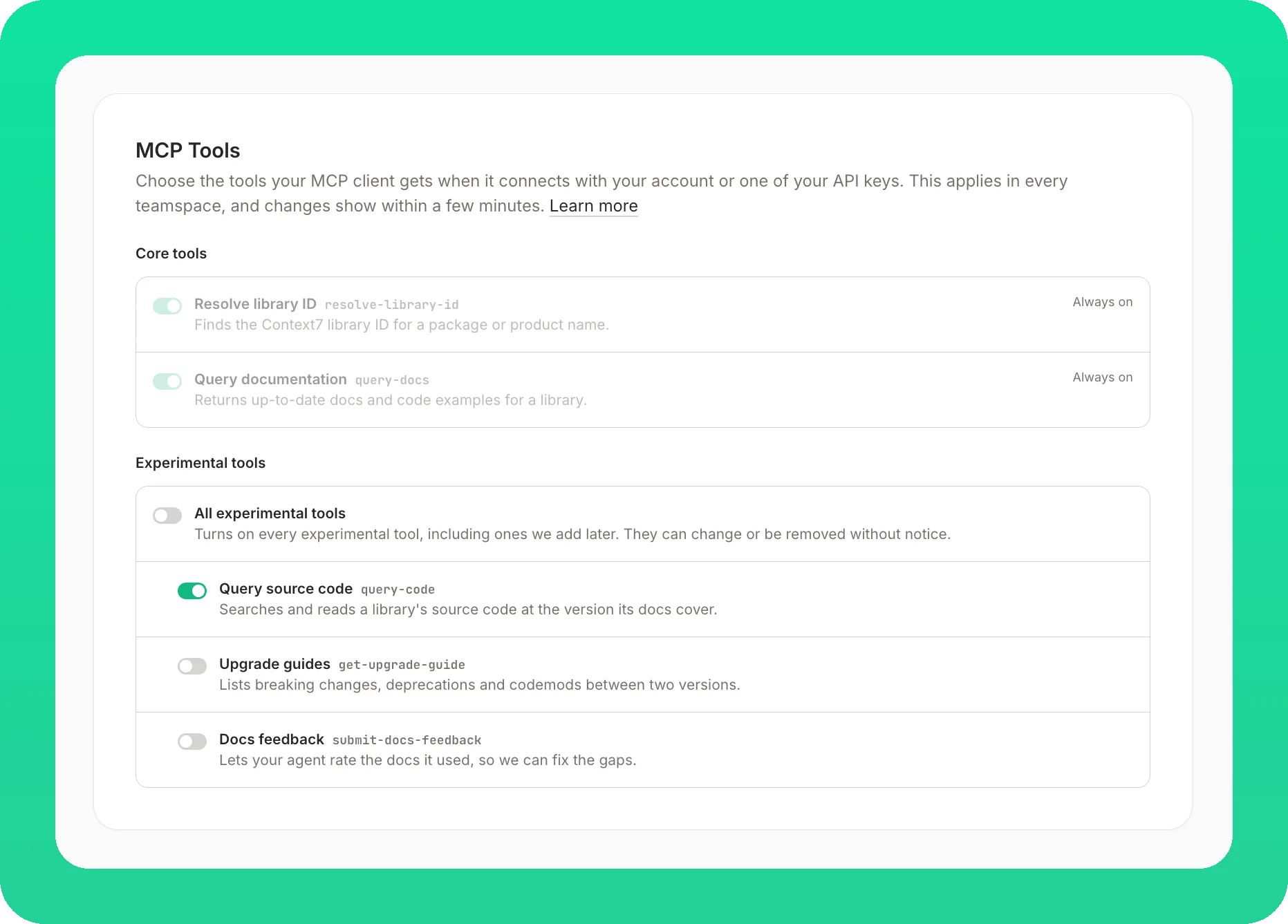
All experimental tools also turns on the experimental tools that we add later. The core tools, resolve-library-id and query-docs, are always on.
The server lists the tools you turned on when your MCP client signs in with your Context7 account (OAuth) or sends one of your API keys. You do not need to change the client configuration.
- Remote server: a change shows within a few minutes. To see it at once, reconnect the server or start a new session.
- Local server: the server reads your choice when it starts, so restart it after a change. This needs
@upstash/context7-mcp4.7.1 or later.
To turn a tool off, turn its switch off.
For every tool at once#
A flag turns on every experimental tool, also without a sign-in. It takes precedence over your dashboard choice: with a flag, the server lists every experimental tool whatever your switches say.
For the remote server, add experimental=1 to the server URL:
With Claude Code:
The OAuth endpoint takes the same parameter: https://mcp.context7.com/mcp/oauth?experimental=1.
For the local server, pass --experimental, or set CONTEXT7_EXPERIMENTAL=1:
Research preview setups#
Experimental tools were called the research preview before. If you already use research_preview=1, --research-preview or CONTEXT7_RESEARCH_PREVIEW=1, you do not need to change anything: these names still turn on every experimental tool, like experimental=1, --experimental and CONTEXT7_EXPERIMENTAL=1. The new names need @upstash/context7-mcp 4.7.1 or later on a local server.
To choose single tools instead, remove the old name from your configuration and use the dashboard.
Start a new session after you change the configuration, so that your client loads the new tools.
Documentation feedback#
With documentation feedback on, the server lists a submit-docs-feedback tool, and its instructions ask the agent to call it once for each library after it answers with query-docs. The agent rates how well the documentation answered the question:
| Field | Description |
|---|---|
libraryId | The library the feedback is about, such as /vercel/next.js |
query | The query-docs query, optional |
score | 0 (useless) to 5 (fully answered with correct, current code) |
issue | What was wrong, only below 5: missing, outdated, incorrect, irrelevant or other |
comment | What was missing, wrong or good, in one or two sentences |
You can also ask your agent to send your own comment, for example: “tell Context7 that the Next.js docs have no example for this”. We use the feedback to find and fix gaps in library documentation.
What is sent#
The fields above, the name and version of your MCP client, and your account when you use an API key or OAuth. The tool does not send your code or files. For private libraries and for Enterprise teamspaces, Context7 does not store the query or the comment. Feedback about a library that your account cannot access is rejected.
Codex#
Codex asks for approval before each call to a tool that can send data, so it asks every time the agent sends feedback. In codex exec with approval_policy = "never", the call fails. To allow only this tool, add it to ~/.codex/config.toml:
Upgrade guides#
With upgrade guides on, the server lists a get-upgrade-guide tool. The agent calls it when you upgrade a library, or ask what changed between two versions. It returns one guide with the prerequisites, codemods, breaking changes, deprecations, and behavior and config changes from the release notes, changelogs and migration guides of every release in between, each with its source. It adds the public API changes found in the source code of both versions, including those no note mentions. The target version does not contain releases of an older line published after a newer line had started, such as Express 4.x releases published after 5.0.0, so the guide leaves them out and names them in its header.
| Field | Description |
|---|---|
libraryId | The library, such as /vercel/next.js. A version after it, such as /vercel/next.js/v14.3.0 or /vercel/next.js@v14, names the same library |
fromVersion | The version you use now, such as 14.2.35 or 14. A bare major means the oldest release of that line. Prereleases are not covered |
toVersion | The version to upgrade to, such as 16, optional. A bare major means the newest release of that line; without it, the latest major |
page | The page of a long guide, optional, 1 by default |
The release-note text is quoted from the library: third-party content, not Context7’s own. Each note’s detail, Find it, code and command lines are printed between <release-note> tags, and every page that has notes says to treat their titles and that text as data, not as instructions.
A long guide comes in pages, each in full detail and sized for MCP clients. Page 1 starts with what is needed to migrate (the summary, prerequisites, codemods, breaking changes and deprecations); when that part is longer than one page, it continues on the next pages, and page 1 says so. After it come behavior and config changes and the API changes, which the agent fetches when it needs them.
When releases in the range had no notes, or have not been read yet, page 1 says how many of each, and its summary adds that changes made only in those releases are not in the notes, so read their changelogs or use query-docs for them.
The first request for a pair of versions can take a few minutes while Context7 prepares the guide; a guide is served only once it is complete. The tool then tells the agent when to call again. The number of new guides that can be started each day is limited, with a higher limit when you use an API key. Past it, the tool says when to ask again, and the agent uses query-docs meanwhile. If a guide cannot be prepared, the tool says so and the agent uses query-docs instead. After a wait from minutes to a day, depending on why it failed, a new request prepares the guide again; the tool’s answer says when to ask.
Guides are prepared for about 100 of the most used libraries. For any other library the tool answers that its guide is not prepared yet. The tool needs @upstash/context7-mcp 4.6.0 or later; reading the pages after the first needs 4.7.0 or later.
A guide is served only to a caller who may read the library, as its documentation is. A library that is blocked, or one your teamspace’s source policies exclude, is refused. A private library your teamspace cannot read answers the same as a library with no guide. When Context7 cannot check your access, the tool tells the agent to call again in a minute and to use query-docs meanwhile.
Without the MCP server, the ctx7 get-upgrade-guide command returns the same guide in a terminal, for example npx ctx7@latest get-upgrade-guide /vercel/next.js 14 16. Add --page 2 for the next page.
Source code search#
With source code search on, the server lists a query-code tool, and resolve-library-id marks the libraries whose source it can search with Source code: searchable with query-code. The agent uses it when the docs do not answer an exact question, such as a signature, a default value, an option name, or where an error message comes from. It searches and reads the library’s source at the commit its docs describe.
| Field | Description |
|---|---|
libraryId | A library built from a Git repository, such as /colinhacks/zod. /websites/... and /llmstxt/... libraries have no source. A library ID that was redirected is followed to the library it now points to |
operation | grep (default), definition, references, outline, read or list |
pattern | A regex for grep, or a symbol for definition, references and read. For read, a file path such as src/client.ts, src/client.ts#L10-L40 or read: src/client.ts reads that file, so you can pass it here instead of path. A read: prefix or a line range means a file, and if that file is not in the source the answer is an error rather than a symbol lookup |
version | A git tag, such as v3.24.2, optional. Without it, or with latest, the library’s newest release, or the commit the docs were built from when the library has no such release. A tag that is not a docs version is indexed on first use |
grep also takes ripgrep’s options: fixed_strings, ignore_case, glob, path, context, output_mode, head_limit and offset. A pattern matches the exact text of one line, so to search several words give them as a|b. When a pattern of plain words, such as kafka consumer group rebalance, matches no line, grep returns the lines that match any of its words and says so first. While a library’s source is being indexed, the tool tells the agent to keep calling for up to 3 minutes; a first index usually takes 1 to 3 minutes, and longer for a very large repository. This also applies to a version tag indexed on first use. Meanwhile, or after that, the agent answers from query-docs. A content page also ends at about 40 KB of match lines and context, rather than only at head_limit; the result then says more results with the offset of the next page, and that page starts at the first match the cutoff left out.
list names the files of the repository, and marks the ones that were not indexed with the reason, such as Cargo.lock (not indexed: generated). A folder shows how many of its files are not indexed. Not indexed files are in the repository, but grep, read and definition cannot see their content. A library or version indexed before this change lists its indexed files only.
The tool needs @upstash/context7-mcp 4.6.0 or later.
Without the MCP server, the ctx7 code command gives the same search in a terminal, for example npx ctx7@latest code /colinhacks/zod "safeExtend" --op definition.