

Verified libraries receive a special badge that signals quality and trustworthiness to developers. Verification helps your library rank higher in search results and gives users confidence that your documentation is reliable.
Why Get Verified?#
Verification provides several benefits for your library:
- Higher search ranking: Verified libraries are prioritized in search results and recommendations
- Trust badge: A verified badge is displayed on your library page, building confidence with users
- Increased visibility: Verified libraries appear more prominently across Context7
- Broader access: Teamspaces can restrict their library access to "verified only" - without verification, your library won't be accessible to these users
Verification Badge#
Once verified, your library displays a green checkmark badge next to its name:
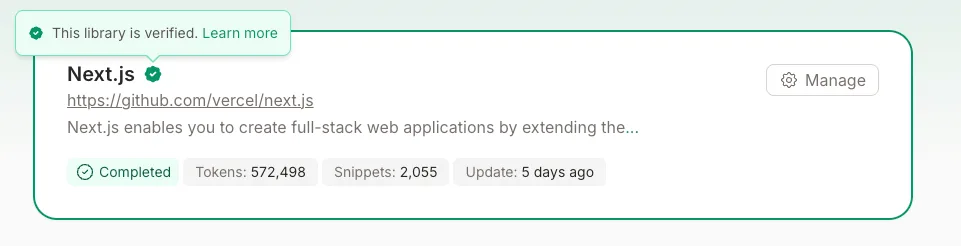
This badge appears on:
- Your library's main page
- Search results
- Library listings and tables
How to Get Verified#
There are two paths to verification:
Automatic Verification#
Libraries are automatically verified when they meet certain quality thresholds:
- High trust score: Libraries with a trust score of 9 or above. Trust score is calculated based on the GitHub organization/user profile, considering factors like total stars, number of repositories, account age, recent activity, followers, and profile completeness.
- Top 100 libraries: Most-used libraries by API requests
Automatic verification is checked daily. If your library qualifies, it will be verified automatically without any action required.
Manual Verification#
If your library doesn't qualify for automatic verification, you can apply manually:
Claim Your Library
You must be a verified owner of the library. See Claim Your Library for instructions.
Go to the Admin Page
Navigate to your library's admin page at:
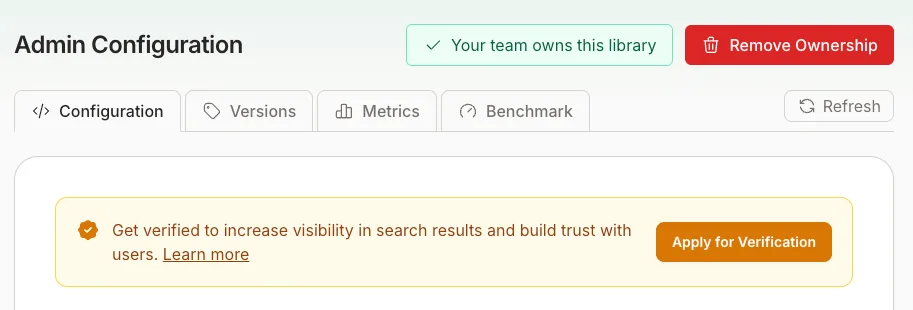
Apply for Verification
If your library is not yet verified, you'll see a banner at the top of the configuration page with an "Apply for Verification" button. Click it to start the process.
Instant Quality Check
When you initiate a verification request, Context7 automatically checks a set of quality criteria. If your library meets any one of the following criteria, it is verified instantly — no form required:
- Trust score above 7: Calculated from your GitHub organization/user profile, including stars, repository count, account age, recent activity, followers, and profile completeness.
- 250+ GitHub stars (repositories only): Indicates a strong and established community.
- Top 1% by popularity ranking: Your library is among the most in-demand sources indexed on Context7.
- 200+ referring domains (websites and llms.txt sources only): Your source is cited or linked to by more than 200 unique external domains, demonstrating broad recognition across the web.
If any of these thresholds are met, verification is granted immediately.
Complete the Application
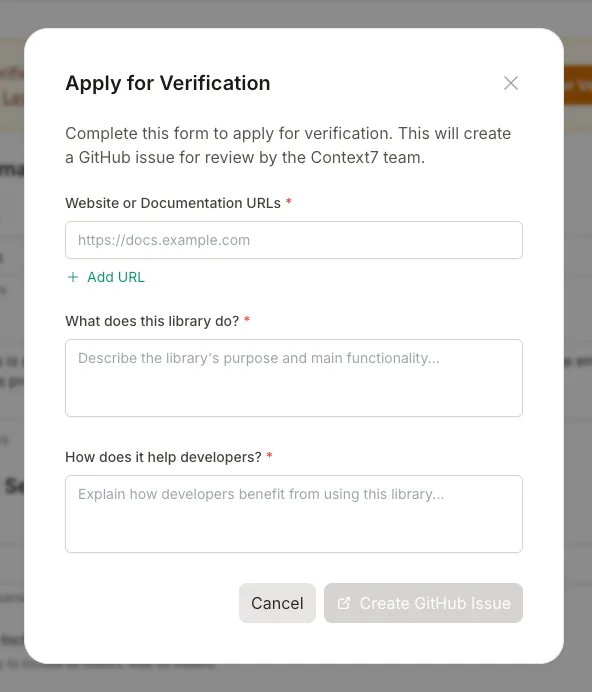
If none of the quality thresholds are met, you'll be prompted to fill out the verification application form:
| Field | Description | Required |
|---|---|---|
| Website/Docs URL | Link to your library's official website or documentation | Yes |
| Library Description | Brief description of what your library does | Yes |
| Developer Value | How your library helps developers | No |
Submit for Review
Click "Submit Application" to send your request. Your application will be reviewed immediately.
Verification Requirements#
To be approved for manual verification, your library should:
- Be a legitimate project: Real libraries with actual users and documentation
- Have quality documentation: Well-organized, up-to-date documentation that helps developers
- Be actively maintained: Regular updates and responsive to issues
- Follow best practices: Clear README, proper licensing, and good code organization
Verification is free and always will be. We verify libraries based on quality, not payment.
Verification Status#
You can check your library's verification status on the admin page:
| Status | Description |
|---|---|
| Verified | Green badge displayed, full verification benefits |
| Not Verified | No badge, apply to get verified |
FAQ#
How long does manual verification take?#
If your library meets one of the quality thresholds, verification is instant. Otherwise, your application is reviewed immediately after submission. If it's not automatically accepted, you can open a GitHub issue to request a manual review.
Can verification be revoked?#
Yes, in rare cases. Verification may be revoked if:
- The library becomes abandoned or unmaintained
- Documentation quality significantly degrades
- The library violates Context7's terms of service
Does verification cost anything?#
No. Verification is completely free and based solely on library quality.
I was automatically verified. Can I lose it?#
Automatic verification is recalculated daily. If your library no longer meets the automatic criteria, you'll retain your verification status but may need to apply manually if it's ever revoked.
My library is popular but not verified. Why?#
Automatic verification considers multiple factors including trust score and usage statistics. When you apply manually, Context7 also checks quality criteria like GitHub stars, popularity ranking, and referring domains. If you believe your library meets any of these thresholds, please apply manually and the check will run immediately.
Need Help?#
If you have questions about verification or encounter issues with the application process:
- Open a GitHub issue
- Join our Discord community
- Contact us at support@context7.com