AI Software Factories Need Current Docs: Grounding Agents in the APIs You Run
 Batuhan Bilgin9 min read
An AI software factory turns specs into code with no human writing or reviewing it, so an outdated API call is only caught when a check fails. In our factory-loop test on APIs released in 2026, adding Context7 docs took Claude Haiku 5.5 from 12 to 20 passing work orders out of 20, and Claude Sonnet 5.5 from 16 to 20.
In a software factory, a work order goes in and a pull request comes out. An agent reads the spec, writes the code and runs the checks. Nobody reads the diff. When the agent calls a function that a library removed after the model's training data ends, the factory finds out the same way it finds out about any bug: a check fails, or it doesn't.
What is an AI software factory?
An AI software factory is a process where coding agents are fed specs and write code that is run against tests. This process continues until the tests pass. The code is never written or reviewed by a human; people who use a software factory judge code based on what it does, not what it looks like.
The AI team at StrongDM published the clearest description of this concept. Their factory is “non-interactive development where specs + scenarios drive agents that write code, run harnesses, and converge without human review.” The team there had two rules:
- Code must not be written by humans.
- Code must not be reviewed by humans.
This is the loop such a factory runs:
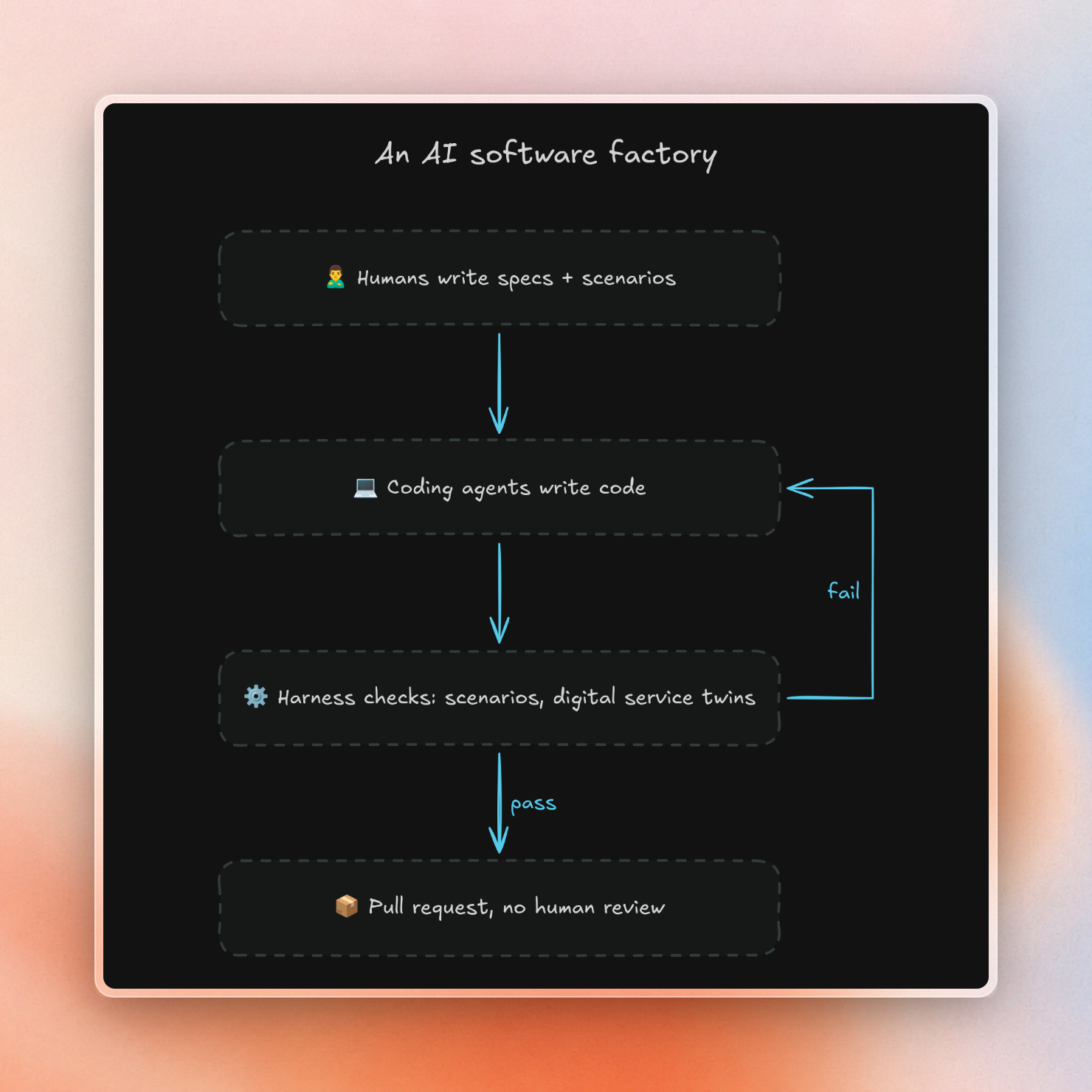
Because nobody is reviewing code, the checks are the most important part of the factory. StrongDM keeps end-to-end “scenarios” outside of the codebase so that agents cannot rewrite the tests to pass. The tests are then run against behavioral clones of Okta, Jira, Slack and Google Drive, so that agents can run thousands of tests per hour without actually interacting with any real services. These clones were also created by agents working off of the services' public API docs and reference SDKs.
Dan Shapiro refers to this as level 5 of AI coding, the “dark factory.” This is a process that is “a black box that turns specs into software.” Companies like 8090 are now selling factory platforms to companies who want this setup.
How outdated APIs break a factory
An outdated API is caught by a factory's checks in one of two ways. Only one is loud.
When a library removes an API, the old call fails right away. Polars 2.0 removed melt(), and the MCP Python SDK v2 renamed FastMCP to MCPServer. Running old-style code against the current versions printed this:
polars.exceptions.AttributeRemovedError: `melt` was removed in version 2.0; use `DataFrame.unpivot` instead, with `index` instead of `id_vars` and `on` instead of `value_vars`
ModuleNotFoundError: No module named 'mcp.server.fastmcp'. This is mcp 2.x, where FastMCP was renamed to MCPServer (from mcp.server.mcpserver import MCPServer)
Both of these errors literally tell you how to fix them. A factory loop will feed back the error to the agent, and the second attempt will likely pass. It does mean you’re paying for an extra model call per break, and if the break isn’t clearly explained by the error message, then it can eat up all the retries.
A deprecated API is much worse: It still runs. This means your code will pass everything today and then fail on the next major release. Polars will keep deprecated functions for two breaking releases before finally dropping them. But nobody in the factory is reading the warning logs!
In Python, you can upgrade these warnings to failures. Our harness runs all checks with -W error::DeprecationWarning, so calling a deprecated function will fail just like calling a removed function.
BCG’s write-up on dark factories puts the general problem well: “AI agents are only as effective as the codified knowledge they can access”, and API documentation is often what’s outdated.
We ran a small factory loop with and without docs
We built a small factory in October 2026 to see what docs change in a factory. Each work order is a short spec that never names the API to use. The installed versions were mcp 2.3.0 and Polars 2.0.0.
The loop works like this:
- Optionally, fetch docs for the installed version from Context7’s search API.
- Ask the model for one complete Python module.
- Run a hidden check against the module, with deprecation warnings treated as errors.
- If the check fails, send the error back to the model. Stop after three attempts.
This is the check step:
def run_check(code: str, check: str) -> tuple[bool, str]:
    with tempfile.TemporaryDirectory() as d:
        Path(d, "solution.py").write_text(code)
        Path(d, "check.py").write_text(check)
        proc = subprocess.run(
            [PY, "-W", "error::DeprecationWarning", "check.py"],
            check=False,
            cwd=d,
            capture_output=True,
            text=True,
            timeout=120,
        )
    return proc.returncode == 0, (proc.stderr or proc.stdout)[-1500:]
We wrote two groups of work orders:
- Older renames and removals. Eight orders targeting APIs that Polars deprecated long before 2.0 (e.g.
melt(),join_nulls), plus theFastMCPrename. Each work order is run twice with no docs, and twice with Context7. - APIs added in late 2025 or 2026. Five orders requiring new functionality (e.g. MCP cache hints, MCP v2 in-memory
Client, Polars'collect_batches(),glimpse(return_type=),empty_string_is_null). Each work order is run four times in each setup.
The new-API orders were run: 1) with no docs; 2) with Context7 using the entire work order as search query; 3) with Context7 using up to 3 short queries written first by the model. OpenRouter was used to call Claude Sonnet 5.5 and Claude Haiku 5.5.
These are the results for the five new-API orders, 20 runs per row:
The same pass counts as a chart:
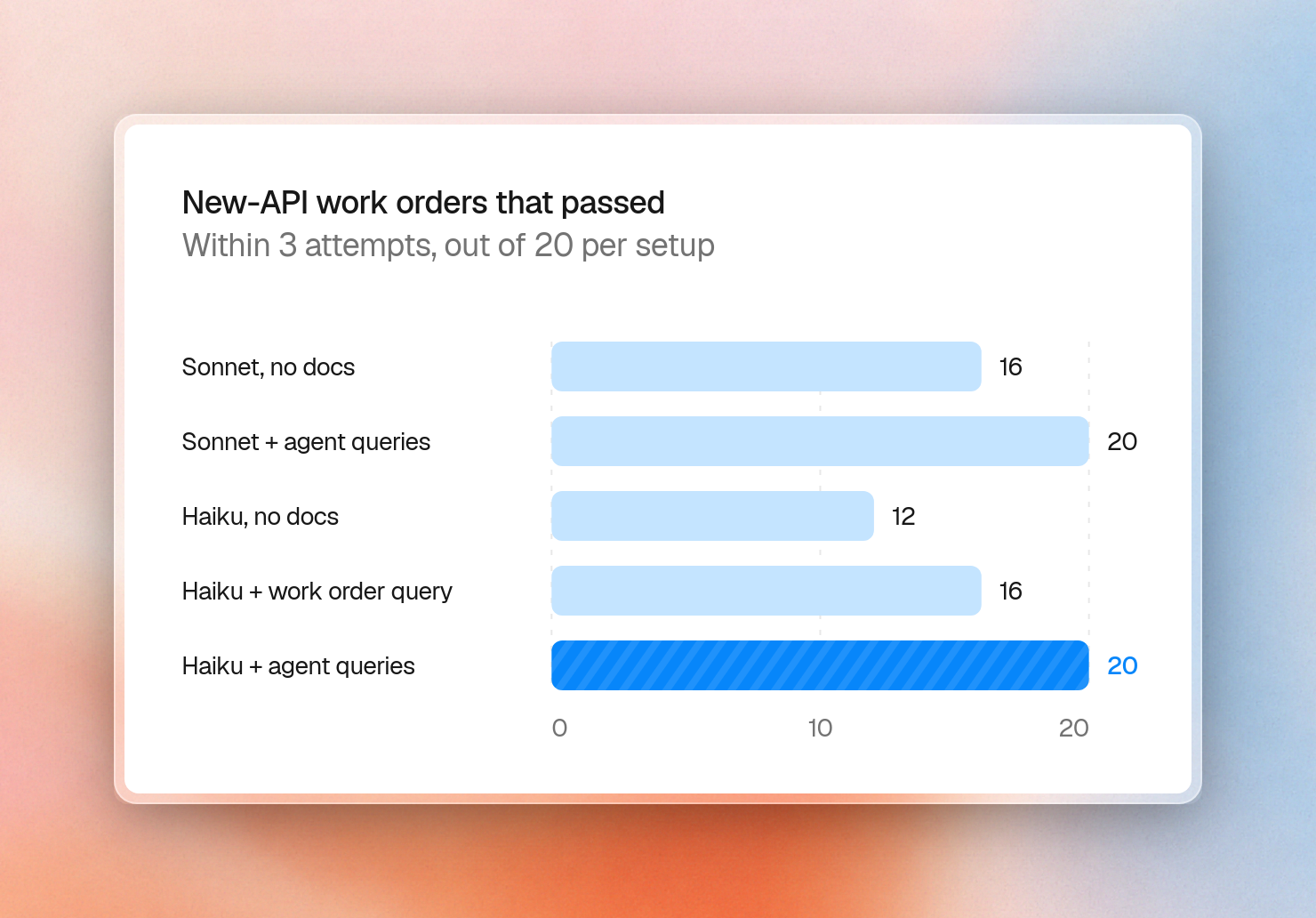
The MCP cache hints order is the most striking example of the gap docs close. Without docs, neither model was able to complete the order in three tries, across eight runs. Seven of the first attempts tried to import FastMCP, which was removed in version 2. With the agent-written queries, all eight runs passed, five of them on the second attempt.
Haiku had the same problem with the in-memory test client: without docs, it was 0 out of 4; with agent-written queries, it was 4 out of 4 on the first try. Sonnet already knew the new Polars APIs and was able to pass all the Polars orders on its own.
The older renames were a different story. These are the eight older orders, 16 runs per row:
Haiku's five first-try misses without docs were four imports of FastMCP and one join_nulls.
This is a small test, thirteen work orders across two Python libraries, with two models. It’s enough to demonstrate the difference between documentation that helps a factory and documentation that only consumes tokens. This is not a benchmark of either model.
Add a docs step to the factory
By the time the agent starts work on any order, the factory knows two things: the spec and the exact package versions in the lockfile. This means the docs step, which runs once per work order, can use that information to prepare ahead of the first attempt:
- Read the installed version of each package involved in the order.
- Translate each package name to its Context7 library ID.
- Have the agent write a short set of queries that it expects to need.
- Run each query against that library and version, then put the results in the prompt.
- Use the deprecation-as-error check as the backstop.
With the docs step, the entire loop looks like this:
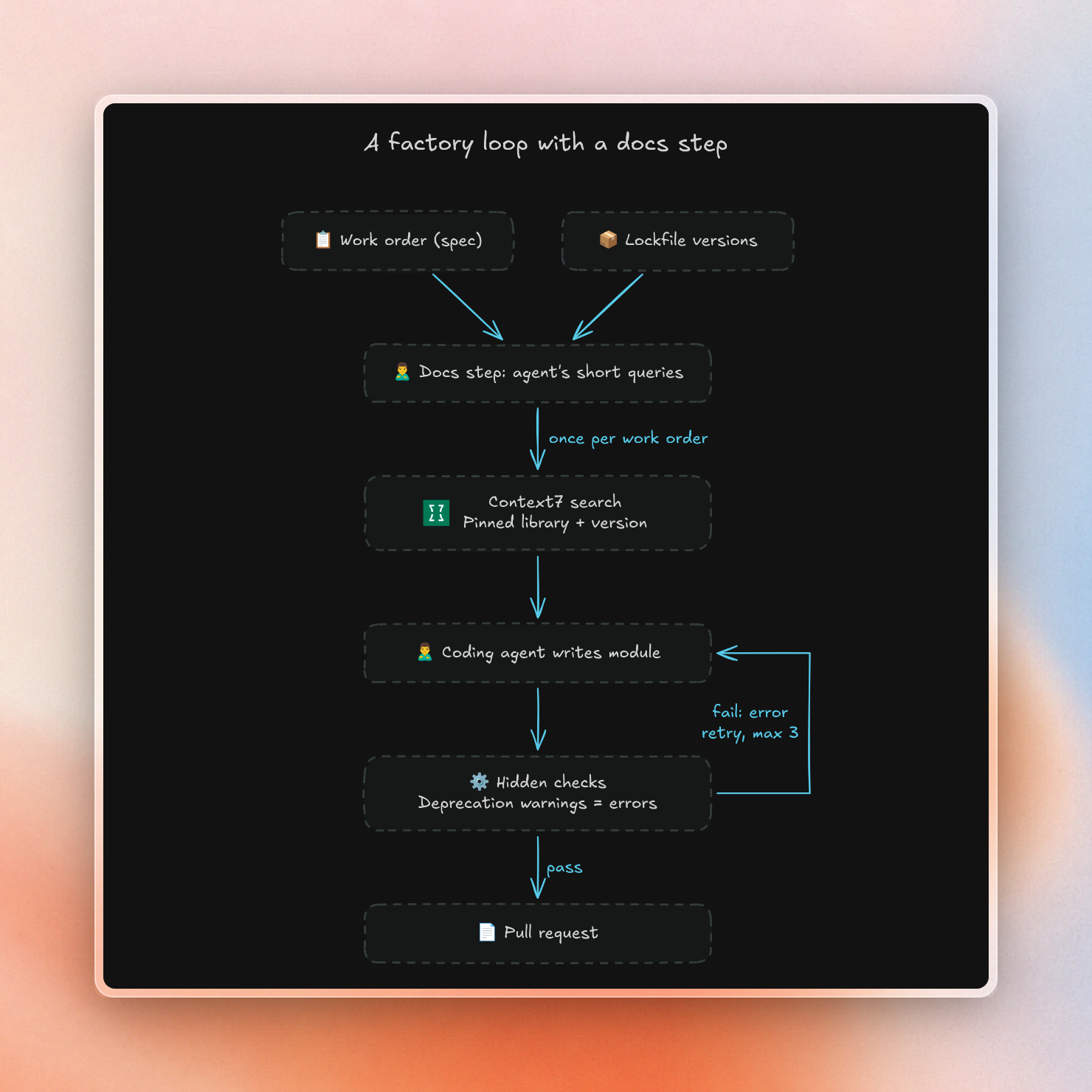
Step 2 is crucial: in our test, the PyPI name mcp was passed as a library hint and brought up docs for Laravel's MCP package. The factory needs to map package names to library IDs reliably.
This is the docs step from our harness, cut down:
import json
import os
import urllib.parse
import urllib.request
from importlib.metadata import version

# Package name -> Context7 library ID. Package names and library IDs differ:
# passing "mcp" as a hint matches unrelated libraries.
LIBRARIES = {
    "polars": ("/websites/pola_rs", None),
    "mcp": ("/modelcontextprotocol/python-sdk", "v{v}"),
}


def search_docs(query: str, package: str) -> list[str]:
    library, version_format = LIBRARIES[package]
    params = {"query": query, "library": library, "type": "json"}
    if version_format:
        params["version"] = version_format.format(v=version(package))
    url = "https://context7.com/api/v3/search?" + urllib.parse.urlencode(params)
    req = urllib.request.Request(
        url, headers={"Authorization": f"Bearer {os.environ['CONTEXT7_API_KEY']}"}
    )
    with urllib.request.urlopen(req, timeout=60) as resp:
        body = json.load(resp)
    titles = [s["codeTitle"] for s in body.get("codeSnippets", [])]
    return titles + [s["breadcrumb"] for s in body.get("infoSnippets", [])]


print(search_docs("server cache hints for the tool list", "mcp"))
It prints the sections it found in the MCP SDK v2.3.0 docs:
['Recap', 'The rest, quickly', 'What the client sees', 'Reading the hints yourself', 'What the client sees']Short queries are why step 3 exists. For example, during one run we analyzed, using the entire cache-hints work order as a query brought up general snippets for MCPServer setup, but didn’t include any caching docs. But running a short query about cache hints did surface the information we needed. We can see this trend on a bigger scale in the table above: queries written by agents achieved a 20/20 success rate for both models, while the work order itself as a query only hit 19/20 and 16/20.
Our search API allows for up to four library hints and a pinned version. This means you can cover an order that touches more than one library in one call. If you have a factory that’s also building on internal SDKs, Context7 Enterprise can index private repositories in the same manner.
What grounding costs
The docs step adds tokens to each prompt. With agent-written queries, each order had about 2,600 to 2,900 tokens of docs plus one short planning call. Fewer retries pay some of that back. These are the 20 new-API orders per row:
The bill didn't change for either model. What changed was how many orders shipped.
The docs step only helped where the model's training data was behind. On the older renames, Sonnet passed all of the runs without docs, and Context7 only added tokens: 27,096 in total compared to 10,450. A factory can decide whether to run the docs step on a per-order basis by comparing the lockfile against the model it runs. The orders with packages that changed after the model's cutoff can run the docs step, while the rest can skip it. A factory running a smaller model for volume, like Haiku here, can get the most mileage out of this approach.
The setup that worked for our test:
- Pin docs to the versions in the lockfile, via a fixed map of library IDs.
- Let the agent write short queries rather than searching with the whole spec.
- Treat deprecation warnings as errors, so quiet breaks can fail in the factory instead of in the next upgrade.
You can try the search API with a free key from the Context7 dashboard. Coding agents can perform the same lookups via the Context7 MCP server.