Context Engineering for Coding Agents: Keep Docs From Filling the Context
 Batuhan Bilgin9 min read
Context engineering for coding agents starts with docs: in our test, Context7 snippets passed all 84 runs using a tenth of the tokens of full web pages.
Coding agents need current docs to use APIs they never saw in training. How those docs get into the prompt decides how much context they take.
We gave Claude Haiku 5.5 seven work orders for Polars 2.0, AI SDK 7 and Next.js 16.4. Then we compared four ways to load the docs:
- Context7 (our docs search for coding agents), which returns ranked snippets
- Exa (web snippets): highlighted passages from web search results
- Exa (web pages): the full text of those same results
- The library's whole docs file
Context7 added about 4,800 tokens per work order, Exa (web snippets) about 7,300, and Exa (web pages) about 50,000. The AI SDK and Next.js docs files are each over a million tokens, so they didn't fit in the model's context window.
Context7 and Exa (web pages) both passed all 84 runs. The extra 45,000 tokens only saved retries: Exa (web pages) passed all 84 on the first try, and Context7 passed 76.
Context engineering is choosing the smallest set of tokens the model sees at each step: instructions, code, tool results and docs. For docs, that means loading only the snippets that answer the current task. Whole pages, other versions and other libraries stay out.
How do I keep docs from filling my agent's context?
Search the docs for the API the task needs, and load only the matching snippets from the library you installed.
In our test, Exa (web pages) used about 10 times the tokens of Context7 for the same pass rate. The AI SDK and Next.js docs files were too big for a 1M-token context window.
Three habits did most of the work:
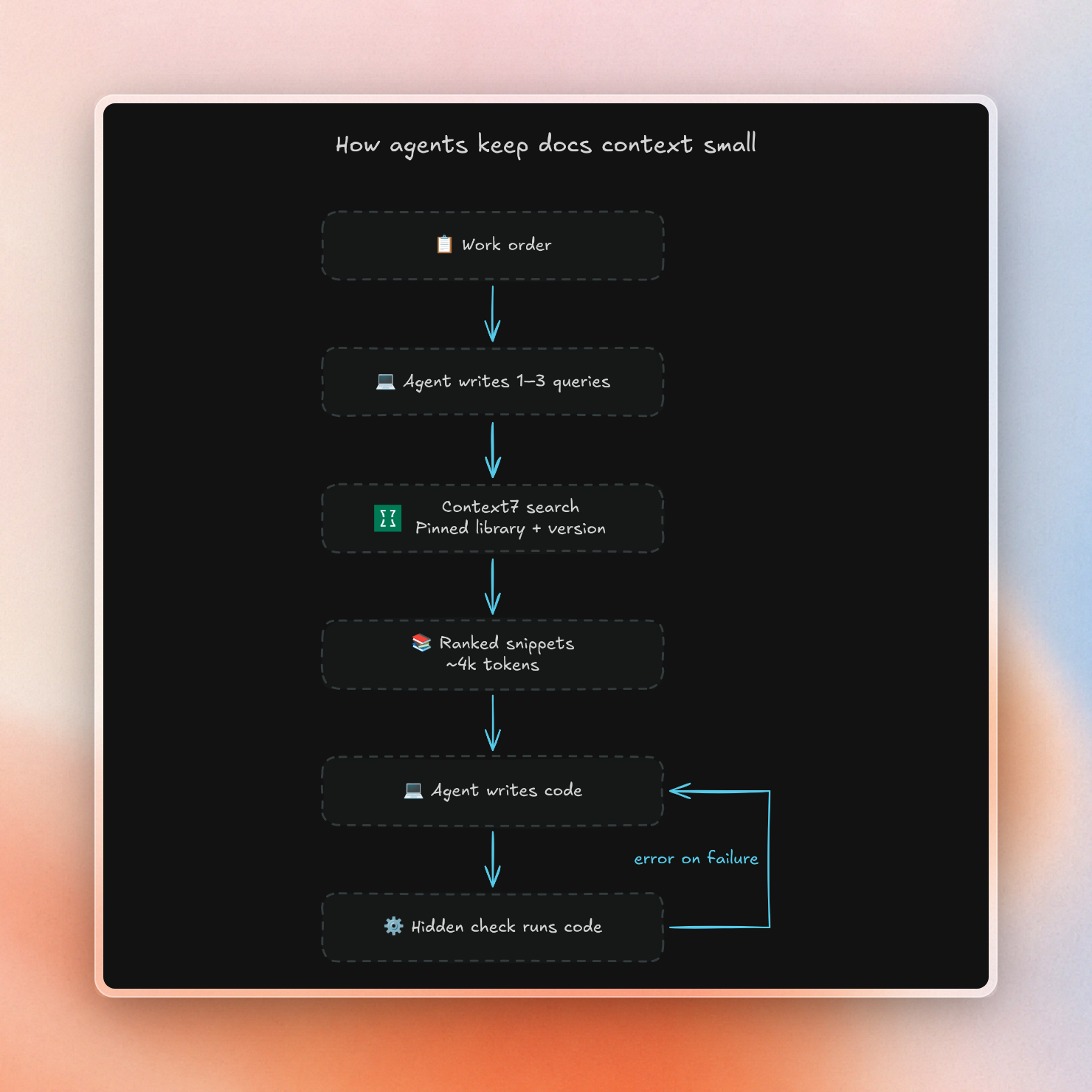
- The agent writes its search queries from the task, before it writes code. Each query asks about one thing.
- The search is pinned to one library, and to the installed version when the docs index has it. Pages from other projects never reach the prompt.
- The search returns snippets, not pages: a few code examples and short doc passages.
Here is the loop our test agent ran:
Why more docs can make the agent worse
Models get worse as the prompt gets longer. Researchers saw this across 18 models, even on simple tasks. Anthropic calls it context rot.
In one of those tests, models answered better when they got only the relevant part of a chat history. With the full 113k-token history, they did worse, even though the answer was in there.
Anthropic describes each model as having a limited "attention budget". Every token you add spends some of it. Their advice is to give the model the smallest set of high-signal tokens that gets the result, and to load data just in time.
Some tokens hurt more than others. A distractor is text on the same topic that doesn't answer the question. In the context rot tests, distractors lowered scores, and the drop grew with more distractors and longer inputs.
Docs are full of distractors: the old way to call a function, a page for another version, or a library with a similar name.
The test: same work orders, different docs
We reused the setup from our AI software factory test. The only thing we changed was how the docs reached the model. Here is the setup:
- Seven work orders that need recent APIs. Three are for Polars 2.0: read a CSV in batches, get
glimpseoutput as a string, and keep empty strings when reading a CSV. Two are for AI SDK 7.0.150: pass a per-call value to a tool, and read the token usage of the final step only. Two are for Next.js 16.4.2: add a non-standard line to robots.txt, and make the build fail if a layout's routes stop being static. The work orders say what the code must do and never name the API. - A hidden test for each work order. The AI SDK tests use the SDK's mock model. The robots.txt test renders the file with Next.js's own code.
- Claude Haiku 5.5 writes the code. It gets up to 3 tries, and it sees the error after each failed try.
- The same search queries for every approach. Before coding, Haiku writes up to three search queries. Every approach gets those same queries, so only the returned docs change. We did this with three different sets of queries.
- 84 runs per approach. That is 7 work orders, 3 query sets and 4 runs each.
These are the approaches we compared:
The full docs file approach never ran:
- Polars doesn't publish one: docs.pola.rs/llms.txt returns a 404.
- The AI SDK file is 4.9 MB, about 1.15 million tokens by OpenAI's tokenizer.
- The Next.js file is 4.5 MB, about 1.03 million tokens.
Haiku 5.5's context window is 1M tokens. OpenRouter rejected our request with the Next.js file at about 1.14 million tokens.
How many tokens each approach adds
The numbers below are the tokens Claude billed for the docs in the first prompt of each order, averaged over the three query sets:
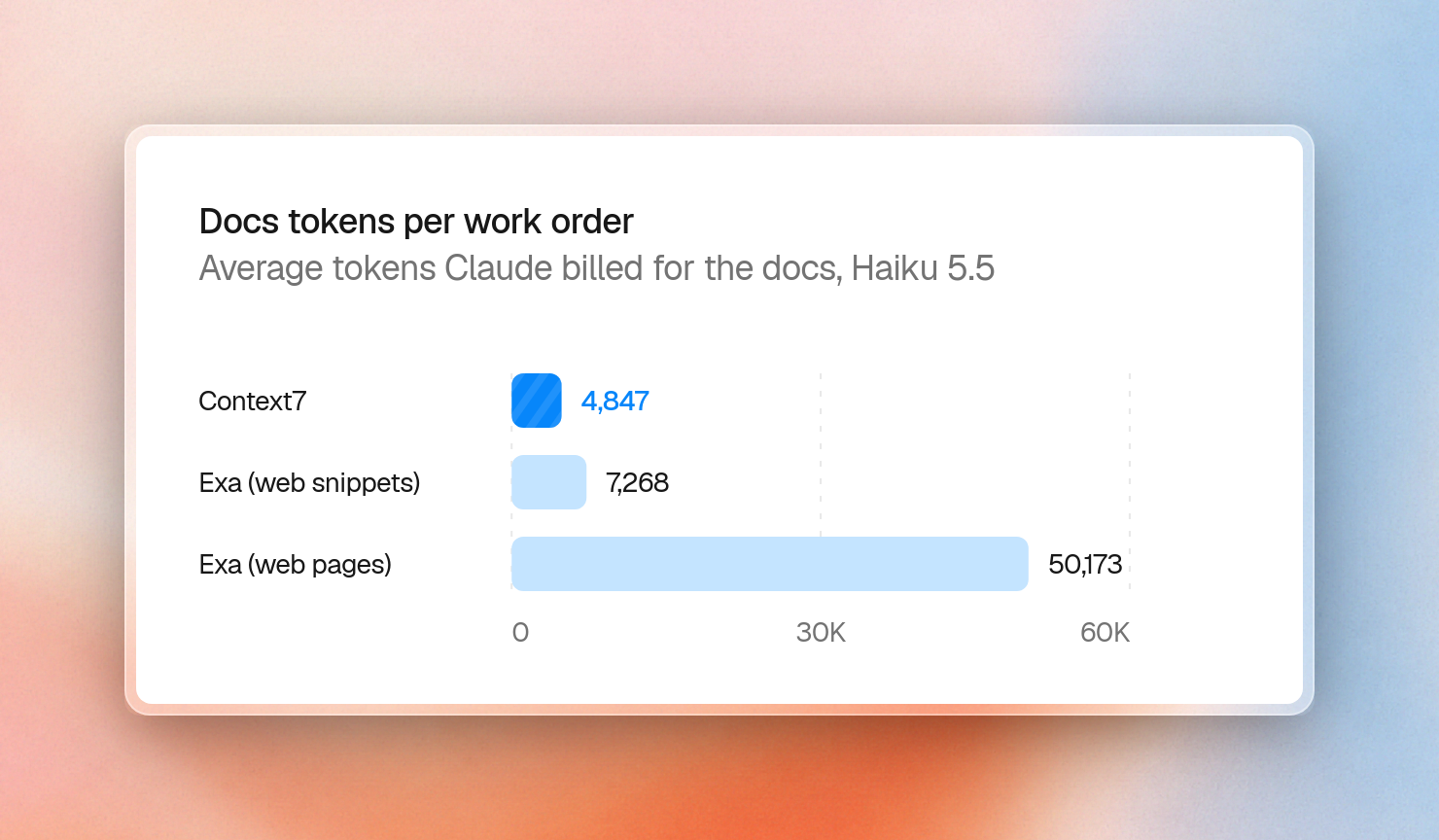
Exa (web pages) varied the most. A single work order got anywhere from 6,689 to 166,331 tokens of pages, depending on what the search returned. Every later message in the same session carries those tokens again.
All three searches found the right API in almost every case. Context7 missed it once, for the Next.js static layout order in one query set.
Did the agent get the code right?
Here is how each approach did across all runs. Prompt tokens and cost count every try, including retries:
Any docs beat no docs.
Context7 and Exa (web pages) both passed all 84 runs. Exa (web pages) passed every run on the first try, but it used 9 times the prompt tokens and cost 9 times as much.
Context7 orders cost slightly less than orders with no docs, because the model needed fewer retries. Costs are what OpenRouter billed for the model, without the search calls.
Docs mattered for three of the seven orders. Haiku already knew the Polars APIs and the AI SDK's final-step usage: it passed all 48 of those runs without docs. Without docs, it never passed the robots.txt order. It also never got the per-call tool value or static layout orders right on the first try.
Context7's 8 first-try misses were all on the static layout order. In one query set, the snippets didn't mention ensureStatic. In another, they described it without listing its values. In a rerun with those snippets, Haiku guessed ensureStatic = 'complete' instead of 'navigation'. All 8 runs passed on the second try.
Exa (web snippets) lost 7 runs, all on the per-call tool value order. In a rerun with those snippets, Haiku's first try used experimental_context, the AI SDK 6 option. AI SDK 7 replaced it with contextSchema and toolsContext.
What web search put in the context
Web search doesn't know which version you have installed. Across the three query sets, Exa returned 148 pages, and 45 of them were for another docs version or project:
These are the distractors from the context rot tests: text on the right topic that answers a slightly different question.
Haiku's queries made it worse. For the per-call tool value order, all three query sets asked for experimental_context and stepCountIs, the AI SDK 6 names.
The AI SDK site keeps older docs under /v5/ and /v6/, and Exa returned those pages next to the current ones. For the robots.txt order, Exa also returned Next.js docs from before the other field was added in 16.3.
Context7 got the same queries, but it only searched the one library for each order.
Adding a docs lookup to your agent
An agent in an editor or CLI gets the lookup as two MCP tools from the Context7 MCP server. One finds the library ID, and one queries its docs. This command sets it up for your coding agent:
$ npx ctx7 setupA software factory or a custom agent can call the search API directly. This call asks one question about the AI SDK:
import json
import os
import urllib.parse
import urllib.request

params = {
    "query": "pass a per-call API key to a tool's execute function",
    "library": "/websites/ai-sdk_dev",
    "type": "json",
}
url = "https://context7.com/api/v3/search?" + urllib.parse.urlencode(params)
req = urllib.request.Request(
    url, headers={"Authorization": f"Bearer {os.environ['CONTEXT7_API_KEY']}"}
)
with urllib.request.urlopen(req) as resp:
    body = json.load(resp)

code = body["codeSnippets"]
info = body["infoSnippets"]
total = sum(s["codeTokens"] for s in code) + sum(s["contentTokens"] for s in info)
print(f"{len(code)} code snippets, {len(info)} doc snippets, {total} tokens")
print(code[0]["codeTitle"])
print(code[0]["codeList"][0]["code"])
It printed:
2 code snippets, 1 doc snippets, 621 tokens
Use runtimeContext and toolsContext with generateText and tool callbacks
import { generateText, tool } from 'ai';
import { z } from 'zod';

const result = await generateText({
  model: "anthropic/claude-sonnet-5.5",
  prompt: 'Check the order status.',
  runtimeContext: {
    requestId: 'req_123',
    tenantId: 'tenant_abc',
  },
  tools: {
    getOrderStatus: tool({
      inputSchema: z.object({ orderId: z.string() }),
      contextSchema: z.object({ region: z.string() }),
      execute: async ({ orderId }, { context }) =>
        getOrderStatus(orderId, context.region),
    }),
  },
  toolsContext: {
    getOrderStatus: {
      region: 'us-east-1',
    },
  },

  onStart({ callId, runtimeContext }) {
    logger.info('ai.request.started', {
      callId,
      requestId: runtimeContext.requestId,
      tenantId: runtimeContext.tenantId,
    });
  },

  onToolExecutionStart({ toolCall, toolContext }) {
    logger.info('ai.tool.started', {
      toolName: toolCall.toolName,
      region: toolContext.region,
    });
  },
});
The whole answer is 621 tokens. Its first snippet shows the contextSchema and toolsContext pattern the per-call tool value order needed.
The AI SDK's whole docs file is about 1.15 million tokens.
Recap
- Docs raised Haiku 5.5 from 66 of 84 passes to 77 with Exa (web snippets), and to 84 with Context7 or Exa (web pages).
- Context7 added about 4,800 tokens per order, Exa (web snippets) 7,300 and Exa (web pages) 50,000.
- The AI SDK and Next.js docs files are over a million tokens each and didn't fit in the context window.
- Exa (web pages) cost 9 times as much per order as Context7 for the same 84 passes, with 8 more first-try passes.
- 45 of Exa's 148 pages were for another docs version or project.
- When snippets named an API without its allowed values, Haiku guessed and needed a second try.