### Gumloop Slack App Setup Guide Overview
Source: https://docs.gumloop.com/core-concepts/custom_slack_app
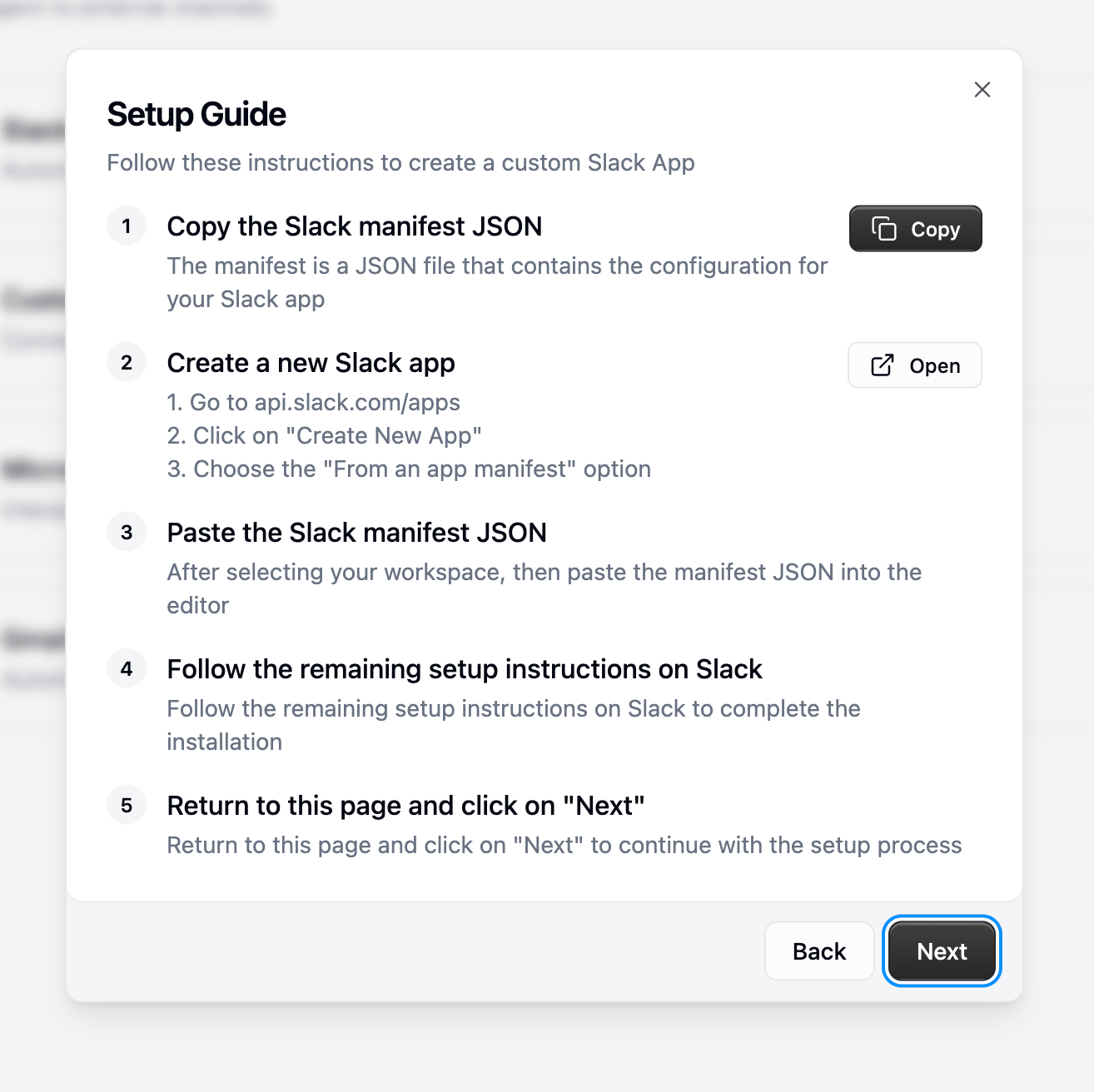
This snippet displays the visual guide for setting up a Slack app provided by Gumloop. It outlines a 5-step process for creating and configuring the app. The guide aims to simplify the setup by offering clear, sequential instructions.
```html
 ```
--------------------------------
### Agent Instructions Example
Source: https://docs.gumloop.com/core-concepts/agents
An example of a system prompt for an agent, outlining its role, specific tasks, and interaction flow. This helps define the agent's purpose and how it should handle user requests and internal processes.
```text
You're a support operations assistant helping evaluate discount eligibility.
When given a Zendesk ticket number:
1. Retrieve ticket details and display them
2. Ask for confirmation before proceeding
3. Run "Get User Profile" workflow
4. Read discount criteria from Notion page [URL]
5. Evaluate eligibility with clear reasoning
```
--------------------------------
### GET /api/v1/start_pipeline - Using URL Query Parameters
Source: https://docs.gumloop.com/api-reference/getting-started
Triggers a pipeline using a GET request, passing all inputs as URL-encoded query parameters. This is useful when the external service does not support POST requests.
```APIDOC
## GET /api/v1/start_pipeline
### Description
Triggers a pipeline using a GET request, passing all inputs as URL-encoded query parameters. This method is suitable for environments that do not support POST requests. Note that inputs are subject to URL length limitations.
### Method
GET
### Endpoint
https://api.gumloop.com/api/v1/start_pipeline
### Parameters
#### Query Parameters
- **user_id** (string) - Required - The ID of the user initiating the pipeline.
- **saved_item_id** (string) - Required - The ID of the saved pipeline or flow to start.
- **api_key** (string) - Required - The API key for authentication.
- **pipeline_inputs** (string) - Required - A URL-encoded string representing an array of input objects, where each object has an `input_name` and a `value`.
### Request Example
```bash
curl --get https://api.gumloop.com/api/v1/start_pipeline? \
-d user_id=xxxxxxxxxxxxxx \
-d saved_item_id=xxxxxxxxxxxxxx \
-d api_key=xxxxxxxxxxxxxx \
-d pipeline_inputs=%5B%7B%22input_name%22%3A%20%22recipient%22%2C%20%22value%22%3A%20%22recipient%40gmail.com%22%7D%2C%20%7B%22input_name%22%3A%20%22subject%22%2C%20%22value%22%3A%20%22Example%20of%20an%20Email%20Subject%20Line%22%7D%2C%20%7B%22input_name%22%3A%20%22body%22%2C%20%22value%22%3A%20%22Example%20of%20the%20Text%20of%20an%20Email%20Body%22%7D%5D
```
### Response
#### Success Response (200)
- **run_id** (string) - A unique identifier for the pipeline run.
- **saved_item_id** (string) - The ID of the saved item that was run.
- **url** (string) - A URL to view the status and logs of the pipeline run.
#### Response Example
```json
{
"run_id": "B7uiXDngvzFvUWxHRKQFAD",
"saved_item_id": "q3dasHQBidkNeXvAZo6Dby",
"url": "https://www.gumloop.com/pipeline?run_id=B7uiXDngvzFvUWxHRKQFAD&flow_id=q3dasHQBidkNeXvAZo6Dby"
}
```
```
--------------------------------
### Get Associations for an Object (HubSpot MCP)
Source: https://docs.gumloop.com/nodes/mcp/hubspot
This prompt shows how to retrieve all associated objects for a specific parent object in HubSpot. It provides an example of getting associated contact IDs for a given deal.
```natural-language
Get associations for deal 'Enterprise Contract 2024' and return associated_contact_ids
```
--------------------------------
### Agent Tool Usage Rules Example
Source: https://docs.gumloop.com/core-concepts/agents
This example demonstrates how to define specific rules for tool usage within an agent's instructions. It outlines a conditional workflow triggered by a ticket number, detailing sequential actions including data retrieval, confirmation, workflow execution, policy assessment, and explanation.
```plain_text
When the user provides a ticket number:
1. Retrieve ticket details and ask for confirmation
2. Once confirmed, run the "Get User Profile" workflow
3. Read the discount policy from Notion
4. Assess eligibility and explain your reasoning
```
--------------------------------
### List Available Association Types (HubSpot MCP)
Source: https://docs.gumloop.com/nodes/mcp/hubspot
This prompt explains how to query HubSpot to get a list of all available association types and their corresponding labels between specified object types. The example requests association types between contacts and companies.
```natural-language
List association types between contacts and companies
```
--------------------------------
### POST /api/v1/start_pipeline - Using pipeline_inputs Array
Source: https://docs.gumloop.com/api-reference/getting-started
Starts a pipeline by providing inputs as an array of objects within the request body.
```APIDOC
## POST /api/v1/start_pipeline
### Description
Starts a pipeline by sending inputs via the `pipeline_inputs` field in the request body. This field contains an array of objects, each specifying an `input_name` and its corresponding `value`.
### Method
POST
### Endpoint
https://api.gumloop.com/api/v1/start_pipeline
### Parameters
#### Query Parameters
- **user_id** (string) - Required - The ID of the user initiating the pipeline.
- **saved_item_id** (string) - Required - The ID of the saved pipeline or flow to start.
#### Headers
- **Content-Type** (string) - Required - Should be `application/json`.
- **Authorization** (string) - Required - Bearer token for authentication.
#### Request Body
- **pipeline_inputs** (array) - Required - An array of input objects.
- **input_name** (string) - Required - The name of the input node in the pipeline.
- **value** (any) - Required - The data to pass to the input node.
### Request Example
```json
{
"pipeline_inputs": [
{"input_name": "recipient", "value": "recipient@gmail.com"},
{"input_name": "subject", "value": "Example of an Email Subject Line"},
{"input_name": "body", "value": "Example of the Text of an Email Body"}
]
}
```
### Response
#### Success Response (200)
- **run_id** (string) - A unique identifier for the pipeline run.
- **saved_item_id** (string) - The ID of the saved item that was run.
- **url** (string) - A URL to view the status and logs of the pipeline run.
#### Response Example
```json
{
"run_id": "B7uiXDngvzFvUWxHRKQFAD",
"saved_item_id": "q3dasHQBidkNeXvAZo6Dby",
"url": "https://www.gumloop.com/pipeline?run_id=B7uiXDngvzFvUWxHRKQFAD&flow_id=q3dasHQBidkNeXvAZo6Dby"
}
```
```
--------------------------------
### Bash Example: Fetch Audit Logs via REST API
Source: https://docs.gumloop.com/enterprise-features/audit_logging
This bash script demonstrates how to retrieve audit logs using the Gumloop REST API. It utilizes `curl` to send a GET request to the `/api/v1/get_audit_logs` endpoint with specified parameters and authentication.
```bash
curl --request GET \
--url 'https://api.gumloop.com/api/v1/get_audit_logs?page=1&page_size=50&start_time=2025-01-01T00%3A00%3A00&end_time=2025-01-02T00%3A00%3A00&user_id=user_abc123&organization_id=org_xyz789' \
--header 'Authorization: Bearer your_api_key_here'
```
--------------------------------
### Install Gumloop Python SDK
Source: https://docs.gumloop.com/api-reference/sdk/python
Installs the Gumloop Python SDK using pip. This is the first step to using the SDK in your Python projects. Ensure you have pip installed and configured correctly.
```bash
pip install gumloop
```
--------------------------------
### Agent Confirmation Rules Example
Source: https://docs.gumloop.com/core-concepts/agents
This example specifies when an agent should seek user confirmation before performing actions. It lists critical operations such as sending emails, deleting data, and modifying external systems, ensuring user consent for significant changes.
```plain_text
Always ask for confirmation before:
* Sending emails
* Deleting data
* Making changes to external systems
```
--------------------------------
### Install Gumloop JavaScript SDK
Source: https://docs.gumloop.com/api-reference/sdk/javascript
Install the Gumloop JavaScript SDK using npm. This is the first step to using the SDK in your project.
```bash
npm install gumloop
```
--------------------------------
### Slack App Creation From Manifest
Source: https://docs.gumloop.com/core-concepts/custom_slack_app
This snippet details the process of creating a new Slack app using an existing manifest. It guides users to the Slack API website, instructs them to click 'Create New App', and select the 'From an app manifest' option. This method streamlines app creation by importing pre-defined configurations.
```html
```
--------------------------------
### POST /api/v1/start_pipeline - Using Request Body
Source: https://docs.gumloop.com/api-reference/getting-started
Starts a pipeline by passing inputs directly in the JSON request body.
```APIDOC
## POST /api/v1/start_pipeline
### Description
Starts a pipeline by passing inputs directly in the JSON request body. This method is concise and straightforward for providing input data.
### Method
POST
### Endpoint
https://api.gumloop.com/api/v1/start_pipeline
### Parameters
#### Query Parameters
- **user_id** (string) - Required - The ID of the user initiating the pipeline.
- **saved_item_id** (string) - Required - The ID of the saved pipeline or flow to start.
#### Headers
- **Content-Type** (string) - Required - Should be `application/json`.
- **Authorization** (string) - Required - Bearer token for authentication.
#### Request Body
- **recipient** (string) - Required - The email address of the recipient.
- **subject** (string) - Required - The subject line of the email.
- **body** (string) - Required - The main content of the email.
### Request Example
```json
{
"recipient": "recipient@gmail.com",
"subject": "Example of an Email Subject Line",
"body": "Example of the Text of an Email Body"
}
```
### Response
#### Success Response (200)
- **run_id** (string) - A unique identifier for the pipeline run.
- **saved_item_id** (string) - The ID of the saved item that was run.
- **url** (string) - A URL to view the status and logs of the pipeline run.
#### Response Example
```json
{
"run_id": "B7uiXDngvzFvUWxHRKQFAD",
"saved_item_id": "q3dasHQBidkNeXvAZo6Dby",
"url": "https://www.gumloop.com/pipeline?run_id=B7uiXDngvzFvUWxHRKQFAD&flow_id=q3dasHQBidkNeXvAZo6Dby"
}
```
```
--------------------------------
### Start Flow Run
Source: https://docs.gumloop.com/api-reference
Initiates a run of a specified flow. Requires the user ID and the saved item ID of the flow to be started.
```APIDOC
## POST /api/v1/start_pipeline
### Description
Starts a new run for a specified automation flow.
### Method
POST
### Endpoint
`/api/v1/start_pipeline`
### Parameters
#### Request Body
- **user_id** (string) - Required - The ID of the user initiating the flow run.
- **saved_item_id** (string) - Required - The ID of the saved flow (automation) to run.
### Request Example
```json
{
"user_id": "xxxxxxxxxxxxxx",
"saved_item_id": "xxxxxxxxxxxxxx"
}
```
### Response
#### Success Response (200)
Details about the started flow run (structure not specified in source).
#### Response Example
(Example response structure not provided in source)
```
--------------------------------
### URL-Encoded JSON for GET Request 'pipeline_inputs' (JSON)
Source: https://docs.gumloop.com/api-reference/getting-started
Represents the JSON structure for the 'pipeline_inputs' parameter when used in a GET request. This is the unencoded version of the string passed in the URL query.
```json
[
{ "input_name": "recipient", "value": "recipient@gmail.com" },
{ "input_name": "subject", "value": "Example of an Email Subject Line" },
{ "input_name": "body", "value": "Example of the Text of an Email Body" }
]
```
--------------------------------
### Create Board with Columns and Items
Source: https://docs.gumloop.com/nodes/mcp/monday
This is a multi-step process to create a new board, add specified columns, and then populate it with initial items. It requires a board title, workspace ID, column names, and item names. The process returns board ID, column IDs, and item IDs.
```text
Create a new board called Product Launch, add columns Status and Owner, create items Kickoff, Design, Development, and assign owners
```
```
--------------------------------
### Agent Instructions Example
Source: https://docs.gumloop.com/core-concepts/agents
An example of a system prompt for an agent, outlining its role, specific tasks, and interaction flow. This helps define the agent's purpose and how it should handle user requests and internal processes.
```text
You're a support operations assistant helping evaluate discount eligibility.
When given a Zendesk ticket number:
1. Retrieve ticket details and display them
2. Ask for confirmation before proceeding
3. Run "Get User Profile" workflow
4. Read discount criteria from Notion page [URL]
5. Evaluate eligibility with clear reasoning
```
--------------------------------
### GET /api/v1/start_pipeline - Using URL Query Parameters
Source: https://docs.gumloop.com/api-reference/getting-started
Triggers a pipeline using a GET request, passing all inputs as URL-encoded query parameters. This is useful when the external service does not support POST requests.
```APIDOC
## GET /api/v1/start_pipeline
### Description
Triggers a pipeline using a GET request, passing all inputs as URL-encoded query parameters. This method is suitable for environments that do not support POST requests. Note that inputs are subject to URL length limitations.
### Method
GET
### Endpoint
https://api.gumloop.com/api/v1/start_pipeline
### Parameters
#### Query Parameters
- **user_id** (string) - Required - The ID of the user initiating the pipeline.
- **saved_item_id** (string) - Required - The ID of the saved pipeline or flow to start.
- **api_key** (string) - Required - The API key for authentication.
- **pipeline_inputs** (string) - Required - A URL-encoded string representing an array of input objects, where each object has an `input_name` and a `value`.
### Request Example
```bash
curl --get https://api.gumloop.com/api/v1/start_pipeline? \
-d user_id=xxxxxxxxxxxxxx \
-d saved_item_id=xxxxxxxxxxxxxx \
-d api_key=xxxxxxxxxxxxxx \
-d pipeline_inputs=%5B%7B%22input_name%22%3A%20%22recipient%22%2C%20%22value%22%3A%20%22recipient%40gmail.com%22%7D%2C%20%7B%22input_name%22%3A%20%22subject%22%2C%20%22value%22%3A%20%22Example%20of%20an%20Email%20Subject%20Line%22%7D%2C%20%7B%22input_name%22%3A%20%22body%22%2C%20%22value%22%3A%20%22Example%20of%20the%20Text%20of%20an%20Email%20Body%22%7D%5D
```
### Response
#### Success Response (200)
- **run_id** (string) - A unique identifier for the pipeline run.
- **saved_item_id** (string) - The ID of the saved item that was run.
- **url** (string) - A URL to view the status and logs of the pipeline run.
#### Response Example
```json
{
"run_id": "B7uiXDngvzFvUWxHRKQFAD",
"saved_item_id": "q3dasHQBidkNeXvAZo6Dby",
"url": "https://www.gumloop.com/pipeline?run_id=B7uiXDngvzFvUWxHRKQFAD&flow_id=q3dasHQBidkNeXvAZo6Dby"
}
```
```
--------------------------------
### Get Associations for an Object (HubSpot MCP)
Source: https://docs.gumloop.com/nodes/mcp/hubspot
This prompt shows how to retrieve all associated objects for a specific parent object in HubSpot. It provides an example of getting associated contact IDs for a given deal.
```natural-language
Get associations for deal 'Enterprise Contract 2024' and return associated_contact_ids
```
--------------------------------
### Agent Tool Usage Rules Example
Source: https://docs.gumloop.com/core-concepts/agents
This example demonstrates how to define specific rules for tool usage within an agent's instructions. It outlines a conditional workflow triggered by a ticket number, detailing sequential actions including data retrieval, confirmation, workflow execution, policy assessment, and explanation.
```plain_text
When the user provides a ticket number:
1. Retrieve ticket details and ask for confirmation
2. Once confirmed, run the "Get User Profile" workflow
3. Read the discount policy from Notion
4. Assess eligibility and explain your reasoning
```
--------------------------------
### List Available Association Types (HubSpot MCP)
Source: https://docs.gumloop.com/nodes/mcp/hubspot
This prompt explains how to query HubSpot to get a list of all available association types and their corresponding labels between specified object types. The example requests association types between contacts and companies.
```natural-language
List association types between contacts and companies
```
--------------------------------
### POST /api/v1/start_pipeline - Using pipeline_inputs Array
Source: https://docs.gumloop.com/api-reference/getting-started
Starts a pipeline by providing inputs as an array of objects within the request body.
```APIDOC
## POST /api/v1/start_pipeline
### Description
Starts a pipeline by sending inputs via the `pipeline_inputs` field in the request body. This field contains an array of objects, each specifying an `input_name` and its corresponding `value`.
### Method
POST
### Endpoint
https://api.gumloop.com/api/v1/start_pipeline
### Parameters
#### Query Parameters
- **user_id** (string) - Required - The ID of the user initiating the pipeline.
- **saved_item_id** (string) - Required - The ID of the saved pipeline or flow to start.
#### Headers
- **Content-Type** (string) - Required - Should be `application/json`.
- **Authorization** (string) - Required - Bearer token for authentication.
#### Request Body
- **pipeline_inputs** (array) - Required - An array of input objects.
- **input_name** (string) - Required - The name of the input node in the pipeline.
- **value** (any) - Required - The data to pass to the input node.
### Request Example
```json
{
"pipeline_inputs": [
{"input_name": "recipient", "value": "recipient@gmail.com"},
{"input_name": "subject", "value": "Example of an Email Subject Line"},
{"input_name": "body", "value": "Example of the Text of an Email Body"}
]
}
```
### Response
#### Success Response (200)
- **run_id** (string) - A unique identifier for the pipeline run.
- **saved_item_id** (string) - The ID of the saved item that was run.
- **url** (string) - A URL to view the status and logs of the pipeline run.
#### Response Example
```json
{
"run_id": "B7uiXDngvzFvUWxHRKQFAD",
"saved_item_id": "q3dasHQBidkNeXvAZo6Dby",
"url": "https://www.gumloop.com/pipeline?run_id=B7uiXDngvzFvUWxHRKQFAD&flow_id=q3dasHQBidkNeXvAZo6Dby"
}
```
```
--------------------------------
### Bash Example: Fetch Audit Logs via REST API
Source: https://docs.gumloop.com/enterprise-features/audit_logging
This bash script demonstrates how to retrieve audit logs using the Gumloop REST API. It utilizes `curl` to send a GET request to the `/api/v1/get_audit_logs` endpoint with specified parameters and authentication.
```bash
curl --request GET \
--url 'https://api.gumloop.com/api/v1/get_audit_logs?page=1&page_size=50&start_time=2025-01-01T00%3A00%3A00&end_time=2025-01-02T00%3A00%3A00&user_id=user_abc123&organization_id=org_xyz789' \
--header 'Authorization: Bearer your_api_key_here'
```
--------------------------------
### Install Gumloop Python SDK
Source: https://docs.gumloop.com/api-reference/sdk/python
Installs the Gumloop Python SDK using pip. This is the first step to using the SDK in your Python projects. Ensure you have pip installed and configured correctly.
```bash
pip install gumloop
```
--------------------------------
### Agent Confirmation Rules Example
Source: https://docs.gumloop.com/core-concepts/agents
This example specifies when an agent should seek user confirmation before performing actions. It lists critical operations such as sending emails, deleting data, and modifying external systems, ensuring user consent for significant changes.
```plain_text
Always ask for confirmation before:
* Sending emails
* Deleting data
* Making changes to external systems
```
--------------------------------
### Install Gumloop JavaScript SDK
Source: https://docs.gumloop.com/api-reference/sdk/javascript
Install the Gumloop JavaScript SDK using npm. This is the first step to using the SDK in your project.
```bash
npm install gumloop
```
--------------------------------
### Slack App Creation From Manifest
Source: https://docs.gumloop.com/core-concepts/custom_slack_app
This snippet details the process of creating a new Slack app using an existing manifest. It guides users to the Slack API website, instructs them to click 'Create New App', and select the 'From an app manifest' option. This method streamlines app creation by importing pre-defined configurations.
```html
```
--------------------------------
### POST /api/v1/start_pipeline - Using Request Body
Source: https://docs.gumloop.com/api-reference/getting-started
Starts a pipeline by passing inputs directly in the JSON request body.
```APIDOC
## POST /api/v1/start_pipeline
### Description
Starts a pipeline by passing inputs directly in the JSON request body. This method is concise and straightforward for providing input data.
### Method
POST
### Endpoint
https://api.gumloop.com/api/v1/start_pipeline
### Parameters
#### Query Parameters
- **user_id** (string) - Required - The ID of the user initiating the pipeline.
- **saved_item_id** (string) - Required - The ID of the saved pipeline or flow to start.
#### Headers
- **Content-Type** (string) - Required - Should be `application/json`.
- **Authorization** (string) - Required - Bearer token for authentication.
#### Request Body
- **recipient** (string) - Required - The email address of the recipient.
- **subject** (string) - Required - The subject line of the email.
- **body** (string) - Required - The main content of the email.
### Request Example
```json
{
"recipient": "recipient@gmail.com",
"subject": "Example of an Email Subject Line",
"body": "Example of the Text of an Email Body"
}
```
### Response
#### Success Response (200)
- **run_id** (string) - A unique identifier for the pipeline run.
- **saved_item_id** (string) - The ID of the saved item that was run.
- **url** (string) - A URL to view the status and logs of the pipeline run.
#### Response Example
```json
{
"run_id": "B7uiXDngvzFvUWxHRKQFAD",
"saved_item_id": "q3dasHQBidkNeXvAZo6Dby",
"url": "https://www.gumloop.com/pipeline?run_id=B7uiXDngvzFvUWxHRKQFAD&flow_id=q3dasHQBidkNeXvAZo6Dby"
}
```
```
--------------------------------
### Start Flow Run
Source: https://docs.gumloop.com/api-reference
Initiates a run of a specified flow. Requires the user ID and the saved item ID of the flow to be started.
```APIDOC
## POST /api/v1/start_pipeline
### Description
Starts a new run for a specified automation flow.
### Method
POST
### Endpoint
`/api/v1/start_pipeline`
### Parameters
#### Request Body
- **user_id** (string) - Required - The ID of the user initiating the flow run.
- **saved_item_id** (string) - Required - The ID of the saved flow (automation) to run.
### Request Example
```json
{
"user_id": "xxxxxxxxxxxxxx",
"saved_item_id": "xxxxxxxxxxxxxx"
}
```
### Response
#### Success Response (200)
Details about the started flow run (structure not specified in source).
#### Response Example
(Example response structure not provided in source)
```
--------------------------------
### URL-Encoded JSON for GET Request 'pipeline_inputs' (JSON)
Source: https://docs.gumloop.com/api-reference/getting-started
Represents the JSON structure for the 'pipeline_inputs' parameter when used in a GET request. This is the unencoded version of the string passed in the URL query.
```json
[
{ "input_name": "recipient", "value": "recipient@gmail.com" },
{ "input_name": "subject", "value": "Example of an Email Subject Line" },
{ "input_name": "body", "value": "Example of the Text of an Email Body" }
]
```
--------------------------------
### Create Board with Columns and Items
Source: https://docs.gumloop.com/nodes/mcp/monday
This is a multi-step process to create a new board, add specified columns, and then populate it with initial items. It requires a board title, workspace ID, column names, and item names. The process returns board ID, column IDs, and item IDs.
```text
Create a new board called Product Launch, add columns Status and Owner, create items Kickoff, Design, Development, and assign owners
```