### Slimefun Installation Guide
Source: https://github.com/slimefun/wiki/blob/master/pages/FAQ.md
Information on how to download and install Slimefun and its addons. It directs users to a specific guide for installation and mentions that addons can be installed similarly by placing them in the server's `/plugins/` folder.
```APIDOC
Slimefun Installation:
Download Slimefun: https://github.com/Slimefun/Slimefun4/wiki/Installing-Slimefun
Addons: https://github.com/Slimefun/Slimefun4/wiki/Addons
Installation Method: Place plugin files in the server's `/plugins/` folder.
```
--------------------------------
### Example Reactor Setup
Source: https://github.com/slimefun/wiki/blob/master/pages/Reactors.md
Illustrates a typical Slimefun reactor setup, showing the reactor, surrounding water blocks, and the Reactor Access Port positioned correctly.
```markdown
## Example Setup
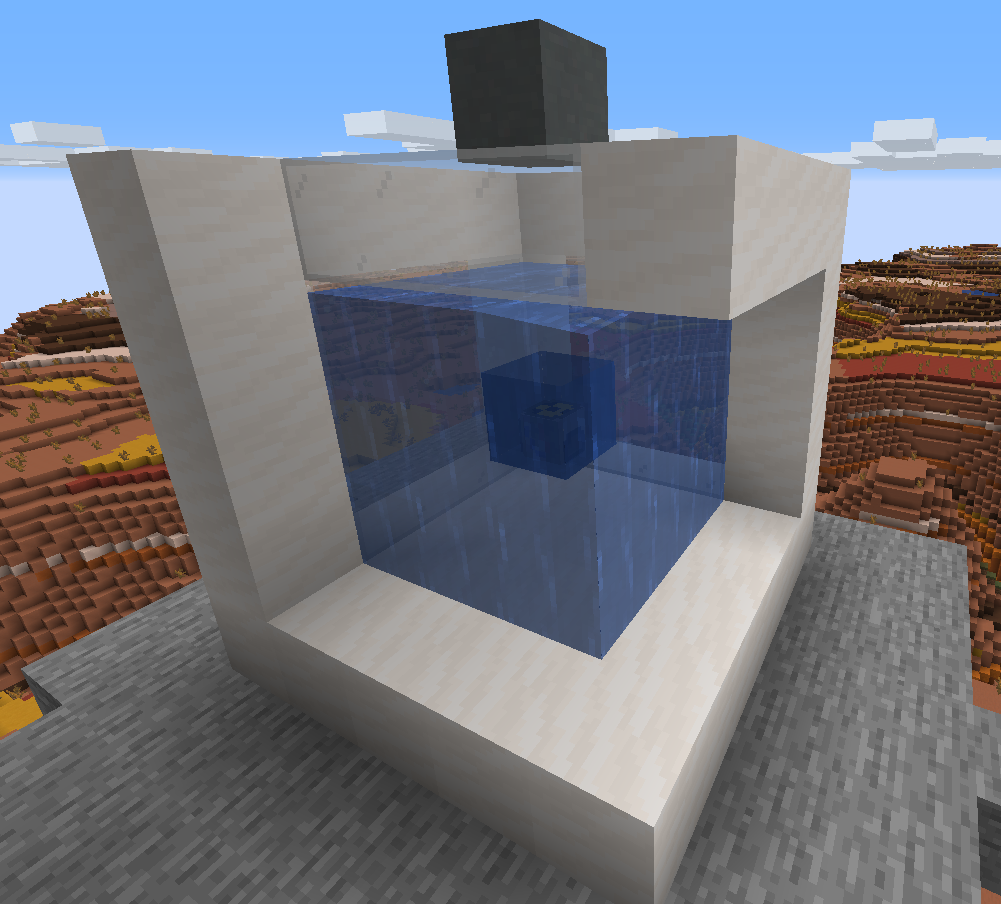
In the center you see the Reactor, surrounded by water. Three blocks above you can see the Reactor Access Port.
**Note:** The quartz and glass blocks are entirely there for decoration (and to keep the water from spilling), they're not necessary for the setup.
```
--------------------------------
### Start Testing Server
Source: https://github.com/slimefun/wiki/blob/master/pages/Developer-Guide-(9-Compiling).md
This command starts a Minecraft server using a specified JAR file. It's crucial for creating the 'eula.txt' file, which must be edited to allow the server to run.
```bash
java -jar [name of jar file].jar
```
--------------------------------
### Slimefun Addon Development - Table of Contents
Source: https://github.com/slimefun/wiki/blob/master/pages/Developer-Guide.md
An overview of the Slimefun addon development process, outlining the key stages and topics covered in the developer guide. This includes project setup, addon creation, item implementation, feature additions, research systems, custom assets, electric machines, and deployment.
```APIDOC
Developer Guide Sections:
1. Project Setup
2. Creating a new addon
3. Creating your first Item
4. Adding features to your Item:
- Performing actions on right-clicking a block or an item
- Making an item radioactive or wither-proof
5. Adding your own Research
6. Custom heads
7. Adding resources to the GEO Miner
8. Creating electric machines:
- Creating a simple input/output machine with recipes (soon)
- Creating your own Generator (soon)
9. Compiling and testing your addon
?. Publishing your addon
```
--------------------------------
### Verify Addon Installation
Source: https://github.com/slimefun/wiki/blob/master/pages/Developer-Guide-(9-Compiling).md
This in-game command is used to check which plugins, including Slimefun and installed addons, are currently running on the server.
```java
/sf versions
```
--------------------------------
### Slimefun Item and Recipe Setup
Source: https://github.com/slimefun/wiki/blob/master/pages/Developer-Guide-(5-Researches).md
Demonstrates the creation of a custom Slimefun item, including its display name, lore, and recipe configuration for an enhanced crafting table. It also shows how to instantiate and register a custom Slimefun item.
```java
NamespacedKey categoryId = new NamespacedKey(this, "cool_category");
CustomItemStack categoryItem = new CustomItemStack(Material.DIAMOND, "&4Our very cool Category");
ItemGroup itemGroup = new ItemGroup(categoryId, categoryItem);
// The custom item for our SlimefunItem
SlimefunItemStack itemStack = new SlimefunItemStack("FIRE_CAKE", Material.CAKE, "&4Fire Cake", "", LoreBuilder.radioactive(Radioactivity.HIGH), LoreBuilder.HAZMAT_SUIT_REQUIRED);
// A 3x3 shape representing our recipe
ItemStack[] recipe = {
new ItemStack(Material.BLAZE_POWDER), null, new ItemStack(Material.BLAZE_POWDER),
null, new ItemStack(Material.CAKE), null,
new ItemStack(Material.BLAZE_POWDER), null, new ItemStack(Material.BLAZE_POWDER)
};
// We are now using our own custom class for this
FireCake cake = new FireCake(itemGroup, itemStack, RecipeType.ENHANCED_CRAFTING_TABLE, recipe);
cake.register(this);
```
--------------------------------
### Slimefun 4 Installation
Source: https://github.com/slimefun/wiki/blob/master/pages/Installing-Slimefun.md
Instructions for installing the Slimefun 4 plugin on a Spigot or Paper Minecraft server. It emphasizes dragging the JAR file into the plugins directory and restarting the server, warning against using the /reload command.
```Java
Drag and drop the Slimefun4 jar file into your server's */plugins/* directory.
Then, restart your server.
***Do not use /reload, as it can cause intense memory leaks.
```
--------------------------------
### Complete Custom Item and Research Example
Source: https://github.com/slimefun/wiki/blob/master/pages/Developer-Guide-(5-Researches).md
A comprehensive code example combining the creation of a custom Slimefun item ('FireCake'), its recipe, and its association with a custom research project, followed by registration.
```java
NamespacedKey categoryId = new NamespacedKey(this, "cool_category");
CustomItemStack categoryItem = new CustomItemStack(Material.DIAMOND, "&4Our very cool Category");
ItemGroup itemGroup = new ItemGroup(categoryId, categoryItem);
// The custom item for our SlimefunItem
SlimefunItemStack itemStack = new SlimefunItemStack("FIRE_CAKE", Material.CAKE, "&4Fire Cake", "", LoreBuilder.radioactive(Radioactivity.HIGH), LoreBuilder.HAZMAT_SUIT_REQUIRED);
// A 3x3 shape representing our recipe
ItemStack[] recipe = {
new ItemStack(Material.BLAZE_POWDER), null, new ItemStack(Material.BLAZE_POWDER),
null, new ItemStack(Material.CAKE), null,
new ItemStack(Material.BLAZE_POWDER), null, new ItemStack(Material.BLAZE_POWDER)
};
// We are now using our own custom class for this
FireCake cake = new FireCake(itemGroup, itemStack, RecipeType.ENHANCED_CRAFTING_TABLE, recipe);
cake.register(this);
NamespacedKey researchKey = new NamespacedKey(this, "fire_cake");
Research research = new Research(researchKey, 123, "You don't wanna eat this", 10);
research.addItems(cake);
research.register();
```
--------------------------------
### Server Optimization Resources
Source: https://github.com/slimefun/wiki/blob/master/pages/Server-Optimizations.md
Provides links to external guides for server optimization, including SpigotMC Wiki, SpigotMC Forums, and aikar's blog on JVM tuning.
```url
https://www.spigotmc.org/wiki/reducing-lag/
https://www.spigotmc.org/threads/guide-server-optimization%E2%9A%A1.283181/
https://aikar.co/2018/07/02/tuning-the-jvm-g1gc-garbage-collector-flags-for-minecraft/
```
--------------------------------
### Obtain Slimefun Guide
Source: https://github.com/slimefun/wiki/blob/master/pages/Getting-Started.md
This command allows players to obtain the Slimefun Guide, which is essential for navigating the plugin's features and recipes. The guide lists all available categories and items, along with their crafting recipes.
```minecraft-commands
/sf guide
```
--------------------------------
### Slimefun Addon Development Guide
Source: https://github.com/slimefun/wiki/blob/master/pages/Addons.md
A guide for developers interested in creating their own Slimefun addons. It covers the process of developing and integrating custom addons with Slimefun.
```Markdown
Do you want to create your own Slimefun Addon? Check out this [Developer Guide](https://github.com/Slimefun/Slimefun4/wiki/Developer-Guide).
If you have made an Addon for Slimefun and want it to be listed on here, simply make a new pull request on our wiki repository. You can find a tutorial here:
https://github.com/Slimefun/Slimefun4/wiki/Expanding-the-Wiki.
If a pull request is not possible, then just create an Issue and select the "Addition" template:
https://github.com/Slimefun/Wiki/issues
```
--------------------------------
### Recommended Profiling Tool
Source: https://github.com/slimefun/wiki/blob/master/pages/Server-Optimizations.md
Recommends the Spark profiler by Luck for detailed code-level performance tracking and bottleneck identification.
```url
https://www.spigotmc.org/resources/spark.57242/
```
--------------------------------
### Slimefun 4 Configuration Files
Source: https://github.com/slimefun/wiki/blob/master/pages/Installing-Slimefun.md
An overview of the primary configuration files for Slimefun 4, including config.yml, items.yml, messages.yml, researches.yml, and permissions.yml. It explains the purpose of each file in customizing Slimefun's behavior, items, messages, research, and permissions.
```YAML
config.yml: Controls general plugin settings, including the auto-updater.
items.yml: Enables or disables specific items globally.
messages.yml: Customizes plugin messages sent to players.
researches.yml: Edits XP values, names, and research availability.
permissions.yml: Defines permission nodes for item usage.
```
--------------------------------
### Full Slimefun Item and Research Registration
Source: https://github.com/slimefun/wiki/blob/master/pages/Developer-Guide-(6-Custom-Heads).md
Provides a complete code example for creating a custom Slimefun item, including its category, item stack with a custom texture, recipe, and registering it with the Slimefun plugin. It also shows how to create and register a research entry for the custom item.
```java
NamespacedKey categoryId = new NamespacedKey(this, "cool_category");
CustomItemStack categoryItem = new CustomItemStack(SkullItem.fromBase64("eyJ0ZXh0dXJlcyI6eyJTS0lOIjp7InVybCI6Imh0dHA6Ly90ZXh0dXJlcy5taW5lY3JhZnQubmV0L3RleHR1cmUvZTk1MmQyYjNmMzUxYTZiMDQ4N2NjNTlkYjMxYmY1ZjI2NDExMzNlNWJhMDAwNmIxODU3NmU5OTZhMDI5M2U1MiJ9fX0="), "&4Our very cool Category");
ItemGroup itemGroup = new ItemGroup(categoryId, categoryItem);
// The custom item for our SlimefunItem
SlimefunItemStack itemStack = new SlimefunItemStack("FIRE_CAKE", "eyJ0ZXh0dXJlcyI6eyJTS0lOIjp7InVybCI6Imh0dHA6Ly90ZXh0dXJlcy5taW5lY3JhZnQubmV0L3RleHR1cmUvZTk1MmQyYjNmMzUxYTZiMDQ4N2NjNTlkYjMxYmY1ZjI2NDExMzNlNWJhMDAwNmIxODU3NmU5OTZhMDI5M2U1MiJ9fX0=", "&4Fire Cake", "", LoreBuilder.radioactive(Radioactivity.HIGH), LoreBuilder.HAZMAT_SUIT_REQUIRED);
// A 3x3 shape representing our recipe
ItemStack[] recipe = {
new ItemStack(Material.BLAZE_POWDER), null, new ItemStack(Material.BLAZE_POWDER),
null, new ItemStack(Material.CAKE), null,
new ItemStack(Material.BLAZE_POWDER), null, new ItemStack(Material.BLAZE_POWDER)
};
// We are now using our own custom class for this
FireCake cake = new FireCake(itemGroup, itemStack, RecipeType.ENHANCED_CRAFTING_TABLE, recipe);
cake.register(this);
NamespacedKey researchKey = new NamespacedKey(this, "fire_cake");
Research research = new Research(researchKey, 123, "You don't wanna eat this", 10);
research.addItems(cake);
research.register();
```
--------------------------------
### Recommended Server Software
Source: https://github.com/slimefun/wiki/blob/master/pages/Server-Optimizations.md
Highlights Paper as a fork of Spigot with improved performance and better timings reports, especially for Slimefun's Cargo networks.
```url
https://papermc.io/
```
--------------------------------
### Creating an ItemGroup
Source: https://github.com/slimefun/wiki/blob/master/pages/Developer-Guide-(3-Your-first-Item).md
Assembles the NamespacedKey and CustomItemStack into a new ItemGroup. This defines a new category within the Slimefun Guide.
```java
ItemGroup itemGroup = new ItemGroup(categoryId, categoryItem);
```
--------------------------------
### Implement GEOResource Interface
Source: https://github.com/slimefun/wiki/blob/master/pages/Developer-Guide-(7-GEO-Resources).md
Demonstrates the initial step of creating a new Java class that implements the GEOResource interface.
```java
public class EnderOreResource implements GEOResource {
}
```
--------------------------------
### Implement getDefaultSupply() and getMaxDeviation()
Source: https://github.com/slimefun/wiki/blob/master/pages/Developer-Guide-(7-GEO-Resources).md
Implements methods to define the default supply and maximum deviation for the resource based on environment and biome.
```java
public class EnderOreResource implements GEOResource {
@Override
public String getName() {
return "Ender Ore";
}
@Override
public boolean isObtainableFromGEOMiner() {
return true;
}
@Override
public int getDefaultSupply(Environment environment, Biome biome) {
// Environment is actually the same as the World Type (NORMAL / NETHER / THE_END)
if (environment == Environment.THE_END) {
return 20;
}
else {
return 0;
}
}
@Override
public int getMaxDeviation() {
return 8;
}
}
```
--------------------------------
### Registering a Custom FireCake Item
Source: https://github.com/slimefun/wiki/blob/master/pages/Developer-Guide-(4a-Right-Clicks).md
Demonstrates how to instantiate and register a custom FireCake item in the main plugin class.
```java
NamespacedKey categoryId = new NamespacedKey(this, "cool_category");
CustomItemStack categoryItem = new CustomItemStack(Material.DIAMOND, "&4Our very cool Category");
ItemGroup itemGroup = new ItemGroup(categoryId, categoryItem);
// The custom item for our SlimefunItem
SlimefunItemStack itemStack = new SlimefunItemStack("MY_ADDON_ITEM", Material.CAKE, "&aA Fire Cake", "", "&7This is awesome");
// A 3x3 shape representing our recipe
ItemStack[] recipe = {
new ItemStack(Material.DIAMOND), null, new ItemStack(Material.DIAMOND),
null, SlimefunItems.CARBONADO, null,
new ItemStack(Material.DIAMOND), null, new ItemStack(Material.DIAMOND)
};
// We are now using our own custom class for this
FireCake cake = new FireCake(itemGroup, itemStack, RecipeType.ENHANCED_CRAFTING_TABLE, recipe);
cake.register(this);
```
--------------------------------
### Project README Best Practices
Source: https://github.com/slimefun/wiki/blob/master/pages/Developer-Guide-(1-Project-Setup).md
This snippet provides guidance on creating an effective README file for your Slimefun addon project. A good README should include a clear project description, links to relevant resources (like Discord, BukkitDev, SpigotMC), and download links. It serves as the primary landing page for your project on platforms like GitHub.
```Markdown
# My Awesome Slimefun Addon
This addon adds amazing new features to Slimefun!
## Features
* Feature 1
* Feature 2
## Installation
[Link to installation guide]
## Support
Join our Discord: [Discord Invite Link]
## Download
[Link to download page]
```
--------------------------------
### Initial plugin.yml Configuration
Source: https://github.com/slimefun/wiki/blob/master/pages/Developer-Guide-(1-Project-Setup).md
This snippet displays the initial configuration of a plugin.yml file for a Bukkit plugin. It includes essential metadata like name, version, author, description, website, main class, dependencies, and API version. Placeholders need to be updated.
```yaml
name: SlimefunAddon
version: ${project.version}
author: CHANGEME
description: A generic Slimefun4-Addon
website: https://github.com/Slimefun/Addon-Template
main: me.CHANGEME.slimefunaddon.SlimefunAddon
depend: [Slimefun]
api-version: 1.14
```
--------------------------------
### Add Specific Item to Research
Source: https://github.com/slimefun/wiki/blob/master/pages/Developer-Guide-(5-Researches).md
Shows a practical example of adding a specific Slimefun item, 'FireCake', to a research project after its registration.
```java
// ...
FireCake cake = new FireCake(itemGroup, itemStack, RecipeType.ENHANCED_CRAFTING_TABLE, recipe);
cake.register(this);
NamespacedKey researchKey = new NamespacedKey(this, "fire_cake");
Research research = new Research(researchKey, 123, "You don't wanna eat this", 10);
research.addItems(cake);
```
--------------------------------
### Choosing an Open-Source License
Source: https://github.com/slimefun/wiki/blob/master/pages/Developer-Guide-(1-Project-Setup).md
This snippet recommends using an open-source license for your Slimefun addon project to encourage community contributions. It specifically suggests the MIT License as a straightforward and widely accepted option. To implement a license, you should create a file named 'LICENSE' in your project's root directory and paste the license text into it.
```Markdown
To select a license, simply copy the license text and paste it into a new file called "LICENSE" (no file ending) in your project's root directory.
We recommend the [MIT License](https://choosealicense.com/licenses/mit/).
```
--------------------------------
### Slimefun Recipe Definition
Source: https://github.com/slimefun/wiki/blob/master/pages/Developer-Guide-(3-Your-first-Item).md
Shows how to define a crafting recipe for a Slimefun item using an ItemStack array. The example uses a 3x3 grid with diamonds and a Carbonado in the center.
```java
ItemStack[] recipe = {
new ItemStack(Material.DIAMOND), null, new ItemStack(Material.DIAMOND),
null, SlimefunItems.CARBONADO, null,
new ItemStack(Material.DIAMOND), null, new ItemStack(Material.DIAMOND)
};
```
--------------------------------
### Initial pom.xml Configuration
Source: https://github.com/slimefun/wiki/blob/master/pages/Developer-Guide-(1-Project-Setup).md
This snippet shows the initial structure of a Maven pom.xml file. It includes essential project information such as model version, groupId, artifactId, and version. Users are instructed to replace placeholder values with their specific project details.
```xml
4.0.0
me.CHANGEME
SlimefunAddon
1.0.0
```
--------------------------------
### Enhanced Crafting Table Setup
Source: https://github.com/slimefun/wiki/blob/master/pages/Getting-Started.md
The Enhanced Crafting Table is a fundamental machine in Slimefun. It requires a Dispenser to be placed directly below a Crafting Table. Most Slimefun recipes are crafted by placing the ingredients into the Dispenser and then interacting with the Crafting Table.
```minecraft-commands
Place a Crafting Table on top of a Dispenser.
```
--------------------------------
### EnderOreResource Class Implementation
Source: https://github.com/slimefun/wiki/blob/master/pages/Developer-Guide-(7-GEO-Resources).md
This Java code defines the EnderOreResource class, implementing the GEOResource interface. It includes methods for getting the resource's key, item, name, obtainability, default supply based on environment, and maximum deviation.
```java
public class EnderOreResource implements GEOResource {
private final NamespacedKey key;
private final ItemStack item;
public EnderOreResource(Plugin plugin, ItemStack item) {
this.key = new NamespacedKey(plugin, "ender_ore");
this.item = item;
}
@Override
public NamespacedKey getKey() {
return key;
}
@Override
public ItemStack getItem() {
// It is important to add a .clone() here since we do not want
// to return the original item.
return item.clone();
}
@Override
public String getName() {
return "Ender Ore";
}
@Override
public boolean isObtainableFromGEOMiner() {
return true;
}
@Override
public int getDefaultSupply(Environment environment, Biome biome) {
// Environment is actually the same as the World Type (NORMAL / NETHER / THE_END)
if (environment == Environment.THE_END) {
return 20;
}
else {
return 0;
}
}
@Override
public int getMaxDeviation() {
return 8;
}
}
```
--------------------------------
### Server Profiling Commands
Source: https://github.com/slimefun/wiki/blob/master/pages/Server-Optimizations.md
Commands to profile server performance. `/timings` provides general server insights, while `/sf timings` offers Slimefun-specific data on chunks, machines, and addons.
```minecraft
/timings
/sf timings
```
--------------------------------
### WitherProof onAttack Method Implementation
Source: https://github.com/slimefun/wiki/blob/master/pages/Developer-Guide-(4b-Radioactive-and-WitherProof).md
This example demonstrates implementing the `onAttack` method required by the WitherProof interface. The method is called when a Wither attempts to destroy the block. The provided code shows how to leave the method empty, as the interface handles the cancellation by default.
```java
public class FireCake extends SlimefunItem implements Radioactive, WitherProof {
public FireCake(ItemGroup itemGroup, SlimefunItemStack item, RecipeType recipeType, ItemStack[] recipe) {
super(itemGroup, item, recipeType, recipe);
}
@Override
public void onAttack(Block block, Wither wither) {
}
// ...
}
```
--------------------------------
### Custom Slimefun Item with Block and Item Use Handlers
Source: https://github.com/slimefun/wiki/blob/master/pages/Developer-Guide-(4a-Right-Clicks).md
This example shows the structure of a custom Slimefun item class, `FireCake`. It registers both a `BlockUseHandler` to handle right-clicks on the placed block and an `ItemUseHandler` for right-clicks with the item in hand, demonstrating how to add multiple handlers.
```java
public class FireCake extends SlimefunItem {
public FireCake(ItemGroup itemGroup, SlimefunItemStack item, RecipeType recipeType, ItemStack[] recipe) {
super(itemGroup, item, recipeType, recipe);
}
@Override
public void preRegister() {
BlockUseHandler blockUseHandler = this::onBlockRightClick;
addItemHandler(blockUseHandler);
ItemUseHandler itemUseHandler = this::onItemUseRightClick;
addItemHandler(itemUseHandler);
}
private void onBlockRightClick(PlayerRightClickEvent event) {
// This will prevent the Player from eating this cake.
event.cancel();
// Now set the Player on fire for 5 seconds
event.getPlayer().setFireTicks(5 * 20);
}
private void onItemUseRightClick(PlayerRightClickEvent event) {
// Calling event.cancel() in here would prevent the cake
// from being placed down.
event.getPlayer().giveExpLevels(1);
}
}
```
--------------------------------
### SimpleUtils Addon Information
Source: https://github.com/slimefun/wiki/blob/master/pages/Addons.md
Details for the SimpleUtils addon, which adds a few simple and useful tools and blocks. Includes author, description, and links to GitHub and builds.
```markdown
Name | Author(s) | Description | More info | Source Code | Download
------------ | --------- | ----------------------------------------------- | --------- | --------- | ---------
SimpleUtils | Mooy1 | expand
This addon adds a few simple & useful tools and blocks.expand
This addon adds many machines and endgame crafting recipes.