### Get Page Initialization Data for Editor
Source: https://context7.com/niuzhiyun/niucloud-admin-java/llms.txt
Use this GET request to fetch initial data required for opening the DIY page装修 editor. Specify the 'page_type'.
```bash
curl -X GET "http://localhost:8080/adminapi/diy/init?page_type=index" \
-H "token: eyJhbGc..." \
-H "site-id: 1"
```
--------------------------------
### Android Installation Permissions
Source: https://github.com/niuzhiyun/niucloud-admin-java/blob/master/webroot/runtime/uni-app/src/uni_modules/rt-uni-update/readme.md
If the progress bar shows but the APK does not automatically prompt for installation on Android, ensure your app includes the necessary installation permissions. These are typically required for offline builds; cloud builds may handle this automatically.
```xml
```
```xml
```
--------------------------------
### Preview Generated Code
Source: https://context7.com/niuzhiyun/niucloud-admin-java/llms.txt
Use this GET request to preview the code that will be generated for a specific configuration ID.
```bash
curl -X GET "http://localhost:8080/adminapi/generator/preview/5" \
-H "token: eyJhbGc..." \
-H "site-id: 1"
```
--------------------------------
### List Custom DIY Pages
Source: https://context7.com/niuzhiyun/niucloud-admin-java/llms.txt
Use this GET request to paginate and retrieve a list of custom DIY pages. Specify 'page' and 'page_size' for pagination.
```bash
curl -X GET "http://localhost:8080/adminapi/diy/diy?page=1&page_size=10" \
-H "token: eyJhbGc..." \
-H "site-id: 1"
```
--------------------------------
### Android Installation Permissions
Source: https://github.com/niuzhiyun/niucloud-admin-java/blob/master/uni-app/src/uni_modules/rt-uni-update/readme.md
Specifies the necessary Android permissions required for installing packages. Add these to your project's `AndroidManifest.xml` if you encounter issues with automatic installation after downloading APKs, especially with offline packaging.
```xml
```
```xml
```
--------------------------------
### HTML Content Example
Source: https://github.com/niuzhiyun/niucloud-admin-java/blob/master/admin/public/ueditor/index.html
Demonstrates how to include raw HTML content within the editor. This allows for structured content like divs and spans.
```html
这里是HTML标签
```
--------------------------------
### Admin Environment and Build Commands (Bash)
Source: https://context7.com/niuzhiyun/niucloud-admin-java/llms.txt
Configuration for development environment variables and commands for installing dependencies, running the development server, and building the production package for the Admin module. Also includes commands for the Web (Nuxt3) and Uni-app modules.
```bash
# admin/.env.development — 开发环境配置
VITE_APP_BASE_API=http://localhost:8080
VITE_APP_UPLOAD_URL=http://localhost:8080/adminapi/upload/image
# 安装依赖并启动开发服务器
cd admin
npm install
npm run dev # 开发模式,访问 http://localhost:5173
# 构建生产包(输出到 webroot/public/admin/)
npm run build
# 启动 PC 端(Nuxt3)
cd web
npm install
npm run dev # 访问 http://localhost:3000
npm run build # 生产构建
# 启动移动端(UNI-APP,使用 HBuilderX 或 CLI)
cd uni-app
npm install
# 编译为 H5
npm run dev:h5
# 编译为微信小程序(需配置 appId)
npm run dev:mp-weixin
```
--------------------------------
### Plugin Management API
Source: https://context7.com/niuzhiyun/niucloud-admin-java/llms.txt
APIs for managing plugins, including local installation, cloud installation from the marketplace, and uninstallation.
```APIDOC
## GET /adminapi/addon/local
### Description
Retrieves a list of locally available plugins.
### Method
GET
### Endpoint
`/adminapi/addon/local`
### Parameters
#### Query Parameters
- **token** (string) - Required - The authentication token.
- **site-id** (string) - Required - The ID of the site.
## GET /adminapi/addon/list
### Description
Retrieves a paginated list of plugins, filterable by type.
### Method
GET
### Endpoint
`/adminapi/addon/list`
### Parameters
#### Query Parameters
- **page** (integer) - Required - The page number for pagination.
- **page_size** (integer) - Required - The number of items per page.
- **type** (string) - Optional - The type of plugins to list (e.g., 'app').
- **token** (string) - Required - The authentication token.
- **site-id** (string) - Required - The ID of the site.
## GET /adminapi/addon/list/install
### Description
Retrieves a list of installed plugins. This endpoint does not require authentication.
### Method
GET
### Endpoint
`/adminapi/addon/list/install`
## POST /adminapi/addon/install/{addonName}
### Description
Installs a local plugin.
### Method
POST
### Endpoint
`/adminapi/addon/install/{addonName}`
### Parameters
#### Path Parameters
- **addonName** (string) - Required - The name of the addon to install.
#### Query Parameters
- **token** (string) - Required - The authentication token.
- **site-id** (string) - Required - The ID of the site.
## POST /adminapi/addon/cloudinstall/{addonName}
### Description
Installs a plugin from the Niucloud cloud application market.
### Method
POST
### Endpoint
`/adminapi/addon/cloudinstall/{addonName}`
### Parameters
#### Path Parameters
- **addonName** (string) - Required - The name of the addon to install from the cloud market.
#### Query Parameters
- **token** (string) - Required - The authentication token.
- **site-id** (string) - Required - The ID of the site.
## GET /adminapi/addon/cloudinstall/{addonName}
### Description
Queries the installation progress of a cloud-installed plugin.
### Method
GET
### Endpoint
`/adminapi/addon/cloudinstall/{addonName}`
### Parameters
#### Path Parameters
- **addonName** (string) - Required - The name of the addon to check progress for.
#### Query Parameters
- **token** (string) - Required - The authentication token.
- **site-id** (string) - Required - The ID of the site.
### Response
#### Success Response (200)
- **data** (object) - Installation progress details.
- **status** (string) - Current status of the installation (e.g., 'installing').
- **progress** (integer) - Percentage of completion.
- **message** (string) - Status message.
#### Response Example
```json
{ "data": { "status": "installing", "progress": 60, "message": "正在编译..." } }
```
## GET /adminapi/addon/install/check/{addonName}
### Description
Checks the environment for plugin installation readiness.
### Method
GET
### Endpoint
`/adminapi/addon/install/check/{addonName}`
### Parameters
#### Path Parameters
- **addonName** (string) - Required - The name of the addon to check.
#### Query Parameters
- **token** (string) - Required - The authentication token.
- **site-id** (string) - Required - The ID of the site.
## POST /adminapi/addon/download/{addonName}
### Description
Downloads a plugin package.
### Method
POST
### Endpoint
`/adminapi/addon/download/{addonName}`
### Parameters
#### Path Parameters
- **addonName** (string) - Required - The name of the addon to download.
#### Query Parameters
- **token** (string) - Required - The authentication token.
- **site-id** (string) - Required - The ID of the site.
#### Request Body
- **version** (string) - Required - The version of the plugin to download.
### Request Example
```bash
curl -X POST "http://localhost:8080/adminapi/addon/download/shop" \
-H "token: eyJhbGc..." \
-H "site-id: 1" \
-H "Content-Type: application/json" \
-d '{"version":"1.2.0"}'
```
## POST /adminapi/addon/uninstall/{addonName}
### Description
Uninstalls a plugin.
### Method
POST
### Endpoint
`/adminapi/addon/uninstall/{addonName}`
### Parameters
#### Path Parameters
- **addonName** (string) - Required - The name of the addon to uninstall.
#### Query Parameters
- **token** (string) - Required - The authentication token.
- **site-id** (string) - Required - The ID of the site.
```
--------------------------------
### Formula Support Example
Source: https://github.com/niuzhiyun/niucloud-admin-java/blob/master/webroot/public/admin/ueditor/index.html
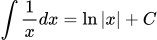
Shows how UEditorPlus renders mathematical formulas using LaTeX syntax. The image is generated from a URL with the formula as a parameter.
```html
```
--------------------------------
### File Upload API Response Example
Source: https://context7.com/niuzhiyun/niucloud-admin-java/llms.txt
This is an example of the JSON response received after a successful file upload via the admin API, detailing the file's access URL and its storage location.
```json
{
"code": 1,
"data": {
"url": "https://your-oss.aliyuncs.com/upload/images/2024/abc.jpg",
"location": "upload/images/2024/abc.jpg"
}
}
```
--------------------------------
### Plugin Management API
Source: https://context7.com/niuzhiyun/niucloud-admin-java/llms.txt
Manages the lifecycle of plugins, including installation (local and cloud), uninstallation, and status checks. Supports dynamic extension of system functionality.
```bash
# 获取本地已有插件列表
curl -X GET "http://localhost:8080/adminapi/addon/local" \
-H "token: eyJhbGc..." \
-H "site-id: 1"
```
```bash
# 分页查询插件列表
curl -X GET "http://localhost:8080/adminapi/addon/list?page=1&page_size=10&type=app" \
-H "token: eyJhbGc..." \
-H "site-id: 1"
```
```bash
# 获取已安装插件列表(无需登录)
curl -X GET "http://localhost:8080/adminapi/addon/list/install"
```
```bash
# 本地安装插件
curl -X POST "http://localhost:8080/adminapi/addon/install/shop" \
-H "token: eyJhbGc..." \
-H "site-id: 1"
```
```bash
# 云安装插件(从云市场下载并安装)
curl -X POST "http://localhost:8080/adminapi/addon/cloudinstall/shop" \
-H "token: eyJhbGc..." \
-H "site-id: 1"
```
```bash
# 查询云安装进度
curl -X GET "http://localhost:8080/adminapi/addon/cloudinstall/shop" \
-H "token: eyJhbGc..." \
-H "site-id: 1"
```
```json
# 响应:{ "data": { "status": "installing", "progress": 60, "message": "正在编译..." } }
```
```bash
# 检测插件安装环境
curl -X GET "http://localhost:8080/adminapi/addon/install/check/shop" \
-H "token: eyJhbGc..." \
-H "site-id: 1"
```
```bash
# 下载插件包
curl -X POST "http://localhost:8080/adminapi/addon/download/shop" \
-H "token: eyJhbGc..." \
-H "site-id: 1" \
-H "Content-Type: application/json" \
-d '{"version":"1.2.0"}'
```
```bash
# 卸载插件
curl -X POST "http://localhost:8080/adminapi/addon/uninstall/shop" \
-H "token: eyJhbGc..." \
-H "site-id: 1"
```
--------------------------------
### HTML Content Example
Source: https://github.com/niuzhiyun/niucloud-admin-java/blob/master/webroot/public/admin/ueditor/index.html
Displays a simple HTML structure within the editor. UEditor supports rendering standard HTML tags.
```html
这里是HTML标签
```
--------------------------------
### Unified Payment Interface (Java)
Source: https://context7.com/niuzhiyun/niucloud-admin-java/llms.txt
Use the PayLoader to get payment drivers (wechat/alipay/balance) and initiate payments. Handles payment parameters and asynchronous notifications.
```java
package com.niucloud.pay;
import com.niucloud.pay.model.PayModelResult;
import com.niucloud.pay.model.PayParam;
import com.niucloud.pay.model.AsyncNotifyParam;
import com.niucloud.pay.model.AsyncNotifyModelResult;
import com.niucloud.pay.driver.BasePay;
import com.niucloud.pay.driver.PayLoader;
import org.springframework.stereotype.Service;
import java.math.BigDecimal;
import javax.servlet.http.HttpServletRequest;
import javax.servlet.http.HttpServletResponse;
@Service
public class OrderPayServiceImpl {
public PayModelResult createPayOrder(Integer orderId, String payType, String channel) {
// 获取支付驱动(wechat/alipay/balance)
BasePay payDriver = PayLoader.getDriver(payType);
// 构建支付参数
PayParam payParam = new PayParam();
payParam.setOrderSn("ORDER202401010001");
payParam.setAmount(new BigDecimal("99.00"));
payParam.setTitle("商品订单支付");
payParam.setNotifyUrl("https://yourdomain.com/api/pay/notify/" + payType);
payParam.setChannel(channel); // miniapp/h5/app/pc
// 发起支付,返回前端拉起支付所需参数
PayModelResult result = payDriver.pay(payParam);
// result 包含:prepayId、timeStamp、nonceStr、paySign 等微信支付参数
return result;
}
// 处理支付异步通知回调
public void handleAsyncNotify(String payType, HttpServletRequest request, HttpServletResponse response) {
BasePay payDriver = PayLoader.getDriver(payType);
AsyncNotifyParam notifyParam = new AsyncNotifyParam();
AsyncNotifyModelResult notifyResult = payDriver.asyncNotify(notifyParam, request, response);
if (notifyResult.isSuccess()) {
// 更新订单状态为已支付
orderService.updatePayStatus(notifyResult.getOrderSn(), "paid");
}
}
}
```
```shell
# === 配置支付参数(后台API) ===
curl -X POST "http://localhost:8080/adminapi/pay/config" \
-H "token: eyJhbGc..." \
-H "site-id: 1" \
-H "Content-Type: application/json" \
-d '{
"pay_type": "wechat",
"mch_id": "1600000000",
"mch_secret_key": "your_api_v3_key",
"mch_public_cert_path": "/resource/certs/apiclient_cert.pem",
"mch_secret_cert": "/resource/certs/apiclient_key.pem"
}'
```
--------------------------------
### Plugin Module Entry Point Annotation (Java)
Source: https://context7.com/niuzhiyun/niucloud-admin-java/llms.txt
Use @SpringModuleApplication to declare a plugin's unique identifier. The framework scans and loads installed plugins dynamically, registering resources like Beans, routes, and scheduled tasks.
```java
// === 定义一个商城插件的主启动类 ===
@SpringModuleApplication("shop") // value 为插件唯一标识符
@ComponentScan(basePackages = "com.niu.shop")
public class ShopApplication {
// 插件入口,框架会自动发现并加载
}
```
```java
// === 插件中的 Controller 与核心框架完全一致 ===
@RestController
@RequestMapping("/adminapi/shop/goods")
@SaCheckLogin
@Description("商品管理")
public class GoodsController {
@Resource
private IGoodsService goodsService;
@GetMapping("/goods")
@Description("商品列表")
public Result> list(@Validated PageParam pageParam,
@Validated GoodsSearchParam searchParam) {
return Result.success(goodsService.list(pageParam, searchParam));
}
@PostMapping("/goods")
@Description("添加商品")
public Result
 ```
--------------------------------
### File Upload API Response Example
Source: https://context7.com/niuzhiyun/niucloud-admin-java/llms.txt
This is an example of the JSON response received after a successful file upload via the admin API, detailing the file's access URL and its storage location.
```json
{
"code": 1,
"data": {
"url": "https://your-oss.aliyuncs.com/upload/images/2024/abc.jpg",
"location": "upload/images/2024/abc.jpg"
}
}
```
--------------------------------
### Plugin Management API
Source: https://context7.com/niuzhiyun/niucloud-admin-java/llms.txt
Manages the lifecycle of plugins, including installation (local and cloud), uninstallation, and status checks. Supports dynamic extension of system functionality.
```bash
# 获取本地已有插件列表
curl -X GET "http://localhost:8080/adminapi/addon/local" \
-H "token: eyJhbGc..." \
-H "site-id: 1"
```
```bash
# 分页查询插件列表
curl -X GET "http://localhost:8080/adminapi/addon/list?page=1&page_size=10&type=app" \
-H "token: eyJhbGc..." \
-H "site-id: 1"
```
```bash
# 获取已安装插件列表(无需登录)
curl -X GET "http://localhost:8080/adminapi/addon/list/install"
```
```bash
# 本地安装插件
curl -X POST "http://localhost:8080/adminapi/addon/install/shop" \
-H "token: eyJhbGc..." \
-H "site-id: 1"
```
```bash
# 云安装插件(从云市场下载并安装)
curl -X POST "http://localhost:8080/adminapi/addon/cloudinstall/shop" \
-H "token: eyJhbGc..." \
-H "site-id: 1"
```
```bash
# 查询云安装进度
curl -X GET "http://localhost:8080/adminapi/addon/cloudinstall/shop" \
-H "token: eyJhbGc..." \
-H "site-id: 1"
```
```json
# 响应:{ "data": { "status": "installing", "progress": 60, "message": "正在编译..." } }
```
```bash
# 检测插件安装环境
curl -X GET "http://localhost:8080/adminapi/addon/install/check/shop" \
-H "token: eyJhbGc..." \
-H "site-id: 1"
```
```bash
# 下载插件包
curl -X POST "http://localhost:8080/adminapi/addon/download/shop" \
-H "token: eyJhbGc..." \
-H "site-id: 1" \
-H "Content-Type: application/json" \
-d '{"version":"1.2.0"}'
```
```bash
# 卸载插件
curl -X POST "http://localhost:8080/adminapi/addon/uninstall/shop" \
-H "token: eyJhbGc..." \
-H "site-id: 1"
```
--------------------------------
### HTML Content Example
Source: https://github.com/niuzhiyun/niucloud-admin-java/blob/master/webroot/public/admin/ueditor/index.html
Displays a simple HTML structure within the editor. UEditor supports rendering standard HTML tags.
```html
```
--------------------------------
### File Upload API Response Example
Source: https://context7.com/niuzhiyun/niucloud-admin-java/llms.txt
This is an example of the JSON response received after a successful file upload via the admin API, detailing the file's access URL and its storage location.
```json
{
"code": 1,
"data": {
"url": "https://your-oss.aliyuncs.com/upload/images/2024/abc.jpg",
"location": "upload/images/2024/abc.jpg"
}
}
```
--------------------------------
### Plugin Management API
Source: https://context7.com/niuzhiyun/niucloud-admin-java/llms.txt
Manages the lifecycle of plugins, including installation (local and cloud), uninstallation, and status checks. Supports dynamic extension of system functionality.
```bash
# 获取本地已有插件列表
curl -X GET "http://localhost:8080/adminapi/addon/local" \
-H "token: eyJhbGc..." \
-H "site-id: 1"
```
```bash
# 分页查询插件列表
curl -X GET "http://localhost:8080/adminapi/addon/list?page=1&page_size=10&type=app" \
-H "token: eyJhbGc..." \
-H "site-id: 1"
```
```bash
# 获取已安装插件列表(无需登录)
curl -X GET "http://localhost:8080/adminapi/addon/list/install"
```
```bash
# 本地安装插件
curl -X POST "http://localhost:8080/adminapi/addon/install/shop" \
-H "token: eyJhbGc..." \
-H "site-id: 1"
```
```bash
# 云安装插件(从云市场下载并安装)
curl -X POST "http://localhost:8080/adminapi/addon/cloudinstall/shop" \
-H "token: eyJhbGc..." \
-H "site-id: 1"
```
```bash
# 查询云安装进度
curl -X GET "http://localhost:8080/adminapi/addon/cloudinstall/shop" \
-H "token: eyJhbGc..." \
-H "site-id: 1"
```
```json
# 响应:{ "data": { "status": "installing", "progress": 60, "message": "正在编译..." } }
```
```bash
# 检测插件安装环境
curl -X GET "http://localhost:8080/adminapi/addon/install/check/shop" \
-H "token: eyJhbGc..." \
-H "site-id: 1"
```
```bash
# 下载插件包
curl -X POST "http://localhost:8080/adminapi/addon/download/shop" \
-H "token: eyJhbGc..." \
-H "site-id: 1" \
-H "Content-Type: application/json" \
-d '{"version":"1.2.0"}'
```
```bash
# 卸载插件
curl -X POST "http://localhost:8080/adminapi/addon/uninstall/shop" \
-H "token: eyJhbGc..." \
-H "site-id: 1"
```
--------------------------------
### HTML Content Example
Source: https://github.com/niuzhiyun/niucloud-admin-java/blob/master/webroot/public/admin/ueditor/index.html
Displays a simple HTML structure within the editor. UEditor supports rendering standard HTML tags.
```html