### Clone and Install Dependencies for Stripe Example
Source: https://dev.to/mmascioni/testing-and-debugging-webhooks-with-ngrok-4alp
These commands clone a GitHub repository containing an example Stripe and ngrok integration, change into the project directory, and install project dependencies using Pipenv.
```bash
git clone https://github.com/mm/stripe-ngrok-example.git
cd stripe-ngrok-example
pipenv install
```
--------------------------------
### Project Parameters
Source: https://docs.getivy.de/reference/checkout/create-a-checkout-session
This section describes the various parameters available for configuring project interactions, including redirect URLs, market selection, and payment preferences.
```APIDOC
## Project Configuration
### Description
This endpoint allows for the configuration of project-specific settings, including redirect URLs, market selection, payment modes, and localization.
### Method
GET
### Endpoint
/llmstxt/getivy_de_llms-full_txt
### Parameters
#### Query Parameters
- **redirectUrl** (string) - Required - The URL to redirect to after an action.
- **successCallbackUrl** (string) - Required - The URL for a successful callback.
- **errorCallbackUrl** (string) - Required - The URL for an error callback.
- **market** (enum) - Required - The market for the transaction. Available options: `AF`, `AL`, `DZ`, `AS`, `AD`, `AO`, `AI`, `AQ`, `AG`, `AR`, `AM`, `AW`, `AU`, `AT`, `AZ`, `BS`, `BH`, `BD`, `BB`, `BY`, `BE`, `BZ`, `BJ`, `BM`, `BT`, `BO`, `BA`, `BW`, `BV`, `BR`, `IO`, `BN`, `BG`, `BF`, `BI`, `KH`, `CM`, `CA`, `CV`, `KY`, `CF`, `TD`, `CL`, `CN`, `CX`, `CC`, `CO`, `KM`, `CG`, `CD`, `CK`, `CR`, `CI`, `HR`, `CU`, `CY`, `CZ`, `DK`, `DJ`, `DM`, `DO`, `EC`, `EG`, `SV`, `GQ`, `ER`, `EE`, `ET`, `FK`, `FO`, `FJ`, `FI`, `FR`, `GF`, `PF`, `TF`, `GA`, `GM`, `GE`, `DE`, `GH`, `GI`, `GR`, `GL`, `GD`, `GP`, `GU`, `GT`, `GN`, `GW`, `GY`, `HT`, `HM`, `VA`, `HN`, `HK`, `HU`, `IS`, `IN`, `ID`, `IR`, `IQ`, `IE`, `IL`, `IT`, `JM`, `JP`, `JO`, `KZ`, `KE`, `KI`, `KP`, `KR`, `KW`, `KG`, `LA`, `LV`, `LB`, `LS`, `LR`, `LY`, `LI`, `LT`, `LU`, `MO`, `MG`, `MW`, `MY`, `MV`, `ML`, `MT`, `MH`, `MQ`, `MR`, `MU`, `YT`, `MX`, `FM`, `MD`, `MC`, `MN`, `MS`, `MA`, `MZ`, `MM`, `NA`, `NR`, `NP`, `NL`, `NC`, `NZ`, `NI`, `NE`, `NG`, `NU`, `NF`, `MP`, `MK`, `NO`, `OM`, `PK`, `PW`, `PS`, `PA`, `PG`, `PY`, `PE`, `PH`, `PN`, `PL`, `PT`, `PR`, `QA`, `RE`, `RO`, `RU`, `RW`, `SH`, `KN`, `LC`, `PM`, `VC`, `WS`, `SM`, `ST`, `SA`, `SN`, `SC`, `SL`, `SG`, `SK`, `SI`, `SB`, `SO`, `ZA`, `GS`, `ES`, `LK`, `SD`, `SR`, `SJ`, `SZ`, `SE`, `CH`, `SY`, `TW`, `TJ`, `TZ`, `TH`, `TL`, `TG`, `TK`, `TO`, `TT`, `TN`, `TR`, `TM`, `TC`, `TV`, `UG`, `UA`, `AE`, `GB`, `US`, `UM`, `UY`, `UZ`, `VU`, `VE`, `VN`, `VG`, `VI`, `WF`, `EH`, `YE`, `ZM`, `ZW`, `AX`, `BQ`, `CW`, `GG`, `IM`, `JE`, `ME`, `BL`, `MF`, `RS`, `SX`, `SS`, `XK`.
- **express** (boolean) - Optional - Whether to express.
- **paymentMode** (enum) - Optional - The payment mode. Available options: `direct`, `settlement`.
- **handshake** (boolean) - Optional - Whether to handshake.
- **guest** (boolean) - Optional - Whether it is a guest transaction.
- **disableBankSelection** (boolean) - Optional - Disable bank selection.
- **plugin** (string) - Optional - Plugin identifier.
- **locale** (enum) - Optional - The locale for the interface. Available options: `de`, `nl`, `en`, `fr`, `es`, `fi`, `it`, `pt`, `sv`, `pl`, `sk`, `lt`.
- **shopLogo** (string) - Optional - URL for the shop logo.
- **shopName** (string) - Optional - Name of the shop.
- **incentiveMode** (string) - Optional - The incentive mode.
- **selectedShippingMethodId** (string) - Optional - The ID of the selected shipping method.
- **category** (string) - Optional - The category for metadata.
- **abortReason** (string) - Optional - The reason for aborting.
- **quoteCallbackUrl** (string) - Optional - Callback URL for quotes.
- **completeCallbackUrl** (string) - Optional - Callback URL for completion.
- **subaccountId** (string) - Optional - The subaccount ID.
- **paymentSchemeSelection** (enum) - Optional - The payment scheme selection. Available options: `instant_preferred`, `standard`, `instant_only`.
#### Request Body
- **required** (object) - Required - Contains required fields for the request.
- **offsetProject** (string) - Required - The offset project identifier.
- **impactOffsetProjects** (string[]) - Required - List of impact offset projects.
- **shippingMethods** (any[]) - Optional - List of available shipping methods.
- **customer** (object) - Optional - Customer details.
- **billingAddress** (object) - Optional - Billing address details.
- **shippingAddress** (object) - Optional - Shipping address details.
- **metadata** (object) - Optional - Additional metadata.
- **createdAt** (any) - Optional - Creation timestamp.
- **updatedAt** (any) - Optional - Update timestamp.
### Response
#### Success Response (200)
- **availableMarkets** (enum[]) - List of available markets.
- **prefill** (any) - Prefill data.
#### Response Example
```json
{
"availableMarkets": [
"DE",
"US"
],
"prefill": {
"customer": {
"email": "test@example.com"
}
}
}
```
```
--------------------------------
### Install Node.js SDK
Source: https://context7_llms
Installs the GetIvy Node.js SDK using npm. This is the first step to integrate with the GetIvy Data API in a Node.js environment.
```bash
npm install @getivy/node-sdk
```
--------------------------------
### Run FastAPI Server
Source: https://context7_llms
This bash command starts the FastAPI server using uvicorn. It's used to run the Python application that handles the checkout session creation. Ensure uvicorn is installed (`pip install uvicorn`).
```bash
uvicorn checkout:app --reload
```
--------------------------------
### Install @getivy/react-sdk
Source: https://www.npmjs.com/package/@getivy/react-sdk
Installs the @getivy/react-sdk package using npm. This is the primary step to integrate the Ivy checkout functionality into a React application. Ensure you have Node.js and npm installed.
```bash
npm install @getivy/react-sdk
```
--------------------------------
### Install Node SDK for Ivy
Source: https://docs.getivy.de/docs/payin/instant-bank-transfer/iframe
Installs the official Node.js SDK for interacting with the Ivy API. This is the first step in setting up the backend for payment processing.
```bash
npm install @getivy/node-sdk
# or yarn add @getivy/node-sdk
```
--------------------------------
### Install Getvvy React SDK
Source: https://context7_llms
Installs the Getvvy React SDK using either npm or yarn. This is the first step in integrating the checkout functionality into a React application.
```bash
npm install @getivy/react-sdk
# or
yarn add @getivy/react-sdk
```
--------------------------------
### Install Node SDK
Source: https://context7_llms
Installs the official Ivy Node SDK using npm or yarn. This is the first step for setting up the backend integration in a Node.js environment.
```bash
npm install @getivy/node-sdk
# or
yarn add @getivy/node-sdk
```
--------------------------------
### Create Checkout Session using Ivy Node.js SDK
Source: https://docs.getivy.de/reference/checkout/create-a-checkout-session
Demonstrates how to create a checkout session using the Ivy Node.js SDK. It requires an API key for authentication and specifies pricing and a reference ID. The output includes the ID of the created checkout session.
```javascript
import Ivy from '@getivy/node-sdk';
const client = new Ivy({
apiKey: 'My API Key',
});
const checkoutsession = await client.checkoutsession.create({
price: {
currency: 'EUR',
total: 1.01
},
referenceId: 'referenceId',
});
console.log(checkoutsession.id);
```
--------------------------------
### Install ngrok via Homebrew (macOS)
Source: https://dev.to/mmascioni/testing-and-debugging-webhooks-with-ngrok-4alp
This command installs ngrok on macOS using the Homebrew package manager. Ensure Homebrew is installed before running this command.
```bash
brew install --cask ngrok
```
--------------------------------
### Install Dependencies for Python (FastAPI)
Source: https://context7_llms
This bash command installs the necessary Python packages for building a web API with FastAPI, including FastAPI itself, Uvicorn for running the server, and requests for making HTTP calls.
```bash
pip install fastapi uvicorn requests
```
--------------------------------
### POST /api/service/checkout/session/create
Source: https://docs.getivy.de/reference/checkout/create-a-checkout-session
Creates a Checkout Session for the merchant corresponding to the given API key. This endpoint allows for the initiation of a payment process.
```APIDOC
## POST /api/service/checkout/session/create
### Description
Creates a Checkout Session for the merchant corresponding to the given API key. See the guide for more information.
### Method
POST
### Endpoint
/api/service/checkout/session/create
### Parameters
#### Path Parameters
None
#### Query Parameters
None
#### Request Body
- **referenceId** (string) - Required - A unique identifier for the checkout session.
- **price** (object) - Required - The pricing details for the checkout session.
- **currency** (string) - Required - The currency of the total price (e.g., 'EUR').
- **total** (number) - Required - The total price for the checkout session.
### Request Example
```json
{
"price": {
"currency": "EUR",
"total": 1.01
},
"referenceId": "referenceId"
}
```
### Response
#### Success Response (200)
- **id** (string) - The unique identifier for the created checkout session.
- **market** (string) - The market associated with the checkout session.
- **availableMarkets** (array) - A list of available markets.
- **express** (boolean) - Indicates if express checkout is enabled.
- **paymentMode** (string) - The payment mode (e.g., 'direct').
- **handshake** (boolean) - Indicates if handshake is enabled.
- **guest** (boolean) - Indicates if guest checkout is enabled.
- **disableBankSelection** (boolean) - Indicates if bank selection is disabled.
- **price** (object) - Pricing details.
- **total** (number) - Total price.
- **currency** (string) - Currency.
- **subTotal** (number) - Subtotal price.
- **shipping** (number) - Shipping cost.
- **totalNet** (number) - Net total.
- **vat** (number) - VAT amount.
- **appId** (string) - The application ID.
- **merchantAppId** (string) - The merchant application ID.
- **merchant** (object) - Merchant details.
- **id** (string) - Merchant ID.
- **appId** (string) - Merchant application ID.
- **address** (object) - Merchant address.
- **firstName** (string)
- **lastName** (string)
- **line1** (string)
- **line2** (string)
- **region** (string)
- **city** (string)
- **zipCode** (string)
- **country** (string) - Country code (e.g., 'AF').
- **legalName** (string) - Merchant legal name.
- **lineItems** (array) - List of line items.
- **name** (string)
- **referenceId** (string)
- **singleNet** (number)
- **singleVat** (number)
- **amount** (number)
- **quantity** (number)
- **image** (string)
- **category** (string)
- **EAN** (string)
- **co2Grams** (number)
- **plugin** (string)
- **prefill** (string)
- **locale** (string) - Locale for the checkout session (e.g., 'de').
- **required** (object) - Required fields.
- **phone** (boolean)
- **offsetProject** (string)
- **expiresAt** (number)
- **created** (number)
- **impactOffsetProjects** (array)
- **shopLogo** (string)
- **shopName** (string)
- **customer** (object)
- **id** (string)
- **incentiveMode** (string)
- **shippingMethods** (array)
- **selectedShippingMethodId** (string)
- **status** (string) - Current status of the checkout session (e.g., 'open').
- **displayId** (string) - Display ID for the checkout session.
- **metadata** (object) - Additional metadata.
- **category** (string)
- **abortReason** (string)
- **billingAddress** (object) - Billing address details.
- **firstName** (string)
- **lastName** (string)
- **line1** (string)
- **line2** (string)
- **region** (string)
- **city** (string)
- **zipCode** (string)
- **country** (string) - Country code (e.g., 'AF').
- **shippingAddress** (object) - Shipping address details.
- **firstName** (string)
- **lastName** (string)
- **line1** (string)
- **line2** (string)
- **region** (string)
- **city** (string)
- **zipCode** (string)
- **country** (string) - Country code (e.g., 'AF').
- **redirectUrl** (string)
- **successCallbackUrl** (string)
- **errorCallbackUrl** (string)
- **quoteCallbackUrl** (string)
- **completeCallbackUrl** (string)
- **createdAt** (string)
- **updatedAt** (string)
- **subaccountId** (string)
- **paymentSchemeSelection** (string)
#### Response Example
```json
{
"id": "",
"market": "AF",
"availableMarkets": [
"AF"
],
"express": true,
"paymentMode": "direct",
"handshake": true,
"guest": true,
"disableBankSelection": true,
"price": {
"total": 1.01,
"currency": "EUR",
"subTotal": 123,
"shipping": 123,
"totalNet": 123,
"vat": 123
},
"appId": "",
"merchantAppId": "",
"merchant": {
"id": "",
"appId": "",
"address": {
"firstName": "",
"lastName": "",
"line1": "",
"line2": "",
"region": "",
"city": "",
"zipCode": "",
"country": "AF"
},
"legalName": ""
},
"lineItems": [
{
"name": "",
"referenceId": "",
"singleNet": 123,
"singleVat": 123,
"amount": 123,
"quantity": 1,
"image": "",
"category": "5045",
"EAN": "",
"co2Grams": 1
}
],
"plugin": "",
"prefill": "",
"locale": "de",
"required": {
"phone": true
},
"offsetProject": "",
"expiresAt": 123,
"created": 123,
"impactOffsetProjects": [
""
],
"shopLogo": "",
"shopName": "",
"customer": {
"id": ""
},
"incentiveMode": "",
"shippingMethods": [
""
],
"selectedShippingMethodId": "",
"status": "open",
"referenceId": "",
"displayId": "",
"metadata": {},
"category": "",
"abortReason": "",
"billingAddress": {
"firstName": "",
"lastName": "",
"line1": "",
"line2": "",
"region": "",
"city": "",
"zipCode": "",
"country": "AF"
},
"shippingAddress": {
"firstName": "",
"lastName": "",
"line1": "",
"line2": "",
"region": "",
"city": "",
"zipCode": "",
"country": "AF"
},
"redirectUrl": "",
"successCallbackUrl": "",
"errorCallbackUrl": "",
"quoteCallbackUrl": "",
"completeCallbackUrl": "",
"createdAt": "",
"updatedAt": "",
"subaccountId": "",
"paymentSchemeSelection": "instant_preferred"
}
```
#### Authorizations
- **X-Ivy-Api-Key** (string) - header - required - API key for authentication.
```
--------------------------------
### Install React SDK for Ivy
Source: https://docs.getivy.de/docs/payin/instant-bank-transfer/iframe
Installs the official React SDK for integrating the Ivy checkout into desktop web applications. This allows for an embedded iframe experience.
```bash
npm install @getivy/react-sdk
# or yarn add @getivy/react-sdk
```
--------------------------------
### Example ngrok URL for Stripe Webhooks
Source: https://dev.to/mmascioni/testing-and-debugging-webhooks-with-ngrok-4alp
This is an example of a forwarding URL provided by ngrok to expose a local server for receiving webhook events. It includes a placeholder for the ngrok-generated subdomain and the specific path your server listens on, such as '/webhooks/stripe'. This is equivalent to 'http://localhost:5000/webhooks/stripe'.
```text
https://07136e03dd33.ngrok.io/webhooks/stripe
```
--------------------------------
### Transaction Retrieval Example
Source: https://context7_llms
This example demonstrates the structure of a successful response when retrieving transaction data. It includes details such as transaction ID, amount, currency, participants, balances, and dates.
```APIDOC
## GET /transactions
### Description
Retrieves a list of transactions with details such as amount, currency, participants, and balance changes. This endpoint is useful for reconstructing account balances over time.
### Method
GET
### Endpoint
/transactions
### Query Parameters
- **cursor** (string) - Optional - A cursor for fetching the next page of results.
### Request Example
(No request body for GET)
### Response
#### Success Response (200)
- **data** (array) - A list of transaction objects.
- **id** (string) - The unique identifier for the transaction.
- **amount** (string) - The transaction amount.
- **currency** (string) - The currency of the transaction (e.g., "EUR").
- **side** (string) - The side of the transaction ('credit' or 'debit').
- **creditor** (object) - Information about the creditor.
- **debtor** (object) - Information about the debtor.
- **balance** (object) - The balance before and after the transaction.
- **before** (string) - The account balance before the transaction.
- **after** (string) - The account balance after the transaction.
- **bankStatementReference** (string) - A reference for the bank statement.
- **transactionDate** (integer) - The timestamp when the transaction was recorded on the ledger.
- **paging** (object) - Pagination details for the response.
- **hasMore** (boolean) - Indicates if there are more results available.
- **nextCursor** (string) - The cursor to use for fetching the next page.
#### Response Example
```json
{
"data": [
{
"id": "txn_12345...",
"amount": "500.00",
"currency": "EUR",
"side": "credit",
"creditor": {
"type": "iban",
"iban": {
"iban": "DE89370400440532013000",
"accountHolderName": "Demo Company Ltd"
}
},
"debtor": {
"type": "iban",
"iban": {
"iban": "ES9121000418450200051332",
"accountHolderName": "John Doe"
}
},
"balance": {
"before": "1500.00",
"after": "2000.00"
},
"bankStatementReference": "REF-INV-8972",
"transactionDate": 1720700000
}
],
"paging": {
"hasMore": true,
"nextCursor": "example.cursor.value"
}
}
```
```
--------------------------------
### Production Testing
Source: https://docs.getivy.de/docs/payin/instant-bank-transfer/test-your-integration
Guidance for testing the integration in a production environment using real payments. It emphasizes toggling off test mode, using live API keys, and starting with small amounts due to real money being involved.
```APIDOC
## Production Testing
Once you’ve thoroughly tested your integration in sandbox mode, you can move to production testing with real payments. Toggle off test mode in the Dashboard and use your live API keys.
*Production testing involves real money. Always start with small amounts and verify your integration thoroughly.*
```
--------------------------------
### Ping Endpoint Example
Source: https://docs.getivy.de/reference/authentication
An example of an authenticated request to the Ivy Sandbox API's ping endpoint.
```APIDOC
## Ping Endpoint Example
### Description
This is an example of an authenticated request to the Ivy Sandbox API's ping endpoint to verify the API connection.
### Method
POST
### Endpoint
`/api/service/ping`
### Parameters
#### Headers
- **X-Ivy-Api-Key** (string) - Required - Your unique API Key for authentication.
- **Content-Type** (string) - Required - `application/json`
#### Request Body
An empty JSON object `{}` is expected.
### Request Example
```shell
curl https://api.sand.getivy.de/api/service/ping \
-H 'Content-Type: application/json' \
-H 'X-IVY-API-KEY: ' \
-d '{}'
```
### Response
#### Success Response (200)
- **message** (string) - A confirmation message, e.g., "Pong".
#### Response Example
```json
{
"message": "Pong"
}
```
```
--------------------------------
### Start ngrok tunnel to local port 5000
Source: https://dev.to/mmascioni/testing-and-debugging-webhooks-with-ngrok-4alp
This command starts an ngrok tunnel, forwarding external HTTP traffic to a local server running on port 5000. ngrok will provide a public URL for this tunnel.
```bash
ngrok http 5000
```
--------------------------------
### Run Flask Development Server
Source: https://dev.to/mmascioni/testing-and-debugging-webhooks-with-ngrok-4alp
This command starts the Flask development server from the project directory using Pipenv. It makes the application accessible on a local URL, typically http://127.0.0.1:5000/.
```bash
pipenv run flask run
```
--------------------------------
### Checkout Session Creation
Source: https://context7_llms
Examples for creating a checkout session using either customer email or customer ID.
```APIDOC
## POST /checkout/sessions
### Description
Creates a new checkout session for processing payments.
### Method
POST
### Endpoint
/checkout/sessions
### Request Body
- **price** (object) - Required - The pricing details for the session.
- **total** (integer) - Required - The total amount.
- **currency** (string) - Required - The currency code (e.g., "EUR").
- **referenceId** (string) - Required - A unique identifier for the transaction.
- **successCallbackUrl** (string) - Required - The URL to redirect to on successful payment.
- **errorCallbackUrl** (string) - Required - The URL to redirect to on payment failure.
- **paymentSchemeSelection** (string) - Optional - Preferred payment scheme (e.g., "instant_preferred").
- **market** (string) - Required - The market code (e.g., "DE").
- **customer** (object) - Required - Customer details.
- **email** (string) - Required if 'id' is not provided - The customer's email address.
- **id** (string) - Required if 'email' is not provided - The customer's unique identifier.
### Request Example (Using customer email)
```json
{
"price": {
"total": 119,
"currency": "EUR"
},
"referenceId": "my-unique-reference-id",
"successCallbackUrl": "https://my-website.com/success",
"errorCallbackUrl": "https://my-website.com/try-again",
"paymentSchemeSelection": "instant_preferred",
"market": "DE",
"customer": {
"email": "customer@example.com"
}
}
```
### Request Example (Using customer ID)
```json
{
"price": {
"total": 119,
"currency": "EUR"
},
"referenceId": "my-unique-reference-id",
"successCallbackUrl": "https://my-website.com/success",
"errorCallbackUrl": "https://my-website.com/try-again",
"paymentSchemeSelection": "instant_preferred",
"market": "DE",
"customer": {
"id": "2efc91d2-6680-4285-ba16-a49bd18fd711"
}
}
```
### Response
#### Success Response (201 Created)
- **sessionId** (string) - The unique identifier for the created session.
- **paymentUrl** (string) - The URL to redirect the customer to for payment.
#### Response Example
```json
{
"sessionId": "sess_abc123",
"paymentUrl": "https://pay.ivy.de/sess_abc123"
}
```
```
--------------------------------
### List Accounts API Response Example
Source: https://context7_llms
This is an example JSON response for the List Accounts API endpoint. It demonstrates the structure of the returned data, which includes a list of accounts, each with its unique ID, financial addresses (IBAN, sort code, BBAN), bank details, currency, and account name.
```json
{
"accounts": [
{
"id": "bafab4a9-2532-5b78-8c6f-4b9b0ecb6302",
"financialAddress": [
{
"type": "iban",
"iban": {
"iban": "GB29NWBK60161331926819",
"accountHolderName": "Mickey Mouse"
}
},
{
"type": "sort_code",
"sortCode": {
"accountHolderName": "Mickey Mouse",
"sortCode": "123456",
"accountNumber": "12345678"
}
}
],
"bankId": "gb-wise",
"bankName": "Wise (UK)",
"currency": "GBP",
"accountName": "GBP account"
},
{
"id": "e4a387be-81bd-5036-ac04-90366b6c0cb8",
"financialAddress": [
{
"type": "iban",
"iban": {
"iban": "BE68539007547034",
"accountHolderName": "Mickey Mouse"
}
},
{
"type": "bban",
"bban": {
"bban": "0012345",
"accountHolderName": "Mickey Mouse"
}
}
],
"bankId": "gb-wise",
"bankName": "Wise (UK)",
"currency": "EUR",
"accountName": "EUR account"
}
]
}
```
--------------------------------
### POST /checkout-sessions
Source: https://docs.getivy.de/reference/checkout/create-a-checkout-session
Creates a new checkout session with the specified details. This endpoint is used to initiate a payment process.
```APIDOC
## POST /checkout-sessions
### Description
Creates a new checkout session with the specified details. This endpoint is used to initiate a payment process.
### Method
POST
### Endpoint
/checkout-sessions
### Parameters
#### Request Body
- **referenceId** (string) - Required - An internal reference id which will be stored with the order. Needs to be unique per shop and can be up to 200 characters.
- **price** (object) - Required - Price of the checkout session.
- **currency** (string) - Required - The currency of the price.
- **amount** (number) - Required - The amount to charge in the smallest currency unit (e.g., cents).
- **express** (boolean) - Optional - Sets the checkout to an express version. Defaults to `false`.
- **paymentMode** (enum) - Optional - The mode in which the payment should be processed. Available options: `direct`, `settlement`. If `direct` is used, you need to provide a `settlementDestination`.
- **settlementDestination** (object) - Optional - Details for direct settlement.
- **displayId** (string) - Optional - The order id which will be displayed to the user and in the merchant dashboard. At most 200 characters are allowed.
- **metadata** (object) - Optional - Any data which will be stored and returned for this checkout session and corresponding order.
- **lineItems** (array) - Required - All line items of this checkout session. At least one line item is required.
- **name** (string) - Required - Name of the line item.
- **price** (object) - Required - Price of the line item.
- **currency** (string) - Required - The currency of the price.
- **amount** (number) - Required - The amount to charge in the smallest currency unit.
- **quantity** (number) - Required - The quantity of the line item.
- **billingAddress** (object) - Optional - The billing address of the customer.
- **prefill** (object) - Optional - The values specified here will be pre-filled in the Ivy Checkout.
- **created** (number) - Optional - The Epoch time in seconds at which the Checkout Session was created. By default, time of api CheckoutSession creation at Ivy. Required range: `x > 0`.
- **expiresAt** (number) - Optional - The Epoch time in seconds at which the Checkout Session will expire. It can be anywhere from 5 minutes to 6 days after Checkout Session creation. By default, this value is 1 hour from creation.
- **locale** (enum) - Optional - The locale for the checkout session. Available options: `de`, `nl`, `en`, `fr`, `es`, `fi`, `it`, `pt`, `sv`, `pl`, `sk`, `lt`.
- **disableBankSelection** (boolean) - Optional - Disable bank selection mode. If set to true, customers cannot modify the pre-selected bank. Defaults to `false`.
- **successCallbackUrl** (string) - Optional - Users will be redirected here on default after a successful checkout.
- **errorCallbackUrl** (string) - Optional - Users will be redirected here on default after an unsuccessful checkout.
- **quoteCallbackUrl** (string) - Optional - Quote Callback requests will be sent to this URL on default.
- **completeCallbackUrl** (string) - Optional - Complete Callback requests will be sent to this URL on default.
- **market** (enum) - Optional - The market of the checkoutSession. Will show the market banks connected with this market. Available options: `AF`, `AL`, `DZ`, ... (list of country codes).
- **subaccountId** (string) - Optional - Subaccount ID for specific merchant setups.
- **paymentSchemeSelection** (enum) - Optional - Controls the selection of payment schemes. Available options: `instant_preferred`, `standard`, `instant_only`.
- **customer** (object) - Optional - Customer details.
- **themeVariant** (enum) - Optional - The theme variant for the checkout UI. Available options: `light`, `dark`.
### Request Example
```json
{
"referenceId": "ref-12345",
"price": {
"currency": "EUR",
"amount": 1000
},
"lineItems": [
{
"name": "Example Product",
"price": {
"currency": "EUR",
"amount": 1000
},
"quantity": 1
}
],
"displayId": "order-abcde",
"locale": "en",
"successCallbackUrl": "https://example.com/success",
"errorCallbackUrl": "https://example.com/error"
}
```
### Response
#### Success Response (200)
- **id** (string) - Required - The unique identifier for the checkout session.
- **price** (object) - Required - The price details of the checkout session.
- **currency** (string) - Required - The currency of the price.
- **amount** (number) - Required - The amount charged.
- **appId** (string) - Required - The application ID associated with the checkout session.
- **merchantAppId** (string) - Required - The merchant's application ID.
- **merchant** (object) - Required - Information about the merchant.
- **lineItems** (array) - Required - Details of the line items included in the checkout session.
- **expiresAt** (number) - Required - The Epoch time in seconds at which the Checkout Session will expire.
- **created** (number) - Required - The Epoch time in seconds at which the Checkout Session was created.
- **status** (enum) - Required - The current status of the checkout session. Available options: `open`, `closed`, `expired`.
- **referenceId** (string) - Required - The reference ID provided for the order.
- **displayId** (string) - Required - The display ID for the order.
#### Response Example
```json
{
"id": "cs_test_12345abcdef",
"price": {
"currency": "EUR",
"amount": 1000
},
"appId": "app_123",
"merchantAppId": "merchant_abc",
"merchant": {
"id": "merch_xyz"
},
"lineItems": [
{
"name": "Example Product",
"price": {
"currency": "EUR",
"amount": 1000
},
"quantity": 1
}
],
"expiresAt": 1678886400,
"created": 1678882800,
"status": "open",
"referenceId": "ref-12345",
"displayId": "order-abcde"
}
```
```
--------------------------------
### Simulate successful Payins with Sandbox Tools
Source: https://docs.getivy.de/docs/payin/instant-bank-transfer/test-your-integration
This section describes how to use the dashboard's Sandbox Tools to simulate successful payins and refunds when Test Mode is activated. It outlines a three-step process: creating an order via API, selecting the order in the dashboard, and simulating funding.
```APIDOC
## Simulate successful Payins with Sandbox Tools
When **Test Mode** is activated, you get access to powerful Sandbox Tools in the dashboard to simulate successful payins and refunds.
1. **Create an Order via API**: The Order will be in the processing status.
2. **Select the Order to open Sandbox Tools**: Find your payment in the Orders table in the dashboard. Click it for the detailed view.
3. **Simulate Funding**: The status will update to paid with a corresponding webhook.
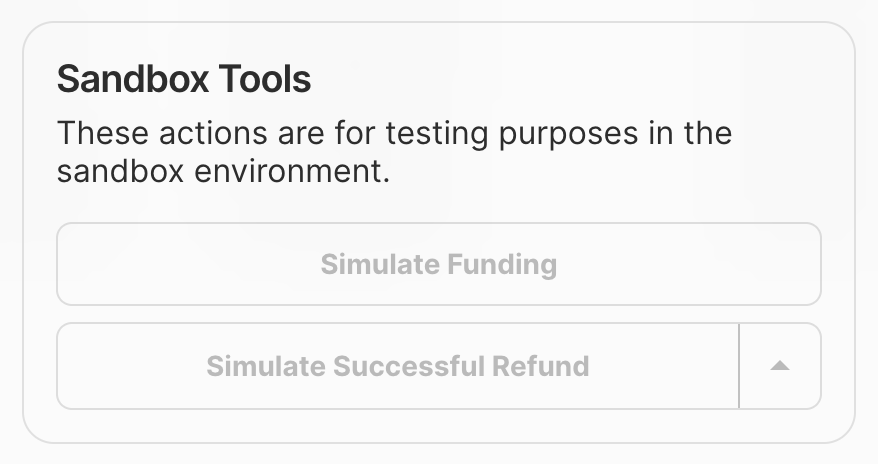
*Sandbox tools in the details view of an order*
*These simulations do not work if you have direct settlement enabled.*
```
--------------------------------
### Sandbox Testing with Sandbox Banks
Source: https://docs.getivy.de/docs/payin/instant-bank-transfer/test-your-integration
This section details how to test checkout flows using sandbox banks. It provides a table with various sandbox banks, their supported currencies and schemes, and the credentials and instructions needed to simulate successful or failed payments.
```APIDOC
## Sandbox Testing with Sandbox Banks
You can test your Ivy integration using sandbox banks with fake login data and the built-in Sandbox Tools. This lets you simulate every flow—success, failure, refunds, and more—before going live.
### Test Banks and Credentials
| Bank Name | Country | Currency | Schemes | Credentials | Instructions |
|-----------------------|---------|----------|--------------------------|----------------------------------------------------------------------------|--------------------------------------------------------------------------------------------------------------|
| Test Bank market | Any 🌍 | Any | SEPA Credit, SEPA Instant| Username: `random`
Password: `random`
OTP: `random` | For success enter any OTP
For failure enter OTP = 666 |
| Deutsche Bank Sandbox | DE 🇩🇪 | EUR | SEPA Credit, SEPA Instant| IBAN: `DE17215730140403340300`
Account Holder Name: `random`
Branch: `615`
Account: `4033403` | 1€ for success
100€ for failure |
| KD Bank Sandbox | DE 🇩🇪 | EUR | SEPA Credit, SEPA Instant| IBAN: `DE39499999600000005111`
Account Holder Name: `random`
Customer ID: `VRK1234567890ALL`
password: `password`
SCA method: `Mobile`
SCA code: `123456` | For success select any SCA method and use the SCA code 123456 if it asks for one |
| Natwest Sandbox | GB 🇬🇧 | GBP | Faster Payments | Username: `123456789012`
Password: displayed on screen | |
| BBVA Sandbox | ES 🇪🇸 | EUR | SEPA Credit, SEPA Instant| IBAN: `ES2501822200160201933547`
username: `user1`
password: `1234`
SCA code: `123456` | To trigger failure click “Cancel” → “Aceptar” in bank UI |
| Alior Sandbox | PL 🇵🇱 | EUR | Elixir, SEPA Credit | username: `60370698`
password: `12345678` | Approve payment in bank interface - simulates delayed bank update |
| PKO BP Sandbox | PL 🇵🇱 | EUR | Elixir, SEPA Credit | n/a | Use buttons in the bank UI to set the desired outcome: Sukces → Success |
```
--------------------------------
### Checkout Session Creation Recommendations
Source: https://context7_llms
Recommendations for optimizing the checkout session creation process, including payment scheme selection, default market, and customer pre-fill.
```APIDOC
## POST /reference/checkout/create-a-checkout-session
### Description
This endpoint details recommended configurations for creating checkout sessions to optimize user experience, speed, and available banks.
### Method
POST
### Endpoint
`/reference/checkout/create-a-checkout-session`
### Parameters
#### Request Body
- **market** (string) - Optional - ISO 3166-1 alpha-2 country code (e.g., "DE"). Pre-selects banks from this market. Defaults to IP-based detection if not provided.
- **customer** (object) - Required - Customer information for the "Remember Me" feature.
- **customer.email** (string) - Required - Customer's email address for recognition.
- **customer.id** (string) - Optional - Pre-defined customer ID from Ivy.
### Request Example
```json
{
"paymentScheme": "instant_only",
"market": "DE",
"customer": {
"email": "customer@example.com"
}
}
```
### Response
#### Success Response (200)
(Details of the created checkout session)
#### Response Example
```json
{
"checkoutSessionId": "chk_abc123xyz",
"status": "pending",
"paymentScheme": "instant_only",
"market": "DE",
"customer": {
"email": "customer@example.com"
}
}
```
```
--------------------------------
### Initialize GetIvy Client (Node.js)
Source: https://context7_llms
Initializes the GetIvy client using your API key and environment settings. This client object is then used to interact with the GetIvy Data API.
```typescript
import Ivy from '@getivy/node-sdk';
const client = new Ivy({
apiKey: 'YOUR_IVY_API_KEY',
environment: 'sandbox', // defaults to 'production'
})
```
--------------------------------
### JSON Response Examples
Source: https://context7_llms
Examples of common API response error structures, including validation errors, authentication errors, and server errors. These JSON payloads indicate the type of issue encountered during an API request.
```json
{
"message": "Amount must be greater than 0",
"category": "invalid_request_error",
"param": "amount",
"docUrl": "https://docs.getivy.de/reference/errors"
}
```
```json
{
"message": "You are not authenticated. Please log in and try again",
"category": "invalid_request_error",
"docUrl": "https://docs.getivy.de/reference/authentication"
}
```
```json
{
"message": "An unknown error occurred. Please reach out to support. Correlation id: abc-123-def",
"category": "api_error"
}
```
--------------------------------
### Example Transaction List API Request (JSON)
Source: https://context7_llms
This is an example JSON request body for the POST /api/service/transaction/list endpoint. It specifies a time window using UNIX timestamps for 'from' and 'to' parameters to retrieve transaction data within that period.
```json
{
"from": 1720656000,
"to": 1720742400
}
```
--------------------------------
### Create Refund using Ivy SDK (JavaScript)
Source: https://docs.getivy.de/reference/refund/create-a-refund
This snippet demonstrates how to initialize the Ivy SDK with an API key and create a refund. It assumes the SDK is installed and configured. The output is the ID of the created refund.
```javascript
import Ivy from '@getivy/node-sdk';
const client = new Ivy({
apiKey: 'My API Key',
});
const refund = await client.refunds.create({
amount: 0
});
console.log(refund.id);
```
--------------------------------
### Retrieve Balances API Response Example
Source: https://context7_llms
This is an example JSON response for the Retrieve Balances API endpoint. It shows the structure of the returned balance data, including account ID, available funds, current balance, currency, and the last updated timestamp.
```json
{
"balances": [
{
"accountId": "bafab4a9-2532-5b78-8c6f-4b9b0ecb6302",
"available": "30.0000",
"current": "30.0000",
"currency": "GBP",
"timestamp": "2025-05-05T09:39:43.748Z"
},
{
"accountId": "e4a387be-81bd-5036-ac04-90366b6c0cb8",
"available": "10.0000",
"current": "10.0000",
"currency": "EUR",
"timestamp": "2025-05-05T09:39:43.748Z"
}
]
}
```
--------------------------------
### Webhook Payload Example for Failed Payment
Source: https://context7_llms
This JSON example demonstrates the structure of a webhook payload for an 'order_updated' event when a payment fails. It highlights the 'statusClassification' field, which provides primary and secondary reasons for the failure, such as 'payment_execution_failed' and 'insufficient_funds'. This classification is only present for failed or cancelled payments.
```json
{
"id": "webhook_123",
"type": "order_updated",
"date": "2024-01-15T10:30:00Z",
"payload": {
"id": "order_456",
"status": "failed",
"statusClassification": {
"primary": "payment_execution_failed",
"secondary": "insufficient_funds"
},
"referenceId": "your-reference-id",
"price": {
"total": 5000,
"currency": "EUR"
}
}
}
```