### Example Server Log Output
Source: https://github.com/inkdropapp/api-docs/blob/main/src/app/guides/integrate-with-external-programs/page.mdx
This is an example of the log output you should see when the local server starts successfully. It confirms the server is listening on the specified address and port.
```text
app:info Starting server on 127.0.0.1:19840
```
--------------------------------
### Start Production Server
Source: https://github.com/inkdropapp/api-docs/blob/main/CLAUDE.md
Use this command to start the production server after building the site.
```bash
npm start
```
--------------------------------
### Create File Response Example
Source: https://github.com/inkdropapp/api-docs/blob/main/src/app/data-access/local-http-server/page.mdx
Example JSON response after successfully creating a new file.
```json
{
"ok": true,
"id": "file:HyBgJ94gx",
"rev": "1-e5ad1c150a30e1ad5a781755466b19a1"
}
```
--------------------------------
### Install npm Dependencies
Source: https://github.com/inkdropapp/api-docs/blob/main/README.md
Run this command to install the necessary npm dependencies for the project.
```bash
npm install
```
--------------------------------
### Start Development Server
Source: https://github.com/inkdropapp/api-docs/blob/main/src/app/guides/create-a-theme/page.mdx
Starts the development server using Bun, which is essential for hot-reloading and previewing UI theme changes. Open the provided URL in a web browser to see your theme in action.
```sh
bunx dev-server
```
--------------------------------
### Get Installed Packages
Source: https://github.com/inkdropapp/api-docs/blob/main/src/app/modules/ipm-wrapper/page.mdx
Retrieves a list of currently installed packages. Returns a Promise that resolves with package details or rejects if unable to retrieve the information.
```json
{
"core": [],
"user": [
{
"name": "breaks",
"repository": {
"type": "git",
"url": "git+https://github.com/inkdropapp/inkdrop-breaks.git"
},
...
},
...
]
}
```
--------------------------------
### Start Astro Development Server
Source: https://github.com/inkdropapp/api-docs/blob/main/src/app/guides/create-a-blog-using-astro/page.mdx
Run this command in your project's terminal to start the Astro development server and preview your site locally.
```sh
npm run start
```
--------------------------------
### Install Dependencies
Source: https://github.com/inkdropapp/api-docs/blob/main/src/app/guides/create-a-theme/page.mdx
Installs project dependencies using Bun. This command is typically run after cloning a UI theme template.
```sh
bun install
```
--------------------------------
### Create/update notebook response example
Source: https://github.com/inkdropapp/api-docs/blob/main/src/app/data-access/local-http-server/page.mdx
Example JSON response after creating or updating a notebook. Indicates success and provides the document ID and revision.
```json
{
"ok": true,
"id": "book:Bk5Ivk0T",
"rev": "1-7f29bee428d16b6f5a05ece8abf7f571"
}
```
--------------------------------
### File Response Example
Source: https://github.com/inkdropapp/api-docs/blob/main/src/app/data-access/local-http-server/page.mdx
Example JSON response when listing files, showing file metadata.
```json
[
{
"name": "dog.png",
"createdAt": 1613887605720,
"contentType": "image/png",
"contentLength": 10389,
"publicIn": [],
"_attachments": {
"index": {
"digest": "md5-if+yj7slT2E8u2JG7ee3yw==",
"content_type": "image/png",
"revpos": 5,
"data": "iVBORw0K...AElFTkSuQmCC"
}
},
"_id": "file:-dKJeWShi",
"_rev": "5-541c58ffdbec966840709683c658c7dc"
}
]
```
--------------------------------
### Development Server Output Example
Source: https://github.com/inkdropapp/api-docs/blob/main/src/app/guides/create-a-theme/page.mdx
Example output from the Vite development server, indicating that the server is ready and providing local and network URLs for accessing the development environment.
```sh
bunx dev-server
#
# VITE v5.4.9 ready in 710 ms
#
# ➜ Local: http://localhost:5173/
# ➜ Network: use --host to expose
```
--------------------------------
### Get Installed Packages
Source: https://github.com/inkdropapp/api-docs/blob/main/src/app/modules/ipm-wrapper/page.mdx
Retrieve a list of currently installed packages.
```APIDOC
## GET /api/packages/installed
### Description
Retrieve a list of currently installed packages.
### Method
GET
### Endpoint
/api/packages/installed
### Returns
#### Success Response (200)
- **core** (array) - Details of core packages.
- **user** (array) - Details of user-installed packages.
### Response Example
```json
{
"core": [],
"user": [
{
"name": "breaks",
"repository": {
"type": "git",
"url": "git+https://github.com/inkdropapp/inkdrop-breaks.git"
},
"...": "..."
},
"..."
]
}
```
```
--------------------------------
### Notebook response example
Source: https://github.com/inkdropapp/api-docs/blob/main/src/app/data-access/local-http-server/page.mdx
Example JSON response when listing notebooks. Includes document ID, revision, and creation/update timestamps.
```json
[
{
"parentBookId": "book:Bk5Ivk0T",
"updatedAt": 1598593031080,
"createdAt": 1598593007103,
"name": "Desktop app",
"_id": "book:0cFae6lCc",
"_rev": "2-7f29bee428d16b6f5a05ece8abf7f571"
},
...
]
```
--------------------------------
### Document Fetch Response Example
Source: https://github.com/inkdropapp/api-docs/blob/main/src/app/data-access/local-http-server/page.mdx
Example JSON response when fetching a document, showing its properties.
```json
{
"doctype": "markdown",
"bookId": "book:tjnPbJakw",
"createdAt": 1589165355584,
"updatedAt": 1592532006000,
"status": "active",
"share": "private",
"numOfTasks": 0,
"numOfCheckedTasks": 0,
"pinned": true,
"title": "hello",
"body": "example note",
"tags": ["tag:HyBgJ94gx", "tag:h11OMPbSs"],
"_id": "note:BKzzd8iGK",
"_rev": "19-d882f96ee27f7b9f71f6183b0cab9193"
}
```
--------------------------------
### Install Rollup and Plugins
Source: https://github.com/inkdropapp/api-docs/blob/main/src/app/guides/es-modules/page.mdx
Install Rollup, Babel plugin, and Node resolution plugin for bundling ES modules. Install React preset if your plugin uses React components.
```sh
npm i -D rollup @rollup/plugin-babel @rollup/plugin-node-resolve
```
```sh
npm i -D @babel/preset-react
```
--------------------------------
### Install ipm CLI Tool
Source: https://github.com/inkdropapp/api-docs/blob/main/src/app/appendix/plugin-migration-from-v5-to-v6/page.mdx
Install the new Inkdrop Plugin Manager CLI tool globally to manage plugins in v6. Run `ipm configure` after installation.
```sh
npm install -g @inkdropapp/ipm-cli
ipm configure
```
--------------------------------
### Plugin Package.json Example
Source: https://context7.com/inkdropapp/api-docs/llms.txt
Example of a package.json file for an Inkdrop plugin, defining metadata, main entry point, and dependencies.
```json
{
"name": "my-plugin",
"main": "./lib/my-plugin",
"version": "1.0.0",
"engines": { "inkdrop": ">=5.6.0 <7" },
"dependencies": {}
}
```
--------------------------------
### JSON Schema Example for Config
Source: https://github.com/inkdropapp/api-docs/blob/main/src/app/modules/config/page.mdx
A basic JSON schema example for defining configuration settings, including boolean and integer types with minimum and maximum constraints.
```json
{
"config": {
"enableThing": {
"title": 'enable thing',
"type": 'boolean',
"default": false
},
"thingVolume": {
"title": 'thing volume',
"type": 'integer',
"default": 5,
"minimum": 1,
"maximum": 11
}
}
}
```
--------------------------------
### Run Development Server
Source: https://github.com/inkdropapp/api-docs/blob/main/README.md
Execute this command to start the development server. Open http://localhost:3000 in your browser to view the website.
```bash
npm run dev
```
--------------------------------
### Example Package Response
Source: https://github.com/inkdropapp/api-docs/blob/main/src/app/modules/ipm-wrapper/page.mdx
This is an example of the JSON response structure when fetching package information. It includes metadata such as name, version, description, repository, license, scripts, dependencies, and distribution details.
```json
{
"name": "vim",
"main": "./lib/vim",
"version": "2.1.7",
"description": "vim keybindings",
"keywords": [],
"repository": "https://github.com/inkdropapp/inkdrop-vim",
"license": "MIT",
"scripts": {
"build": "babel src/ -d lib/",
"dev": "babel src/ -s -d lib/ --watch"
},
"engines": {
"inkdrop": "^5.x"
},
"dependencies": {},
"devDependencies": {
"@babel/cli": "^7.8.4",
"@babel/core": "^7.9.0",
"@babel/plugin-proposal-class-properties": "^7.8.3",
"@babel/preset-env": "^7.9.5",
"@babel/preset-react": "^7.9.4",
"babel-eslint": "^10.1.0",
"eslint": "^6.8.0",
"eslint-config-prettier": "^6.10.1",
"eslint-plugin-prettier": "^3.1.2",
"eslint-plugin-react": "^7.19.0",
"prettier": "^2.0.4"
},
"dist": {
"tarball": "https://api.inkdrop.app/v1/packages/vim/versions/2.1.7/tarball"
},
"readme": "# vim keybindings plugin for Inkdrop\n\nProvides Vim modal control for Inkdrop, blending the best of Vim and Inkdrop.\n\n## Features\n\n- All common motions and operators, including text objects\n- Operator motion orthogonality\n- Visual mode - characterwise, linewise, blockwise\n- Incremental highlighted search (`/`, `?`, `#`, `*`, `g#`, `g*`)\n- Search/replace with confirm (:substitute, :%s)\n- Search history\n- Sort (`:sort`)\n- Marks (`,`)\n- Cross-buffer yank/paste\n- Select next/prev item in note list bar (`j` / `k`)\n- Scroll markdown preview pane\n\n## Install\n\n```sh\nipm install vim\n```\n\n## Key customizations\n\nDefault vim keymaps are defined [here](https://github.com/inkdropapp/inkdrop-vim/blob/master/keymaps/vim.json) and you can override them in your `keymap.json` file.\n\nCSS selectors for each mode:\n\n- Not insert mode: `.CodeMirror.vim-mode:not(.insert-mode):not(.key-buffering) textarea`\n- Normal mode: `.CodeMirror.vim-mode.normal-mode:not(.key-buffering) textarea`\n- Insert mode: `.CodeMirror.vim-mode.insert-mode textarea`\n- Replace mode: `.CodeMirror.vim-mode.replace-mode textarea`\n- Visual mode: `.CodeMirror.vim-mode.visual-mode:not(.key-buffering) textarea`\n\nYou can check current keybindings on the _Keybindings_ pane on preferences window:\n\n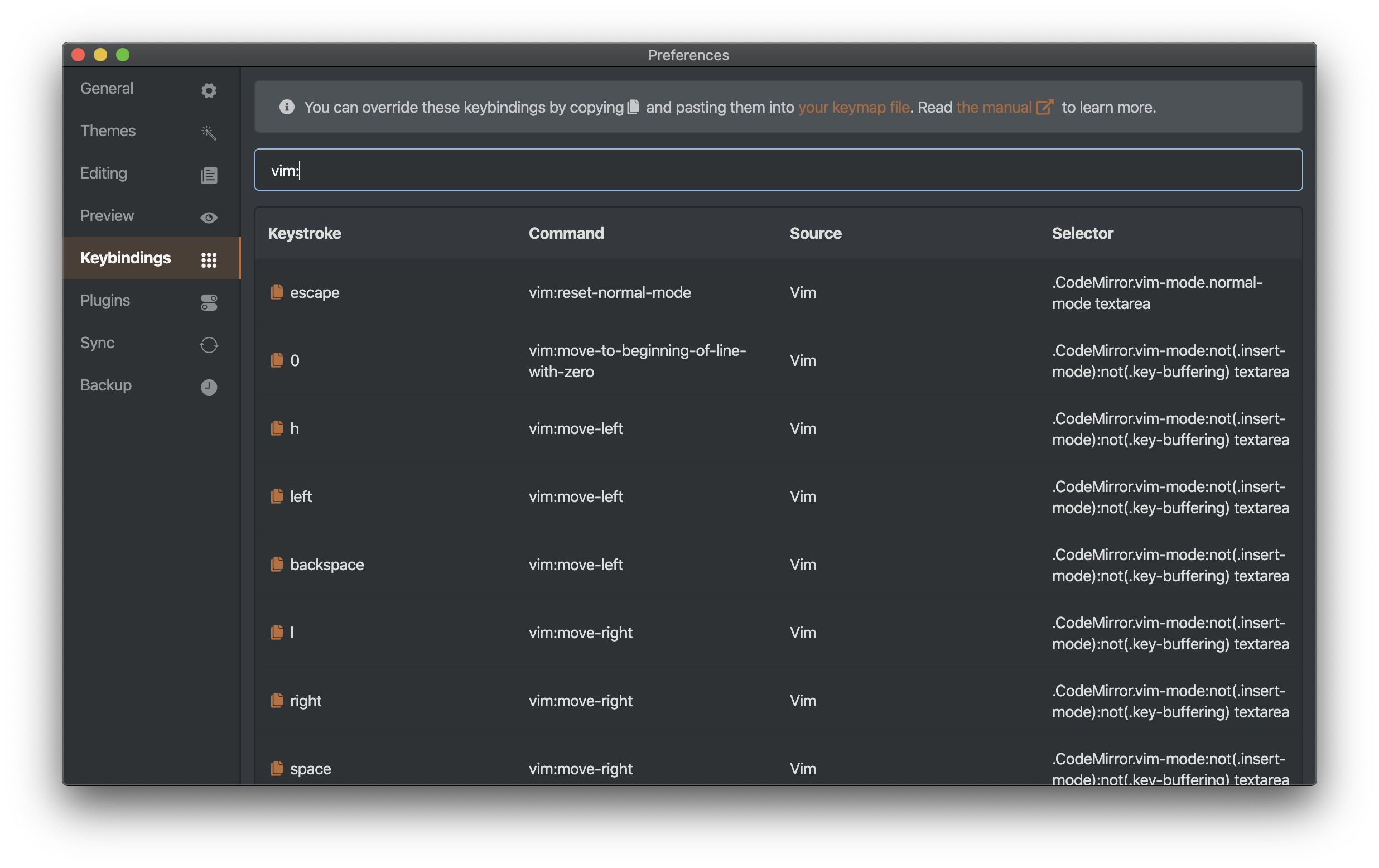\n\n## Ex Commands\n\n### `:w`, `:write`\n\nSaves current note immediately to the disk.\n\n### `:next`, `:n`\n\nOpens next note on the note list.\n\n### `:prev`\n\nOpens previous note on the note list.\n\n### `:preview`, `:p`\n\nToggles HTML preview.\n\n### `:side-by-side`, `:side`\n\nToggles side-by-side mode.\n\n## Changelog\n\n### 2.1.7\n\n- fix(typo): Number keys not working as expected (Thanks [FORTRAN](https://forum.inkdrop.app/t/vim-plugin/2228/2))\n\n### 2.1.6\n\n- fix(motion): Ignore numeric keys when a modifier key is pressed (Thanks [Basyura](https://github.com/inkdropapp/inkdrop-vim/pull/25))\n\n### 2.1.5\n\n- fix(motion): enter/space/arrow keys not working as expected while key buffering (Thanks [rcashie](https://github.com/inkdropapp/inkdrop-vim/issues/24))\n\n### 2.1.4\n\n- fix(motion): text object manipulation not working for some tokens (Thanks [rcashie](https://github.com/inkdropapp/inkdrop-vim/issues/23))\n\n### 2.1.2\n\n- fix(keymap): remove keybindings of s h, s k, s l since those conflict with the default vim behavior of `s` (Thanks [oniatsu-san](https://github.com/inkdropapp/inkdrop-vim/issues/19))\n\n### 2.1.1\n\n- fix(keymap): change keybinding for `vim:move-to-mark` from " to ' (Thanks [oniatsu-san](https://github.com/inkdropapp/inkdrop-vim/issues/18))\n\n### 2.1.0\n\n- feat(motion): support moving cursor up/down by display lines (g k / g j) (Thanks [jolyon129](https://github.com/inkdropapp/inkdrop-vim/issues/16))\n\n### 2.0.1\n\n- Fix a bug where `vim:scroll-full-screen-up` and `vim:scroll-full-screen-down` not working (Thanks [@basyura](https://github.com/inkdropapp/inkdrop-vim/issues/13#issuecomment-612326857))\n\n### 2.0.0\n\n- (Breaking) The command prefix has been changed from `vim-mode:`
```
--------------------------------
### Create/update tag response example
Source: https://github.com/inkdropapp/api-docs/blob/main/src/app/data-access/local-http-server/page.mdx
Example JSON response after creating or updating a tag. Shows the operation status, document ID, and revision.
```json
{
"ok": true,
"id": "tag:HyBgJ94gx",
"rev": "1-e5ad1c150a30e1ad5a781755466b19a1"
}
```
--------------------------------
### Install Package
Source: https://github.com/inkdropapp/api-docs/blob/main/src/app/modules/ipm-wrapper/page.mdx
Installs a plugin into Inkdrop. It takes a package object with name, optional version, and theme flag.
```APIDOC
## Install Package
### Description
Installs plugins into Inkdrop.
### Method
POST (conceptual, as it's a method call on an object)
### Endpoint
`inkdrop.ipm.install(pack)`
### Parameters
#### Request Body
- **pack** (object) - Required - The package object with the following keys:
- **name** (string) - Required - The package name.
- **version** (string) - Optional - The package version.
- **theme** (boolean) - Optional - Indicates if the package is a theme.
### Request Example
```json
{
"name": "my-plugin",
"version": "1.0.0",
"theme": false
}
```
### Response
#### Success Response (200)
Resolves upon successful installation.
#### Response Example
```json
{
"message": "Package installed successfully"
}
```
#### Error Handling
Rejects if the installation fails, providing stdout and stderr in the error object.
```
--------------------------------
### Tag response example
Source: https://github.com/inkdropapp/api-docs/blob/main/src/app/data-access/local-http-server/page.mdx
Example JSON response when listing tags. Includes document ID, revision, color, name, and timestamps.
```json
[
{
"count": 4,
"color": "orange",
"createdAt": 1489212448648,
"updatedAt": 1607068381327,
"name": "Lifehack",
"_id": "tag:h11OMPbSs",
"_rev": "3-bceb5835af6be6ae277762a877b884d1"
},
...
]
```
--------------------------------
### Get Server Information
Source: https://context7.com/inkdropapp/api-docs/llms.txt
Use this endpoint to get basic server information. Requires an authorization token.
```shell
curl "https://localhost:19840/"
-H "Authorization: Basic {token}"
```
--------------------------------
### Subscribe to Full-Text Index Build Start
Source: https://github.com/inkdropapp/api-docs/blob/main/src/app/data-access/events/page.mdx
Invoke the given callback when the app started building full-text search index. Returns a Disposable to unsubscribe.
```javascript
const db = inkdrop.main.dataStore.getLocalDB()
const subscription = db.onFullTextIndexBuildStart(changes => {
console.log('Full-text search index building has been started')
});
// Later, dispose
subscription.dispose();
```
--------------------------------
### Example Layout Values
Source: https://github.com/inkdropapp/api-docs/blob/main/src/app/states/layouts/page.mdx
Illustrates the structure of the `layouts` state, showing a map of layout names to arrays of component class names.
```json
{
"main:full": [
"ModalLayout",
"SideBarLayout",
"NoteListBarLayout",
"EditorLayout"
],
"main:slim": [
"ModalLayout",
"NoteListBarLayout",
"EditorLayout"
],
"main:distraction-free": [
"ModalLayout",
"EditorLayout"
],
"sidebar": [
...
]
}
```
--------------------------------
### onFullTextIndexBuildStart(callback)
Source: https://github.com/inkdropapp/api-docs/blob/main/src/app/data-access/events/page.mdx
Subscribes to the event that is triggered when the app starts building the full-text search index. The callback function is invoked with no arguments.
```APIDOC
## onFullTextIndexBuildStart(callback)
### Description
Invoke the given callback when the app started building full-text search index.
### Method
SUBSCRIBE
### Endpoint
N/A (Event Subscription)
### Parameters
#### Path Parameters
None
#### Query Parameters
None
#### Request Body
None
### Parameters
#### Callback Function
- **callback** (() => void) - Required - A Function to be invoked.
### Returns
- **Disposable** - Returns a [Disposable][disposable] on which `.dispose()` can be called to unsubscribe.
### Request Example
```js
const db = inkdrop.main.dataStore.getLocalDB()
const subscription = db.onFullTextIndexBuildStart(changes => {
console.log('Full-text search index building has been started')
});
// Later, dispose
subscription.dispose();
```
```
--------------------------------
### List All Files (GET /files)
Source: https://github.com/inkdropapp/api-docs/blob/main/src/app/data-access/local-http-server/page.mdx
Retrieves a list of all files from the local database. Supports limiting and skipping results.
```bash
curl "https://localhost:19840/files?limit=1" \
-H "Authorization: Basic {token}"
```
--------------------------------
### GFM Emphasis Examples
Source: https://github.com/inkdropapp/api-docs/blob/main/src/app/guides/text-annotations/page.mdx
Demonstrates standard GitHub Flavored Markdown syntax for emphasis, strong emphasis, and strikethrough.
```markdown
Emphasis, aka italics, with *asterisks* or _underscores_.
Strong emphasis, aka bold, with **asterisks** or **underscores**.
Combined emphasis with **asterisks and _underscores_**.
Strikethrough uses two tildes. ~~Scratch this.~~
```
--------------------------------
### Example queryContext State for 'book' Mode
Source: https://github.com/inkdropapp/api-docs/blob/main/src/app/states/query-context/page.mdx
Illustrates the data structure for the queryContext state when filtering notes within a specific book.
```json
{
"mode": "book",
"filterKeyword": "",
"bookId": "book:uP2kEsahM",
"includeChildren": false
}
```
--------------------------------
### GET /
Source: https://github.com/inkdropapp/api-docs/blob/main/src/app/data-access/local-http-server/page.mdx
Accessing the root of the HTTP server returns meta information about the Inkdrop app.
```APIDOC
## GET /
### Description
Accessing the root of a HTTP server returns meta information about the app.
### Method
GET
### Endpoint
/
### Parameters
No parameters
### Request Example
```bash
curl -G https://localhost:19840/ \
-H "Authorization: Basic {token}"
```
```
--------------------------------
### Construct an Emitter Instance
Source: https://github.com/inkdropapp/api-docs/blob/main/src/app/event-subscription/emitter/page.mdx
Create a new instance of the Emitter class. No specific setup is required beyond instantiation.
```javascript
const emitter = new Emitter();
```
--------------------------------
### Get Changes Feed
Source: https://context7.com/inkdropapp/api-docs/llms.txt
Retrieve changes from the changes feed, with options to limit results and specify the starting point. Requires an authorization token.
```shell
curl "https://localhost:19840/_changes?limit=10&since=306"
-H "Authorization: Basic {token}"
```
--------------------------------
### Custom Commands and Init File
Source: https://context7.com/inkdropapp/api-docs/llms.txt
Demonstrates how to add custom commands and menu items using the `init.js` file for quick customizations without creating a full plugin.
```APIDOC
## Init File and Custom Commands
The `init.js` file in your data directory runs on startup and provides full API access for quick customizations without creating a full plugin.
### Example: Add a custom command to paste clipboard as Markdown link
```javascript
// init.js - Add a custom command to paste clipboard as Markdown link
const { clipboard } = require('electron')
inkdrop.commands.add(document.body, 'editor:paste-as-link', () => {
const { cm } = inkdrop.getActiveEditor()
const selectionText = cm.getSelection()
const clipboardText = clipboard.readText()
cm.replaceSelection(`[${selectionText}](${clipboardText})
`)
})
inkdrop.menu.add([
{
label: 'Edit',
submenu: [
{
label: 'Paste as Link',
command: 'editor:paste-as-link'
}
]
}
])
```
```
--------------------------------
### Export Inkdrop Note with YAML Frontmatter
Source: https://github.com/inkdropapp/api-docs/blob/main/src/app/guides/create-a-blog-using-astro/page.mdx
Notes intended for export must start with YAML frontmatter. Set `public: true` to indicate that the note should be exported. This example also includes an image and a command for video conversion.
```markdown
---
public: true
---

```
ffmpeg -i masthead-bg.mp4 -c:v libvpx-vp9 -crf 30 -b:v 0 -b:a 128k -c:a libopus masthead-bg.webm
```
```
--------------------------------
### Create New Notebook
Source: https://github.com/inkdropapp/api-docs/blob/main/src/app/data-access/books/page.mdx
Initializes a new Book instance, optionally with initial values like a name.
```javascript
const book = new Book({
name: 'My Notebook'
})
```
--------------------------------
### Build for Production
Source: https://github.com/inkdropapp/api-docs/blob/main/CLAUDE.md
This command builds the documentation site for production deployment.
```bash
npm run build
```
--------------------------------
### Get Active Theme Names
Source: https://github.com/inkdropapp/api-docs/blob/main/src/app/modules/theme-manager/page.mdx
Get the names of all themes that are currently active.
```APIDOC
## Get Active Theme Names
### Description
Get the names of all active themes.
### Method
GET
### Endpoint
N/A (Method Call)
### Parameters
#### Path Parameters
None
#### Query Parameters
None
#### Request Body
None
### Request Example
```javascript
const activeThemeNames = inkdrop.themes.getActiveThemeNames();
```
### Response
#### Success Response (200)
- **activeThemeNames** (Array) - An array of strings, where each string is the name of an active theme.
#### Response Example
```json
{
"activeThemeNames": ["one-dark-syntax"]
}
```
```
--------------------------------
### Add Keymap for Custom Command
Source: https://github.com/inkdropapp/api-docs/blob/main/src/app/guides/create-a-note-template/page.mdx
Configure a keybinding to trigger a custom command. This example associates 'cmd-shift-j' with 'custom:new-journal'.
```yaml
'body':
'cmd-shift-j': 'custom:new-journal'
```
--------------------------------
### Create a new file instance
Source: https://github.com/inkdropapp/api-docs/blob/main/src/app/data-access/files/page.mdx
Initialize a new File instance. You can provide initial values, such as a name, to configure the file.
```javascript
const file = new File({
name: 'My file'
})
```
--------------------------------
### Delete Document Response Example
Source: https://github.com/inkdropapp/api-docs/blob/main/src/app/data-access/local-http-server/page.mdx
Example JSON response after successfully deleting a document.
```json
{
"ok": true,
"id": "note:BKzzd8iGK",
"rev": "2-e5ad1c150a30e1ad5a781755466b19a1"
}
```
--------------------------------
### Install Package with IPM Wrapper
Source: https://github.com/inkdropapp/api-docs/blob/main/src/app/modules/ipm-wrapper/page.mdx
Use this function to install a plugin into Inkdrop. It requires the plugin name, an optional version, and a boolean indicating if it's a theme. Error handling for installation failures is included.
```javascript
async function installPackage(
pluginName: string,
version: string,
theme: boolean
) {
try {
await inkdrop.ipm.install({ name: pluginName, version, theme })
} catch (e) {
logger.error(e)
logger.error('stdout:', e.stdout)
logger.error('stderr:', e.stderr)
}
}
```
--------------------------------
### Creating a New File Instance
Source: https://github.com/inkdropapp/api-docs/blob/main/src/app/data-access/files/page.mdx
Illustrates how to create a new File instance, optionally with initial values.
```APIDOC
## Create New File
### Description
Initializes a new `File` instance. You can provide initial values or create an empty instance.
### Method
```js
// Create with initial values
const file = new File({
name: 'My file'
})
// Create an empty instance
const emptyFile = new File()
```
```
--------------------------------
### build
Source: https://github.com/inkdropapp/api-docs/blob/main/src/app/modules/keymap-manager/page.mdx
Constructs KeyBinding objects from a given source, bindings, and priority.
```APIDOC
## build(source, bindings, priority)
### Description
Construct `KeyBinding`s from an object grouping them by CSS selector.
### Parameters
#### Path Parameters
- **source** (string) - Required - A string uniquely identifying the given bindings for later removal.
- **bindings** (object) - Required - Objects mapping keystroke patterns to commands, grouped by CSS selector.
- **priority** (number) - Optional - Number used to sort keybindings with the same specificity, defaults to `0`.
### Request Example
```js
inkdrop.keymaps.build('my-plugin', {
'body': {
'ctrl-alt-n': 'my-plugin:do-something'
}
}, 0)
```
```
--------------------------------
### Get Enabled Theme Names
Source: https://github.com/inkdropapp/api-docs/blob/main/src/app/modules/theme-manager/page.mdx
Get the names of themes that are enabled in the configuration, in the order they should be activated.
```APIDOC
## Get Enabled Theme Names
### Description
Get the names of enabled themes from the configuration.
### Method
GET
### Endpoint
N/A (Method Call)
### Parameters
#### Path Parameters
None
#### Query Parameters
None
#### Request Body
None
### Request Example
```javascript
const enabledThemeNames = inkdrop.themes.getEnabledThemeNames();
```
### Response
#### Success Response (200)
- **enabledThemeNames** (Array) - An array of theme names in the order that they should be activated.
#### Response Example
```json
{
"enabledThemeNames": ["one-dark-syntax", "solarized-dark"]
}
```
```
--------------------------------
### Create a Notebook
Source: https://context7.com/inkdropapp/api-docs/llms.txt
Create a new notebook with a specified name. Requires Content-Type and Authorization headers.
```shell
curl -X POST "https://localhost:19840/books"
-H "Content-Type: application/json"
-H "Authorization: Basic {token}"
-d '{ "name": "New Notebook" }'
```
--------------------------------
### Getting Help for `ipm publish`
Source: https://github.com/inkdropapp/api-docs/blob/main/src/app/guides/plugin-word-count/page.mdx
To view all available options for the `publish` command, use `ipm help publish`. For general command help, use `ipm help`.
```bash
ipm help publish
```
```bash
ipm help
```
--------------------------------
### Add API Documentation Steps
Source: https://github.com/inkdropapp/api-docs/blob/main/CLAUDE.md
Steps to follow when adding new API documentation. Ensure to use the specified components and include practical code examples.
```markdown
1. Create MDX file in appropriate category
2. Use two-column layout with `` and `
`
3. Document properties with `` component
4. Include practical code examples
5. Add to navigation in `/src/components/Navigation.jsx`
```
--------------------------------
### Menu JSON Format Example
Source: https://github.com/inkdropapp/api-docs/blob/main/src/app/modules/menu-manager/page.mdx
This is an example of the JSON structure for defining menu items, used in packages like inkdrop-paste-as-markdown.
```js
[
{
label: 'Plugins',
submenu: [
{
label: 'Paste as Markdown',
command: 'paste-as-markdown'
}
]
}
]
```
--------------------------------
### Create Custom Command and Menu Item - init.js
Source: https://github.com/inkdropapp/api-docs/blob/main/src/app/guides/the-init-file/page.mdx
Implement a custom command to construct a Markdown link from selected text and clipboard content. This requires importing the 'electron' module for clipboard access and defining the command and its menu entry.
```javascript
const { clipboard } = require('electron')
inkdrop.commands.add(document.body, 'editor:paste-as-link', () => {
const { cm } = inkdrop.getActiveEditor()
const selectionText = cm.getSelection()
const clipboardText = clipboard.readText()
cm.replaceSelection(`[${selectionText}](${clipboardText})`)
})
inkdrop.menu.add([
{
label: 'Edit',
submenu: [
{
label: 'Paste as Link',
command: 'editor:paste-as-link'
}
]
}
])
```
--------------------------------
### List all notebooks
Source: https://github.com/inkdropapp/api-docs/blob/main/src/app/data-access/local-http-server/page.mdx
Use this endpoint to retrieve a list of all notebooks from the local database. Query parameters 'limit' and 'skip' can be used for pagination.
```bash
curl "https://localhost:19840/books" \
-H "Authorization: Basic {token}"
```
--------------------------------
### Install TypeScript Definitions
Source: https://github.com/inkdropapp/api-docs/blob/main/src/app/appendix/plugin-migration-from-v5-to-v6/page.mdx
Install the official Inkdrop v6 TypeScript definitions as a development dependency to enable type-checking and autocompletion for the Inkdrop API in your plugin.
```sh
npm install --save-dev @inkdropapp/types
```
--------------------------------
### Creating a File from a File Path
Source: https://github.com/inkdropapp/api-docs/blob/main/src/app/data-access/files/page.mdx
Demonstrates creating a File instance from a local file path.
```APIDOC
## Create File from Path
### Description
Creates a new file attachment from the provided file path.
### Method
```js
const file = File.createFromFilePath('/path/to/file.png')
```
```
--------------------------------
### Install CodeMirror Addons
Source: https://github.com/inkdropapp/api-docs/blob/main/src/app/guides/customize-the-editor/page.mdx
Demonstrates how to require CodeMirror addons by constructing the correct path to the app's node_modules directory. This is necessary because addons are not directly in the default require search path.
```js
const app = require('electron').remote.app
const modulePath = app.getAppPath() + '/node_modules/'
require(modulePath + 'codemirror/addon/fold/foldcode.js')
require(modulePath + 'codemirror/addon/fold/foldgutter.js')
require(modulePath + 'codemirror/addon/fold/markdown-fold.js')
```
--------------------------------
### List All Notes with Query Parameters
Source: https://github.com/inkdropapp/api-docs/blob/main/src/app/data-access/local-http-server/page.mdx
Retrieve a list of all notes from the local database. Supports filtering, limiting, skipping, sorting, and descending order. Requires an Authorization header.
```bash
curl "https://localhost:19840/notes/?limit=1" \
-H "Authorization: Basic {token}"
```
--------------------------------
### GET /api/books
Source: https://github.com/inkdropapp/api-docs/blob/main/src/app/data-access/books/page.mdx
Retrieve a list of all notebooks.
```APIDOC
## GET /api/books
### Description
Retrieve a list of your notebooks.
### Method
GET
### Endpoint
/api/books
### Parameters
No parameters
### Response
#### Success Response (200)
- **_id** (string) - The notebook ID
- **_rev** (string) - The revision ID of the notebook
- **updatedAt** (number) - Timestamp of the last update
- **createdAt** (number) - Timestamp of creation
- **name** (string) - The name of the notebook
- **count** (number) - The number of notes in the notebook
- **parentBookId** (string) - The ID of the parent notebook, if any
### Response Example
```json
[
{
"updatedAt": 1475549348850,
"createdAt": 1475549348850,
"count": 0,
"name": "Inbox",
"parentBookId": null,
"_id": "book:SkTsOceR",
"_rev": "2-aa25f8bfe83cfcd6910fbb78c8e45eeb"
},
...
]
```
```
--------------------------------
### Update Existing Documentation Steps
Source: https://github.com/inkdropapp/api-docs/blob/main/CLAUDE.md
Steps for updating existing documentation. Includes local testing and verification of search indexing.
```markdown
1. Edit the MDX file directly
2. Test locally with `npm run dev`
3. Verify search indexing works for new content
4. Check that all links and images work correctly
```
--------------------------------
### Get Notifications
Source: https://github.com/inkdropapp/api-docs/blob/main/src/app/modules/notification-manager/page.mdx
Retrieve all currently active notifications.
```APIDOC
## Get Notifications
### Description
Get all the notifications.
### Parameters
No parameters.
### Returns
Returns an Array of [Notification](/modules/notification)s.
### Request Example
```js
const notifications = inkdrop.notifications.getNotifications()
console.log('There are', notifications.length, 'notifications')
```
```
--------------------------------
### GET /api/files/count
Source: https://github.com/inkdropapp/api-docs/blob/main/src/app/data-access/files/page.mdx
Counts the number of files in the database.
```APIDOC
## GET /api/files/count
### Description
Counts the number of files in the database.
### Method
GET
### Endpoint
/api/files/count
### Parameters
No parameters.
### Request Example
```js
const db = inkdrop.main.dataStore.getLocalDB()
const num = await db.files.countAll()
```
### Response
#### Success Response (200)
- **count** (number) - The total number of files stored in the database.
#### Response Example
```json
5
```
```
--------------------------------
### Config Schema: Title and Description
Source: https://github.com/inkdropapp/api-docs/blob/main/src/app/modules/config/page.mdx
Includes 'title' and 'description' keys in the schema to provide user-friendly labels and explanatory text for configuration settings in the UI.
```json
{
"config": {
"someSetting": {
"title": 'Setting Magnitude',
"description": 'This will affect the blah and the other blah',
"type": 'integer',
"default": 4
}
}
}
```
--------------------------------
### Get Outdated Packages
Source: https://github.com/inkdropapp/api-docs/blob/main/src/app/modules/ipm-wrapper/page.mdx
Identify packages that have available updates.
```APIDOC
## GET /api/packages/outdated
### Description
Identify packages that have available updates.
### Method
GET
### Endpoint
/api/packages/outdated
### Returns
#### Success Response (200)
- **Array** - An array of package objects that have available updates.
### Response Example
```json
[
{
"name": "breaks",
"repository": {
"type": "git",
"url": "git+https://github.com/inkdropapp/inkdrop-breaks.git"
},
"...": "..."
},
"..."
]
```
```
--------------------------------
### Get Active Themes
Source: https://github.com/inkdropapp/api-docs/blob/main/src/app/modules/theme-manager/page.mdx
Retrieve all themes that are currently active.
```APIDOC
## Get Active Themes
### Description
Retrieve all active themes.
### Method
GET
### Endpoint
N/A (Method Call)
### Parameters
#### Path Parameters
None
#### Query Parameters
None
#### Request Body
None
### Request Example
```javascript
const activeThemes = inkdrop.themes.getActiveThemes();
```
### Response
#### Success Response (200)
- **activeThemes** (Array